
A stockout is the one case where a visitor lands on a product page with a clear intent to buy and leaves with nothing. The traffic has been paid for, the demand is qualified, and the only obstacle is temporary. It is the best effort-to-revenue ratio in the whole store, and it is also what most PrestaShop shops let slip away.
What the native module does
PrestaShop ships with the Mail alerts module (ps_emailalerts), which offers two distinct functions: merchant-side notifications, and a customer alert along the lines of “notify me when this product is available”. The second one is switched on in the module configuration and adds a link on out-of-stock product pages.
It works, in the strict sense. The customer leaves an email, and when the quantity goes back above zero, a message goes out. Three limits appear as soon as you try to turn it into a commercial lever.
No visibility on demand
The back office does not expose the list of people waiting. You do not know which products concentrate the most sign-ups, nor how long people have been waiting. Yet that information is worth more than the alert itself: it is a free restocking signal, reported by your own customers.
No measurement
Once the email has gone out, the trail stops. There is no way to know how many recipients clicked, how many ordered, what revenue the alert produced. Without that figure, you cannot arbitrate between restocking a reference and dropping it from the catalogue.
A raw send
Everyone on the list receives the message at the same time, with no staggering. On a restock of ten units for three hundred sign-ups, you generate two hundred and ninety disappointments and a pointless traffic spike. The message reserves nothing and does not state the quantity available.
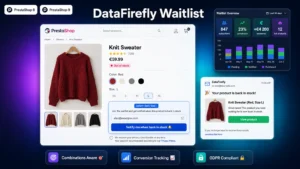 DataFirefly Waitlist — Back-in-stock alert with conversion tracking for PrestaShop 8 & 9Capture the sales you lose on stock-outs.€49.00
The form: three rules
Placement. The form replaces the add-to-cart button, in the same spot and with the same visual weight. A discreet link under the description is seen by a fraction of visitors.
Fields. Email only. Every extra field costs sign-ups, and you need nothing else to send the alert. If the customer is logged in, pre-fill it.
Consent. Signing up for an alert is processing for a specific purpose: it authorises sending the availability message, not adding the person to your newsletter. Two separate checkboxes, or one checkbox and no newsletter. The reverse shortcut is a classic and easily observed compliance failure.
The email: timing and content
Send timing is the single most decisive parameter. An alert sent within the hour following the restock captures intent while it is still warm. Sent the next day by an overnight job, it arrives after the customer has bought elsewhere.
The content comes down to very little: the product image, its current price, a link that adds directly to the cart rather than a link to the product page, and an indication of the quantity available when it is low. That last detail changes the click rate: “6 units available” triggers more than “back in stock”.
The four figures to track
- Sign-up rate: sign-ups against visits to out-of-stock product pages. Below 5%, the form is badly placed or hard to see.
- Click rate on the alert email. It is structurally high, often above 30%, because the message answers an explicit request.
- Conversion rate of the clickers. That is the figure that counts, and the only one that justifies a restock.
- Revenue attributed to alerts over the period, to be compared with the cost of the restock.
Those four figures turn a convenience feature into a purchasing decision tool.
The combinations case
A technical point often overlooked: the alert has to be on the combination, not on the product. A customer waiting for a shirt in size L has no use for a message announcing that size XS is back. Check that behaviour before anything else, it is the leading source of unsubscribes and complaints.
Using demand upstream
The real gain sits before the alert itself. A waiting list growing on one reference tells you three things: the demand exists, it is measurable, and it is dated. On a seasonal product, the sign-up curve tells you when to place the supplier order far better than sales history does, since it captures demand you did not serve.
The Waitlist module for PrestaShop covers this full chain on PrestaShop 8 and 9: a form per combination, automatic sending on restock, a table of waiting lists per reference, and tracking of the revenue each alert produces.