
Everything you'd want to know before you install.
A detailed look at how 301 Redirect Manager for PrestaShop 8 & 9 works, why we built it the way we did, and the thinking behind the features above.
§ 01
Why a professional redirects manager?
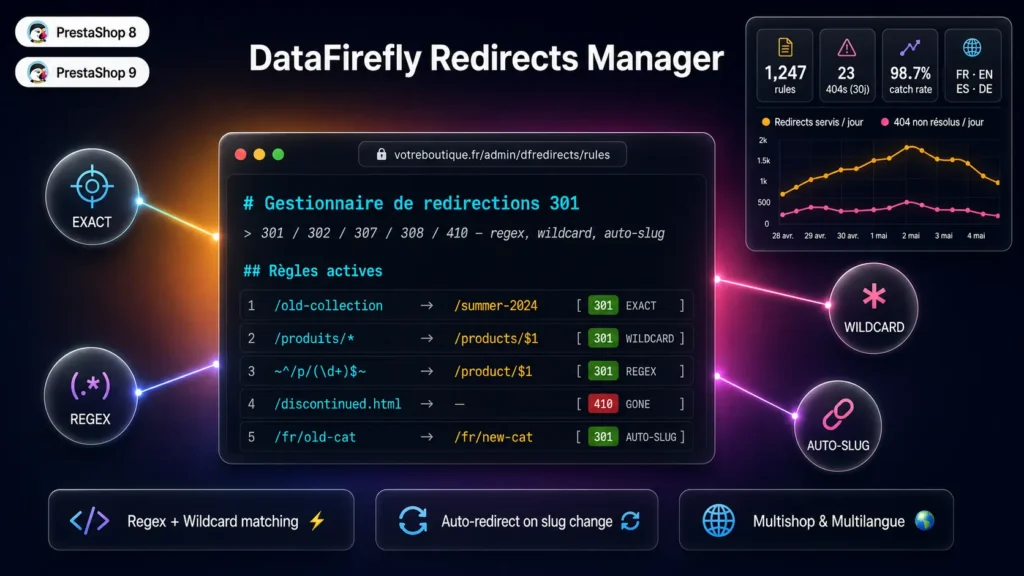
Every URL that changes without a 301 redirect is a broken link for Google, a lost visitor, and a negative signal for your SEO. During a migration, a catalog change, a category restructure or simply a slug correction, dozens or even hundreds of URLs can disappear silently. The dfredirects module automates everything: it captures changes in real time, monitors your 404s and helps you rebuild your SEO link structure.
§ 02
Three matching engines for every use case
Exact matching uses an indexed database lookup for optimal performance, ideal for one-to-one redirects. Wildcard matching with asterisk and captures lets you redirect entire trees in one rule. Full PCRE regex matching opens the door to the most complex migrations with capturing groups and substitutions. Wildcard and regex rules are cached in memory to avoid impacting performance.
§ 03
Intelligent 404 monitoring
The module automatically logs every 404 with URL, referrer, user-agent, IP, hit counter and last visit. Bot detection filters Googlebot, Bingbot, GPTBot, ClaudeBot and all known crawlers. You can define URL patterns to ignore to filter noise (well-known, wp-admin, etc.). Configurable auto-cleanup purges old logs.
§ 04
Automatic redirection on every change
When you change the slug of a product, category, CMS page, manufacturer or supplier, dfredirects detects the change and creates the 301 redirect instantly. On deletion, it creates a redirect to the parent category. Chain detection automatically merges multi-step redirects to preserve your crawl budget.
§ 05
Similarity-based suggestions to recover your 404s
For each logged 404, the module analyzes your catalog and suggests the best targets among your products, categories and CMS pages. The algorithm combines normalized Levenshtein and tokenized matching to identify the closest content. You confirm in one click and the redirect is automatically created.
§ 06
CSV import and export for migrations
Import your existing redirects in bulk with a CSV file. Common delimiters (comma, semicolon, tab, pipe) are auto-detected. The module supports UPSERT by source to update existing rules, validates regex syntax before insertion, and produces a detailed import report with per-line errors. UTF-8 BOM CSV export is Excel-compatible.
§ 07
Modern architecture and PrestaShop 9 compatibility
The module is built in PSR-4 with typed PHP 8.1+ services. The use of ModuleAdminController and native helpers guarantees compatibility with PrestaShop 8 and PrestaShop 9 without modification. The file structure follows PrestaShop conventions: ObjectModel in classes, services in src, admin controllers in controllers/admin.






There are no reviews yet.