
Everything you'd want to know before you install.
A detailed look at how DataFirefly Shopify Migrator works, why we built it the way we did, and the thinking behind the features above.
§ 01
A painless migration, with or without an API key
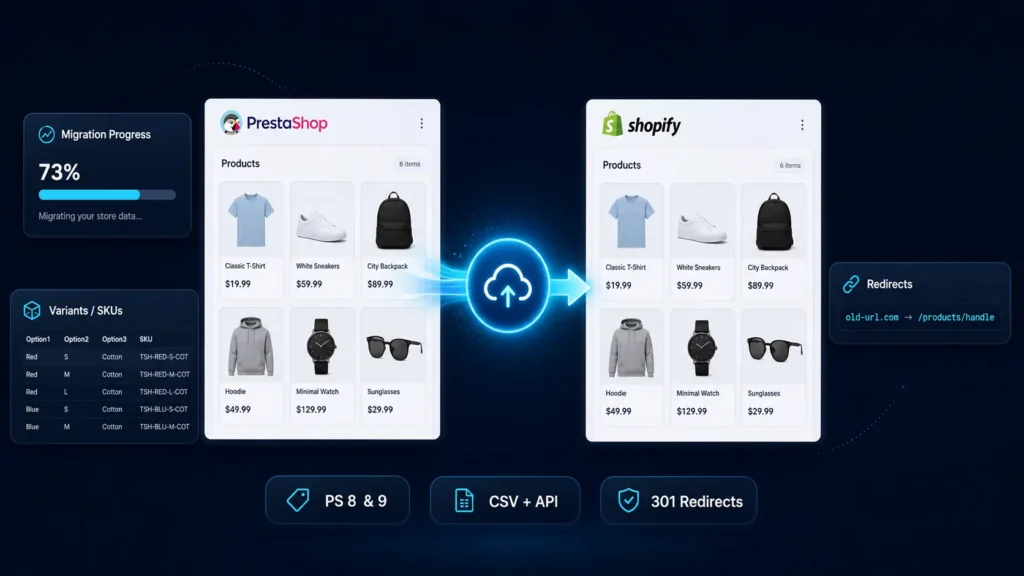
Migrating a PrestaShop store to Shopify is one of the riskiest projects an e-commerce operator can undertake. Catalog, variants, images, prices, stocks, customers, CMS pages and most importantly SEO: one oversight and months of organic traffic go down the drain. This module was designed to give you two migration paths: a full CSV export that requires no API key and that you import calmly via the Shopify Admin interface, or a direct push via the Shopify Admin REST API if you prefer to automate the operation end to end.
§ 02
The whole catalog, variants and images included
The module treats every PrestaShop product as a complete unit: title, short and long descriptions, manufacturer used as Shopify vendor, categories converted to tags and type, SEO meta preserved via global title_tag and description_tag metafields. Variants with up to three attribute groups are mapped to Shopify's Option1, Option2 and Option3 slots, with their individual SKU, barcode, price and stock. Images are served from your PrestaShop in absolute URL form, the first one as main image and the others added with their position, plus the variant image if defined in PrestaShop.
§ 03
SEO preserved thanks to 301 redirects
The day you switch your domain to Shopify, all your old PrestaShop URLs become void. Without 301 redirects, Google loses your signals and your backlinks point nowhere. The module automatically builds the mapping table between old PrestaShop URLs and new Shopify URLs based on generated handles, for products, collections and CMS pages. You get a two-column CSV in the exact format expected by Shopify Online Store URL Redirects, importable in one click, or pushed directly via the API if you are in connected mode.
§ 04
An architecture built for large catalogs
No export runs in the same request as your click in the back office. Every operation creates a job in the database, which is then processed in configurable batches via a token-protected cron worker. You can start a migration of 50000 references with no timeout risk: the job runs in the background, batch after batch, with a complete trace of successes and errors. Shopify's rate limit is handled automatically at a pace of 1.8 requests per second, well under the official limit, with an automatic retry on 429 responses. A persistent mapping in the database stores every correspondence between PrestaShop and Shopify identifiers, which allows redirects to be wired and duplicates to be avoided on re-runs.
§ 05
A clear dashboard, actionable logs
The administrator interface groups four tabs: run a migration, browse recent jobs, configure the module, and a quick-start guide. Each job displays its entity, mode, status, progress percentage, success and error counts, plus a collapsible log area to inspect every line of the processing. The generated CSV files are downloadable directly from the list, and you can re-run or cancel a job at any time. A ten-second auto-refresh keeps the display up to date while the worker is at work.
§ 06
Limits acknowledged in version 1
This first version exports a single language per migration, the one you select in the settings: v2 will add mapping of PrestaShop languages to Shopify Markets and Translate & Adapt. Orders are exported as a consultative CSV only, for archive or analysis, since Shopify does not offer native order import via standard CSV. Customer passwords are not migrated, which is in line with security best practices: Shopify will send a reset invite to each of your customers on your first sendout.





There are no reviews yet.