


Everything you'd want to know before you install.
A detailed look at how Social Login (Google, Apple, Facebook) for PrestaShop works, why we built it the way we did, and the thinking behind the features above.
§ 01
Why social login
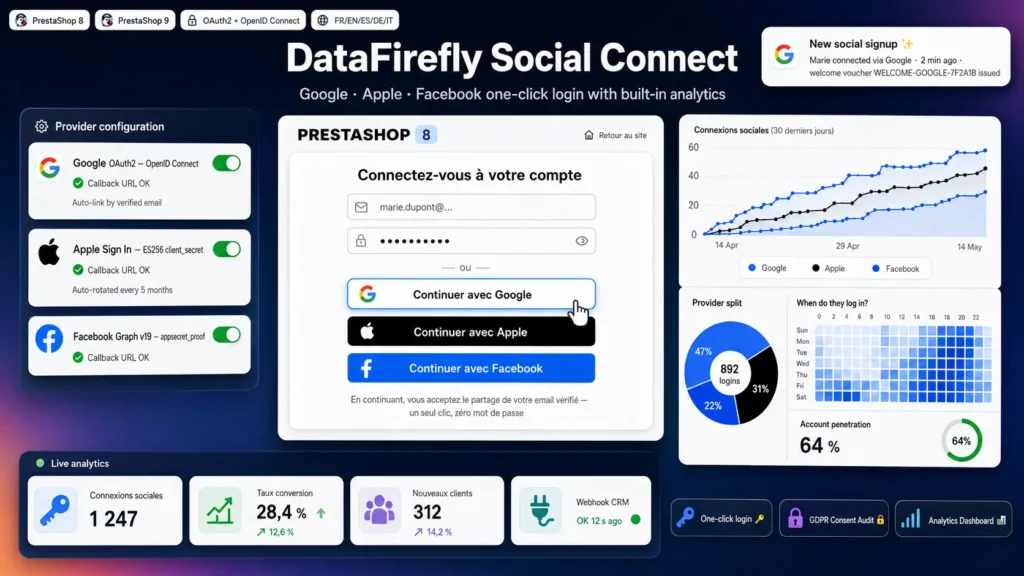
The registration form is one of the main drop-off points of an online shop, especially on mobile. With social login, customers pick their Google, Apple or Facebook account and their customer account is created with their name and email, with no password to invent.
§ 02
At the right point in the journey
The buttons appear on the login page, the registration page and, optionally, in the "Personal information" step of the checkout. After login, customers return to the page they came from: a visitor who signs in during checkout lands straight back in the checkout.
§ 03
Clean accounts, no duplicates
The module first looks for a social account that is already linked, then attaches the provider to the existing account when the provider has verified the email. If the email already exists but cannot be attached, the customer is asked to sign in with their password and then connect the provider from their account. Disabled accounts cannot sign in. On a multistore setup without shared customers, a social account never signs in a customer from another shop.
§ 04
A dashboard that answers real questions
How many clicks turn into a login, which provider leads, on which devices, at what times, what share of your customers use social login and how much revenue those customers generate. Each customer is counted once in revenue, even with several linked providers. The "Recent activity" list shows the exact provider error, which makes setup easier.
§ 05
Security
Single-use OAuth state and nonce, attempt limit per IP, validated return parameter that blocks any redirect to a third-party site, token-protected disconnection, and secrets that are never displayed again in the back office or written to the logs. The Apple client_secret is signed with ES256 at every login and is valid for only 5 minutes.
§ 06
GDPR
A legal notice linked to your CMS page appears under the buttons and the acceptance is recorded for each account created. Logs, which contain IP addresses, are purged automatically. The module answers export and deletion requests from the official psgdpr module, and cleans up its data when a customer is deleted.
§ 07
Welcome voucher and CRM
Each new social account can receive a single-use voucher, visible in the cart, to trigger the first order. Customer groups per provider let you target your campaigns. The HMAC-SHA256 signed webhook sends logins, links and disconnections to Make, n8n, Zapier or your own CRM.

There are no reviews yet.