
Everything you'd want to know before you install.
A detailed look at how PrestaShop Product Carousel Module 8/9 — Unlimited Product Sliders works, why we built it the way we did, and the thinking behind the features above.
Product cards that finally respect your theme
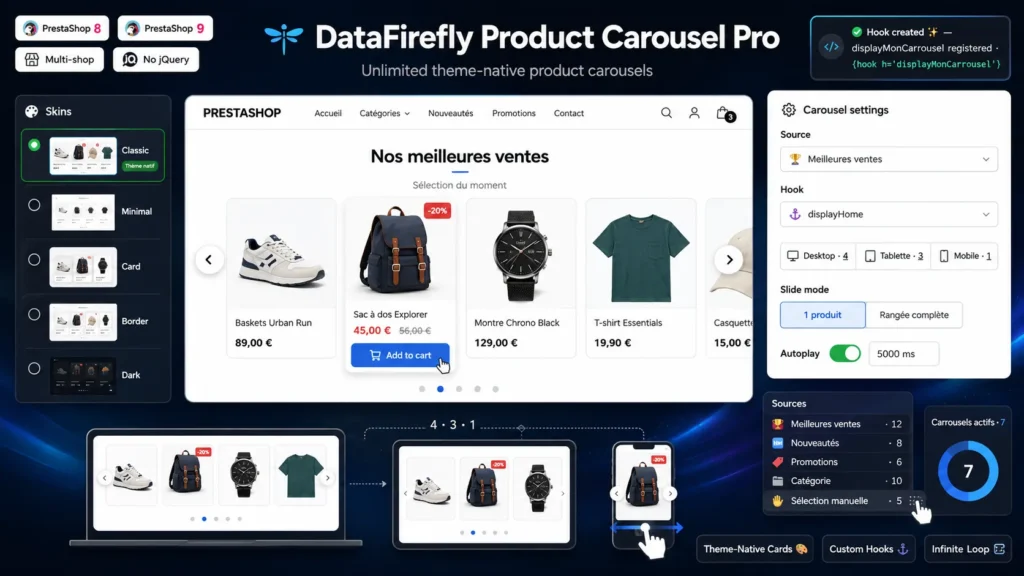
Most carousel modules ship their own product card HTML. The result: prices that ignore your display rules, missing discount flags, a dead quick view button and a style that stands out for the wrong reasons. Product Carousel Pro renders every product through your active theme's miniature template, fed by ProductAssembler and ProductPresenter, PrestaShop's internal mechanisms. What you see on a category page is exactly what you get in the carousel: same prices, same badges, same quick view, same add to cart. Switch themes tomorrow and the carousel follows without a single line of code.
Six product sources, including hand-picked selection
Each carousel picks its source: best sellers, new products, current specials, products from a category chosen in the tree, the home category, or manual selection. In manual mode, an autocomplete search finds your products by name or reference, and a simple drag and drop sets their order: the front office follows that order to the letter. You cap the number of products loaded per carousel, and inactive or hidden products are filtered out automatically.
Any placement, including your own hooks
Six standard hooks cover the classic placements: homepage, top and bottom of content, before the footer, bottom of the product page, cart. But the real asset is the custom hook: type a name in the form, the module registers it on the fly, and you place {hook h='displayMyCarousel'} wherever you want in your templates. Several carousels can share the same hook, sorted by position. And the widget syntax {widget name='dfproductcarousel' carousel=3} targets one specific carousel, handy in a CMS page or a bespoke template.
A polished sliding engine, without jQuery
The engine is written in vanilla JavaScript: columns recomputed per responsive breakpoint (the desktop, tablet and mobile values you chose), sliding one product or one full row at a time, seamless infinite loop thanks to transparent edge cloning, autoplay that pauses on hover and when the tab is hidden, touch and mouse swipe with accidental-click protection, keyboard navigation, RTL support and prefers-reduced-motion respected. A per-instance CSS block applies the responsive columns before the script even loads: zero layout shift on first paint.
Five skins and fine-grained settings, without touching the theme
The classic skin leaves your product cards strictly untouched. Minimal flattens them, Card elevates them with a shadow and rounded corners, Outline frames them thinly, and Dark section places the carousel on a dark background that looks great on a homepage. Add title alignment, subtitle, accent color (inherited from your theme if you leave it empty), gap between products, three arrow styles, two pagination styles and full-width mode: every carousel gets its own personality, and your theme is never modified.



There are no reviews yet.