
Everything you'd want to know before you install.
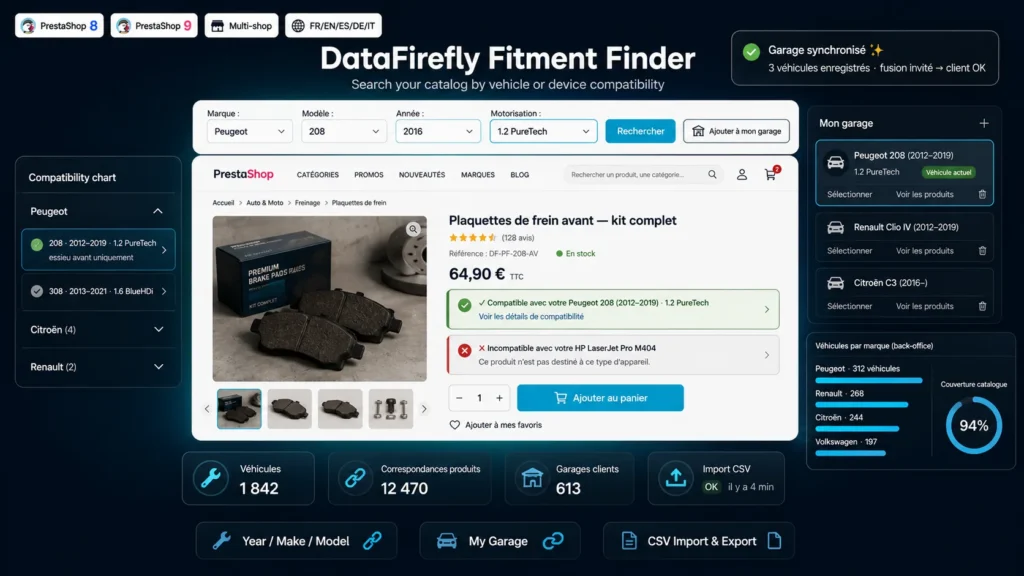
A detailed look at how Vehicle Fitment Finder Module for PrestaShop 8 & 9 — Year/Make/Model Search, Parts Compatibility & My Garage works, why we built it the way we did, and the thinking behind the features above.
§ 01
Fitment is the only criterion that really matters
On a shop selling car parts, printer cartridges or spare parts, a customer is not looking for a product: they are looking for what fits their vehicle, their printer, their machine. As long as that question has no clear answer, they do not buy — or they buy, get it wrong, and send the parcel back. Fitment Finder answers that question in three places: while searching, on the product page, and on every following visit thanks to the garage.
§ 02
A cascading selector, in the language of your catalog
The customer picks a make, then a model, then a year, then an engine: each dropdown is populated from the previous one, with no page reload. Searching is possible from make and model alone, without forcing the finest level. Results are shown on a paginated page that reuses your theme's native product miniatures — no visual break.
§ 03
Not only for the automotive industry
All four levels are configurable and their labels editable per language. Disable the year and you get a Brand / Series / Reference selector, perfect for cartridges or phone cases. Keep the year and the engine and you get a complete automotive selector. The same module covers home appliances, tools, spare parts and any catalog where compatibility drives the sale.
§ 04
My Garage: the vehicle follows the customer
Once selected, the vehicle is remembered and recalled on every page. Customers can save it in My Garage, add other vehicles — their car, their partner's, the company van — and switch between them. The garage works even for a guest visitor, and when they create an account or log in, the vehicles are attached to their profile automatically.
§ 05
A back office built for large databases
Vehicles are managed from a dedicated list under the Catalog menu, each showing the number of attached products. On a vehicle's page, an AJAX search lets you attach a product in two seconds, with a free-form note. For large databases, the CSV import accepts year ranges and attaches products directly by their reference — one file, one complete database. The export hands the whole thing back whenever you want.
§ 06
Built for PrestaShop 8 and 9
The module follows PrestaShop 8 and 9 conventions: no core override, no Composer dependency, a front-end in vanilla JavaScript, token-protected AJAX controllers, and automatic fitment cleanup when a product is deleted. It runs on single-store as well as multistore setups, across the five languages of the catalog.


There are no reviews yet.