


Everything you'd want to know before you install.
A detailed look at how Brand Pages SEO — A–Z Brand Wall works, why we built it the way we did, and the thinking behind the features above.
§ 01
The native manufacturer page does not sell your brands
PrestaShop's manufacturer page is a bare list of names and a raw product listing. No banner, no editorial content, generic meta tags: there is no way to rank for the highly transactional product-plus-brand queries. Brand Pages SEO replaces it with a genuine, marketplace-grade brand hub.
§ 02
A brand wall that invites the click
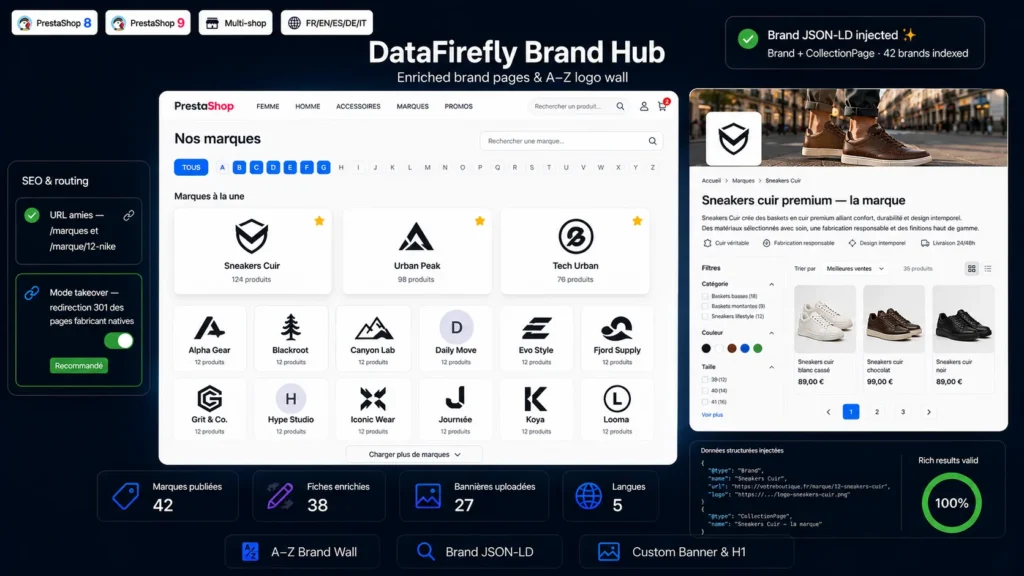
The wall displays every active brand as a logo card (with an elegant initial-letter fallback), grouped by letter under a sticky alphabet navigation. Instant search filters cards as you type, ignoring accents. A Featured brands strip showcases your strategic partnerships, and optional product counters inform visitors at a glance.
§ 03
Brand pages engineered for search
Each brand gets its enriched page: wide banner, custom H1, long description written in a rich-text editor, dedicated meta title and meta description. Every field is multilingual and multistore. A smart fallback chain guarantees no page ever ships empty: enriched meta first, then native manufacturer meta, then an automatically built title.
§ 04
Your theme's product listing, untouched
Unlike modules that reinvent a proprietary listing, the brand page inherits PrestaShop's native listing controller. Pagination, sorting options and faceted navigation behave exactly as on your category pages, rendered by your theme — no UX break, no incompatibility with your filter modules.
§ 05
Structured data and clean URLs
The module automatically injects Brand markup on every brand page and CollectionPage with ItemList on the wall, helping Google understand your brand catalog. URLs are configurable (/brands and /brand/slug by default), with an automatic 301 redirect whenever a wrong slug is requested. Takeover mode 301-redirects legacy manufacturer pages to their enriched counterparts: your SEO history is preserved.
§ 06
Five-minute install, zero overrides
Upload the ZIP and the module creates its tab under the Catalog menu. Every existing manufacturer immediately appears in the list, ready to be enriched. The module uses no class overrides: only native hooks and controllers, for maximum compatibility with your other modules and future PrestaShop releases.






There are no reviews yet.