
Everything you'd want to know before you install.
A detailed look at how PrestaShop Homepage Slider Module 8/9: Fast WebP Banner Blocks works, why we built it the way we did, and the thinking behind the features above.
A hero grid, not just another carousel
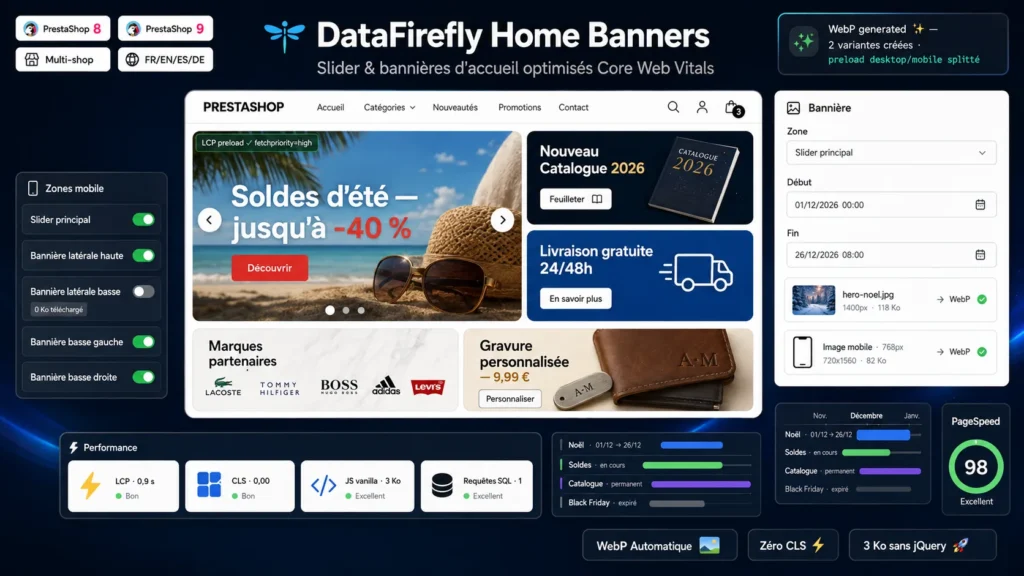
Classic slider modules show one image after another and stop there. This one reproduces the homepage structure of major e-commerce sites: a main slider taking three quarters of the width, two banners stacked to its right (catalog, shipping, service) and two wide promotional banners below (brands, current offers). On mobile the grid stacks cleanly into a single column. Every zone is filled from the same back office tab, with a preview of the images in place and their dimensions.
Built for Core Web Vitals
A slider is almost always the LCP element of a homepage, and that is where most modules fail. Here, every image is resized to its zone's maximum width and converted to WebP on upload. The first slide is announced to the browser through a link rel preload tag with fetchpriority high, placed in the head: it starts loading before the CSS is even parsed. Every other image is lazy loaded with async decoding, and width and height attributes stored in the database remove any layout shift. The slider's JavaScript weighs about 3 KB, vanilla, loaded with defer, with no library at all.
Schedule your campaigns, the module handles the rest
Every banner accepts a start date and an end date, down to the day or the hour. Your Christmas operation is prepared in November, goes live on December 1st at midnight and disappears on the morning of the 26th, without anyone logging into the back office. The module's cache regenerates automatically to follow the calendar, and any back office save clears it instantly.
Mobile treated as a real channel, not a shrunken screen
A 1400 pixel panoramic visual is unreadable when squeezed onto a phone screen. Each slide and each banner therefore accepts a dedicated mobile image, framed for portrait or for text that stays readable on a phone, served under 768 px through the picture element. Preloading follows suit: two preload tags with media attributes, so each device downloads only its own variant. And when a zone makes no sense on mobile, a switch in the settings cuts it entirely: its images go lazy and are never requested by the browser. Those are kilobytes actually saved, not merely hidden.
Clean on the server side too
The hero rendering is cached in Smarty per language and per shop: at cruising speed, displaying all five zones costs zero SQL queries. When the cache regenerates, a single grouped query fetches every banner. CSS and JS are registered on the homepage controller only, so the rest of the shop loads none of it. The module follows PrestaShop standards: ObjectModel, dedicated admin controller, native multistore and multilingual support, clean uninstall.



This module is a gem for PrestaShop, easy to install and set up, it’s intuitive and you won’t have any issues, and if for some reason you do run into a problem, the technical support is great.
Module 100% worth buying.Automatically translated