PrestaShop Marketing & Promotions

Affiliate Program Module for PrestaShop 8 & 9: Tracked Links, Commissions and Payouts

Your ambassadors sell, you pay per order, the module keeps the books.

Bloggers, YouTubers, Instagram accounts and newsletters sell better than most ads, as long as you can pay them properly. This module sets up a real affiliate program inside PrestaShop: a public application page, an affiliate area where each partner creates tracked links and follows their sales, commissions calculated on every order, then a monthly statement and a transfer file ready to import into your bank. It is separate from customer referral: here you work with partners who publish.

At a glance
  • Tracked links to any page, short links and a personal discount code per affiliate
  • Signed attribution cookie, first or last click, duration adjustable per affiliate
  • Percentage or fixed commission, rules per category and per product
  • Cancellations and credit slips deducted automatically, even after the affiliate was paid
  • Monthly statement, SEPA XML transfer file, PayPal Payouts CSV and accounting CSV
PrestaShop 8 & 9 SEPA and PayPal export Affiliate area included 8 languages
  • 30-day refund
  • 12 months updates
  • 24h support
www.datafirefly.com/en/
Affiliate Program Module for PrestaShop 8 & 9: Tracked Links, Commissions and Payouts
v1.1.0 · updated 2026-09-23
What it does

The short version.

01

An affiliate area designed for people who publish

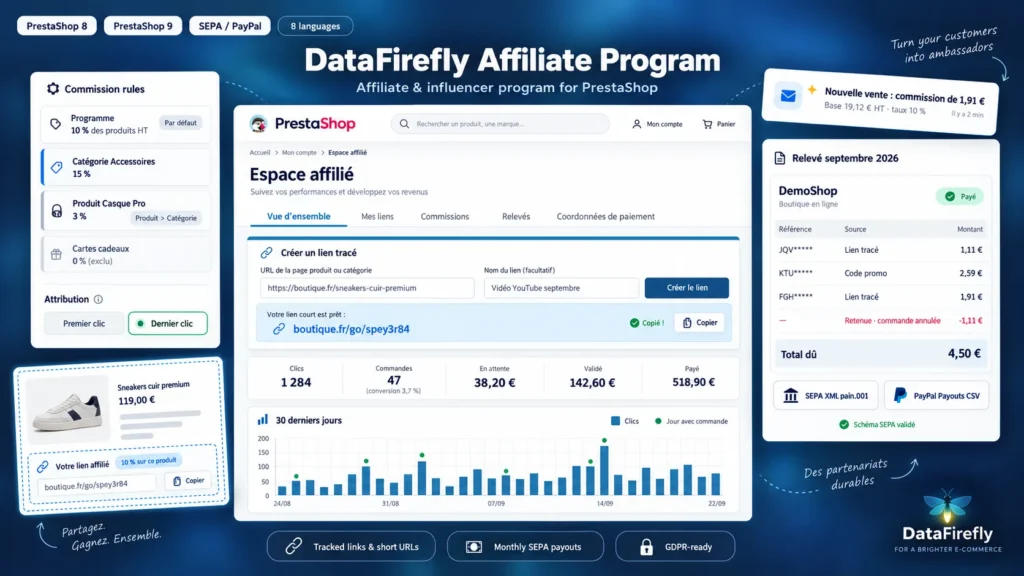
The affiliate pastes the address of any product or category and gets a short link to share. Their area shows clicks, orders, conversion rate, pending, approved and paid commissions, a 30-day chart, printable statements and payment details. On every product page, a box only they can see gives them their link and the rate earned on that product.

02

Commissions that follow the order

A commission is created as pending with the order, becomes approved at the status you choose and disappears if the order is cancelled. A partial credit slip reduces it pro rata. If the affiliate was already paid, a negative adjustment goes on their next statement, and an issued statement is never modified.

03

Paying affiliates without retyping anything

At the start of the month, the module groups each affiliate's payable commissions in a statement, after a holding period that covers returns and above a minimum threshold. You export a SEPA transfer file ready to import into your bank or a PayPal Payouts CSV, then mark the statements as paid with the transfer reference.

04

Attribution that is hard to abuse

The cookie is signed, bots and the affiliate's own clicks are ignored, and self-referral is blocked by customer account and by e-mail. A personal discount code credits the sale even without a click, useful for podcasts and videos. Carts are linked to the affiliate for payments confirmed later by the bank.

The long version

Everything you'd want to know before you install.

A detailed look at how Affiliate Program Module for PrestaShop 8 & 9: Tracked Links, Commissions and Payouts works, why we built it the way we did, and the thinking behind the features above.

§ 01

Affiliate program or referral: two different needs

Referral rewards a customer who recommends the shop to a friend. An affiliate program pays partners whose job is to recommend: bloggers, video creators, Instagram or TikTok accounts, comparison sites, newsletters. They need links to specific products, statistics, a negotiated rate and regular payment. This module is built for them, and for the merchant who has to pay them without a spreadsheet.

§ 02

Links the affiliate creates on their own

From their area, the affiliate pastes the address of a product, a category or any page of your shop and gets a short link, with a name to keep track of it. Each link has its own click and order counter, which shows which publication brings the most. They can also add the tracking parameter to any address, and on every product page a box only they can see gives them the link and the applicable rate.

§ 03

Clear, verifiable attribution

The attribution order is fixed: the affiliate's personal discount code first, then the link or cookie, then, if you enable it, a customer previously referred by that affiliate. The cookie is signed to prevent tampering, bots are ignored and clicks are deduplicated. An affiliate cannot earn a commission on their own purchases. Each commission shows its source: tracked link, discount code or returning customer.

§ 04

Fair commissions, even after a return

The base is the product amount tax excluded, discounts deducted if you wish, without shipping. You set a global rate, a rate per affiliate, and rates per category or product to reflect your margins. A cancelled order cancels the commission, a partial refund reduces it. If the affiliate was already paid, the difference is deducted from their next statement and a negative balance is carried over until it is offset.

§ 05

Monthly payouts in a few clicks

At the start of each month, the cron URL or the back-office button creates a statement per affiliate with the approved commissions whose holding period is over. The affiliate receives an e-mail and opens a detailed, printable statement. You export a SEPA transfer file or a PayPal CSV, import it into your bank, then mark the statements as paid. A paid statement can no longer be exported, which removes the risk of paying twice.