PrestaShop Marketing & Promotions

Bulk Generate Unique Coupon Codes for PrestaShop 8 & 9: Single-Use Codes and Campaign Tracking

Thousands of unique codes, and the revenue each campaign brings in.

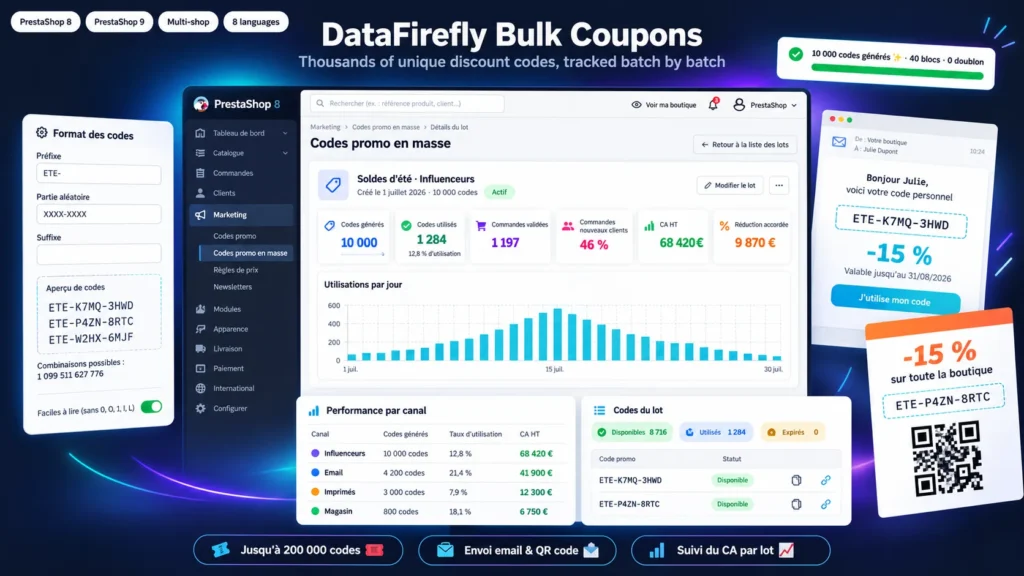
An influencer campaign, a flyer in every parcel, a win-back email to inactive customers: each operation needs its own codes, unique and traceable. PrestaShop only creates cart rules one at a time. This module generates a batch of 100 or 100,000 codes in the format you choose, sharing the same rules, then distributes them by email, as a printable PDF with QR codes or as a CSV export. Each batch has its own statistics page: codes used, valid orders, revenue excluding tax, discount granted and share of new customers.

At a glance
  • 1 to 200,000 unique codes per batch, in a prefix + random part + suffix format
  • Anonymous codes, or personal codes assigned to customers of selected groups or to an email list
  • Native rules: single use, uses per customer, products, categories, brands, minimum amount, countries, shops
  • Email sending in the customer's language, PDF with QR codes and a direct link that applies the code to the cart
  • Statistics per batch and per channel: redemption rate, orders, revenue, new customers
PrestaShop 8 & 9 Up to 200,000 codes per batch QR codes Email sending CSV export
  • 30-day refund
  • 12 months updates
  • 24h support
www.datafirefly.com/en/
Bulk Generate Unique Coupon Codes for PrestaShop 8 & 9: Single-Use Codes and Campaign Tracking
v1.1.0 · updated 2026-09-24
What it does

The short version.

01

Thousands of codes without overloading the server

Codes are created in blocks of 250 with a progress bar. If the page is closed, generation resumes where it stopped. Every code is checked against all existing cart rules, and the module rejects a format that does not offer at least 20 times more combinations than the requested quantity.

02

Native cart rules, not a parallel system

Each code is a standard PrestaShop cart rule: it works in the cart, on the invoice and with other modules. Single or multiple use, limit per customer, percentage or amount discount, free shipping, free gift, product, category or brand restrictions, minimum amount, groups, countries and shops.

03

Get the codes to where your customers are

Personal codes are emailed in the language of the customer account, with a button that applies the code to the cart. Anonymous codes print on cards, labels or A6 flyers with a QR code. The CSV lists each code with its customer and direct link, ready for Brevo or Mailchimp.

04

The result of every campaign

A batch page shows codes used, valid orders, revenue excluding tax, discount granted, revenue to discount ratio and the share of orders placed by new customers. A table compares channels: email, SMS, influencers, print, store.

The long version

Everything you'd want to know before you install.

A detailed look at how Bulk Generate Unique Coupon Codes for PrestaShop 8 & 9: Single-Use Codes and Campaign Tracking works, why we built it the way we did, and the thinking behind the features above.

§ 01

Why unique codes instead of one shared code

A code like WELCOME10 shows up on deal sites the next day, and nobody can tell which channel produced which order. A unique code per recipient limits leaks, allows single use and ties every sale to a campaign. You still need a way to create 5,000 of them without spending the day in Catalog > Discounts.

§ 02

One batch, shared rules

You set the format, quantity, discount and conditions once. The module then creates the matching native cart rules, tagged [DFBC#id] in their description so you can find them in the discount list. A personal code is linked to one customer account and only works for that customer. A batch can be duplicated to run the same operation next month.

§ 03

Get the codes to where your customers are

Personal codes are sent from the module in the language of the customer account, with an editable message and a button that applies the code to the cart. Sending is throttled to stay under the limit of your SMTP server and, by default, restricted to customers who accepted the newsletter. For parcels, trade fairs or the shop counter, the PDF lays out cards, labels or flyers with a QR code. For an external email tool, the CSV export lists each code with its customer and direct link.

§ 04

A link that applies the code by itself

Each code has a URL that opens the shop and adds the discount to the cart. If the visitor has no cart yet, or the cart does not meet the conditions, the code is kept for 30 days and applied as soon as the cart meets them. The customer has nothing to type, which matters on mobile and after scanning a QR code.

§ 05

Measure what each campaign earns

Statistics are based on PrestaShop orders: only valid orders count toward revenue and discount, converted into the default currency. For each batch you see the redemption rate, average order value, revenue to discount ratio and the share of orders placed by customers who had never ordered before. The channel table shows where your codes perform best.