
Everything you'd want to know before you install.
A detailed look at how Paginated Pages SEO – Auto H1, Title & Yoast Meta for WordPress & Elementor works, why we built it the way we did, and the thinking behind the features above.
§ 01
The problem: paginated pages are duplicate content
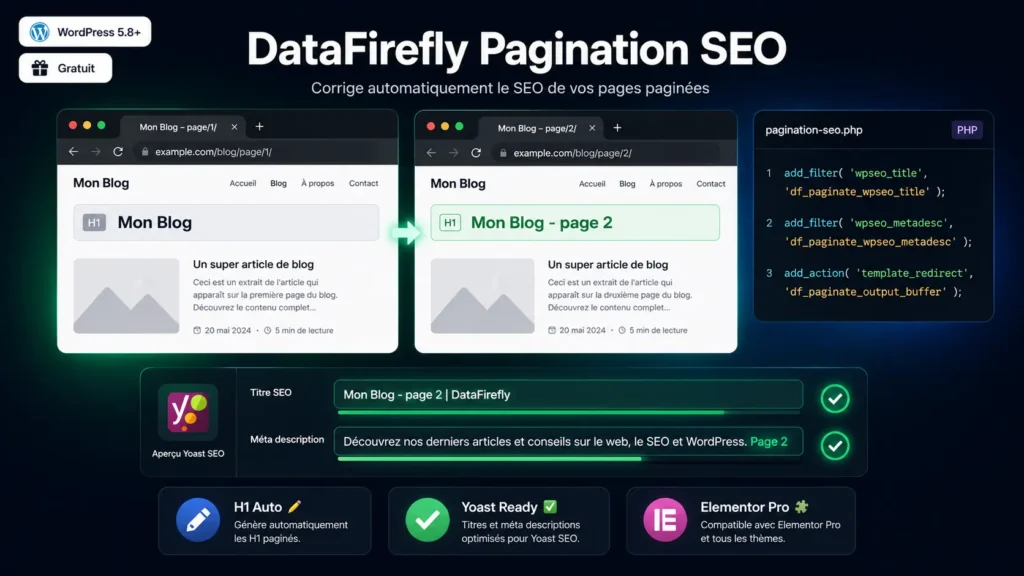
On WordPress, paginated blog archives (/blog/page/2/, /blog/page/3/…) share by default the same H1, the same SEO title and the same meta description as page 1. Google treats these pages as duplicate content: they compete against each other in the index, dilute authority and can be demoted in rankings. Differentiating each page with its number is the fix recommended by official SEO guides.
§ 02
What the plugin does, exactly
On any page with a number greater than 1 (is_home(), is_archive(), is_post_type_archive()), the plugin appends “- page X” to the first H1 in the DOM, to the Yoast SEO title, and “. Page X” to the Yoast meta description. Page 1 is never touched. Changes apply automatically on activation, with no settings required.
§ 03
Elementor compatibility: the output buffer method
Elementor Theme Builder Pro handles archive templates through its own rendering system, which makes classic PHP hooks unreliable for modifying the H1. This plugin starts an output buffer at template_redirect, captures the full HTML rendered by the server and injects the suffix directly into the first tag in the final HTML, before it is sent to the browser. This method works regardless of which page builder is in use.
§ 04
Yoast integration without touching settings
The plugin hooks into two Yoast filters — wpseo_title and wpseo_metadesc — with priority 20, ensuring execution after Yoast’s own internal filters. The page number is appended at the end of the string, without overriding or disabling any existing Yoast settings (tags, variables, templates).




There are no reviews yet.