
Everything you'd want to know before you install.
A detailed look at how International Phone Input PrestaShop — Flags & E.164 Normalization works, why we built it the way we did, and the thinking behind the features above.
§ 01
The problem: unreadable, uncomparable, uncontactable phone numbers
On a multi-country store, phone numbers arrive in the database in every imaginable format: 06 33 54 78 64, 0633547864, plus 33 6 33 54 78 64, 0033 6 33 54 78 64, 33-633-547-864. Consequence: impossible to detect customer duplicates, exports to a CRM or ERP must be cleaned manually, transactional SMS services reject one number out of three, and sales teams waste time reformatting before every international call.
§ 02
The solution: a single format, clear UX, server-side guarantee
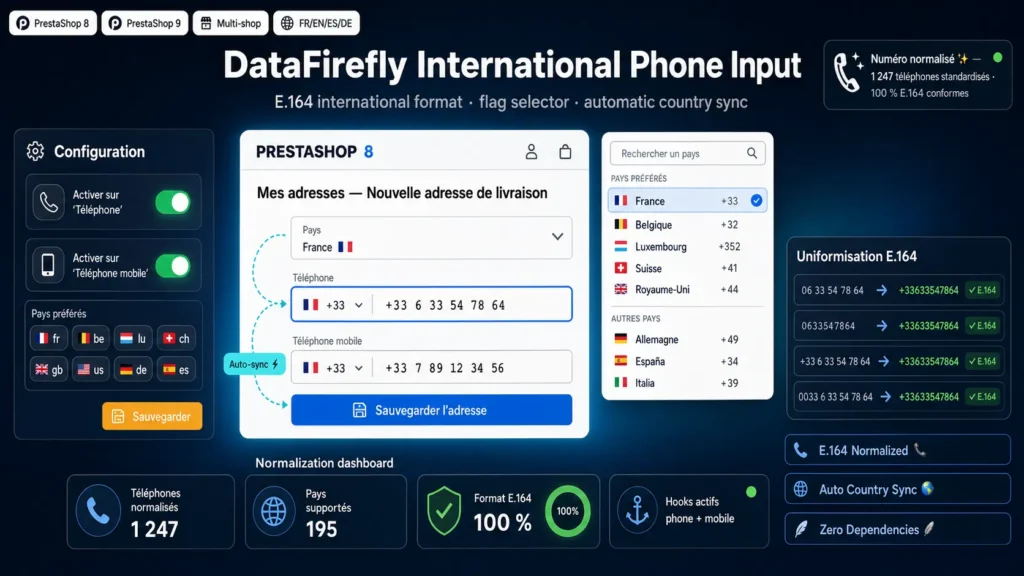
The module adds a dial code selector with flag directly on the phone and mobile phone fields, wherever they appear: registration form, address management, 5-step or one-page checkout. The customer immediately sees which dial code applies, can change it in two clicks, and the list filters by instant search. On the database side, regardless of what the customer types, you always get a clean, normalized, immediately exploitable format.
§ 03
Automatic sync with the delivery country
When the customer selects their country in the address form, the dial code in the phone selector changes automatically. Selecting Belgium switches to plus 32, selecting Germany switches to plus 49, with no manual intervention. This synchronization also works on AJAX reloads of the native PrestaShop checkout (updatedAddressForm event). For heavily customized themes, a debounced MutationObserver serves as a safety net.
§ 04
Guaranteed E.164 normalization on the server side
Client-side normalization secures the UX, but it's not enough. If an order is created via the PrestaShop REST API, via the back office, via a CSV import, or via another module manipulating the Address class, the JS form is never executed. That's why the module also hooks into actionObjectAddressAddBefore and actionObjectAddressUpdateBefore: before every INSERT or UPDATE on the ps_address table, the phone and phone_mobile fields go through server-side normalization. No bypass possible.
§ 05
Normalization rules applied
For an address tied to a country with dial code plus 33: a number starting with plus is kept as-is (only spaces and separators are removed). A number starting with 00 has the 00 replaced with plus. A number starting with 0 (national trunk prefix) has the 0 removed and replaced with plus followed by the country dial code. A number that already starts with the dial code without a plus simply gets the plus prepended. These rules comply with the international E.164 standard used by all telecom operators and professional SMS services.
§ 06
Preferred countries and selector UX
By default, France, Belgium, Luxembourg, Switzerland, United Kingdom, United States, Germany, Spain, Italy and Netherlands are pinned at the top of the list. This list is fully configurable from the back office (ISO codes separated by commas). Other countries appear below, sorted alphabetically. A search bar lets you find a country instantly by name, ISO code or dial code. The whole list is built from the countries enabled in your store, read directly from the native ps_country.call_prefix column.
§ 07
Zero dependency, native Unicode flags
The module ships no external library. No intl-tel-input to maintain, no jQuery plugin, no heavy CSS framework. Flags are Unicode emojis (Regional Indicator Symbols) supported natively by all modern browsers and operating systems. The stylesheet is under 4 KB, the script under 16 KB. No extra network call, no external CDN, no data leakage to third parties.



There are no reviews yet.