
Everything you'd want to know before you install.
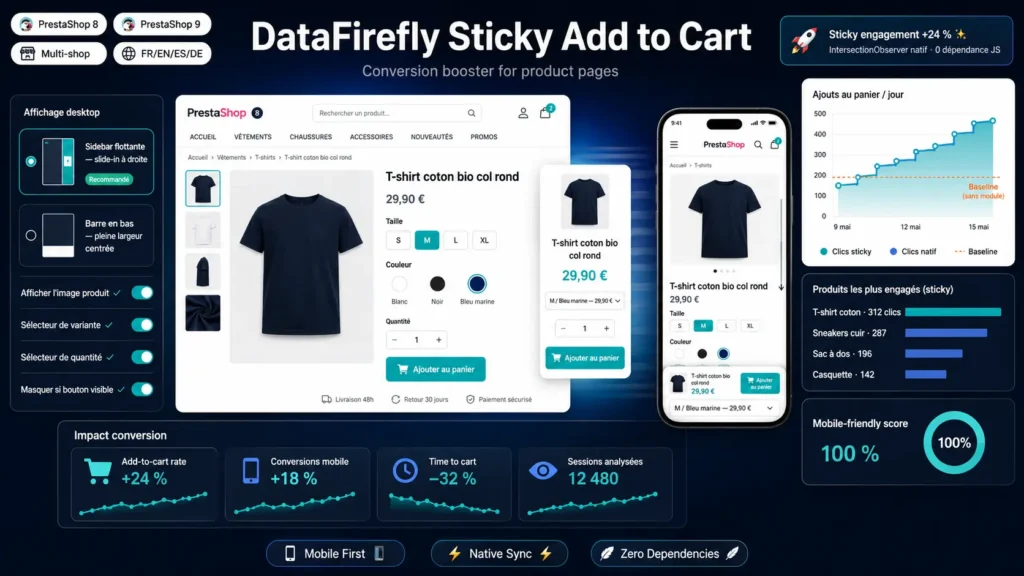
A detailed look at how Sticky Add to Cart button for PrestaShop works, why we built it the way we did, and the thinking behind the features above.
§ 01
Why a sticky Add to Cart button
On mobile, over 60 percent of visitors scroll past the Add to Cart button without clicking. On desktop, almost as many do on long product pages with detailed descriptions, customer reviews and related products. A sticky bar that follows the visitor captures that purchase intent exactly when it would otherwise fade away. The biggest marketplaces, starting with Amazon, have made this a default feature for years.
§ 02
UX tailored to every screen size
On mobile (under 992 pixels wide), a compact bar sits at the bottom of the screen, with full support for notched-iPhone safe areas. On desktop, two modes are available in the back office: a floating right-side sidebar that slides into view with a subtle animation, or a centered bottom bar in the same style as mobile. You choose based on your design and the type of product pages you run.
§ 03
Smart compact variant selector
The compact selector lists every available combination with its price and availability. When the customer changes variant from the sticky bar, the module automatically syncs your main product page's variant UI (radio buttons or dropdowns), which triggers PrestaShop's native combinations engine: price is recalculated, stock is checked, the image updates, exactly as if the customer had picked the variant from the product page itself.
§ 04
Clean integration, no surprises
The module uses the official PrestaShop hooks and stays out of your theme's main DOM tree. Clicking Add to Cart from the sticky bar programmatically triggers the original theme button, which preserves the confirmation modal, the updateCart events, success notifications and any customization already in place in your theme or other modules.
§ 05
Performance-focused
No framework, no external dependencies. The CSS weighs around 7 KB and the JavaScript around 12 KB, gzipped. Assets load only on product pages, never on the homepage, catalog or checkout. Bar visibility is handled by native IntersectionObserver, much more efficient than a continuous scroll listener.
§ 06
Configure everything from the back office
Every option lives in the PrestaShop back office, no code to touch: global on or off switch, per-device display (mobile and or desktop), desktop mode (floating sidebar or bottom bar), top offset for themes with sticky headers, toggles for product thumbnail, variant selector and quantity selector, and a complete color palette (background, button, button text, text color, price color).
§ 07
Accessibility and best practices
The sticky bar follows ARIA recommendations: region role, explicit labels for every control, aria-live announcements for price changes, visible focus on all buttons, full keyboard support. The prefers-reduced-motion media query disables transitions for users sensitive to animations. All strings are translatable.



There are no reviews yet.