
Everything you'd want to know before you install.
A detailed look at how AEO Monitor & Optimizer — LLM Visibility (ChatGPT, Perplexity, Claude, Gemini, Mistral) works, why we built it the way we did, and the thinking behind the features above.
§ 01
Why measure visibility in LLMs?
In 2026, more than 40 percent of commercial searches start with a question asked to an AI assistant. If ChatGPT, Claude or Perplexity don't know your brand, you lose those opportunities before they ever become Google traffic. AEO Monitor measures that visibility objectively and identifies the concrete fixes to apply, page by page.
§ 02
How does the plugin work?
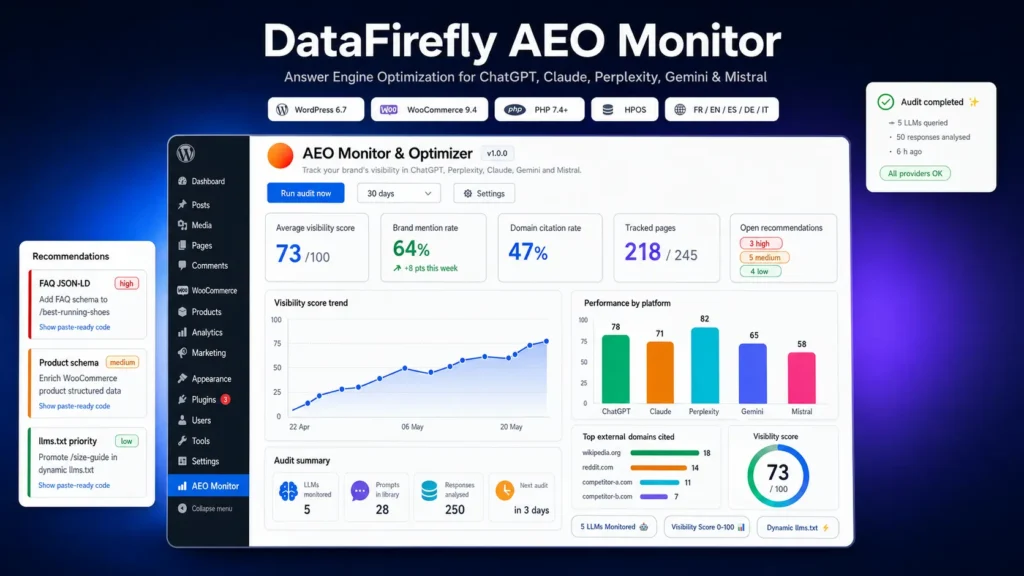
You define your brand name, aliases and competitors. The plugin automatically generates prompts from your WooCommerce categories or runs your own scenarios. Every week or every day, these prompts are sent to each enabled LLM. Responses are analysed to detect brand mentions, domain citations, target URLs and competitor references.
§ 03
What does it do with the results?
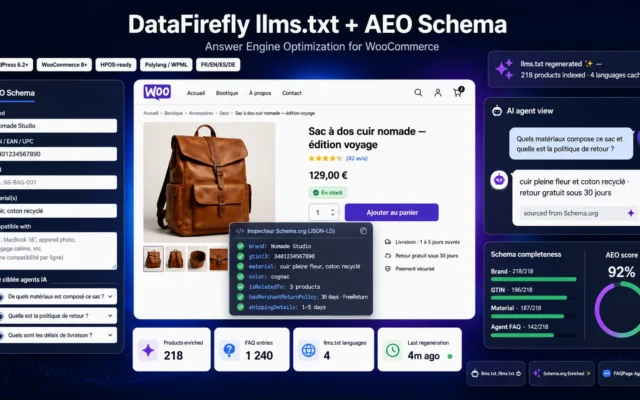
For every page poorly detected by LLMs, AEO Monitor generates an actionable recommendation: ready-to-paste FAQ JSON-LD code, enriched Product structured data for WooCommerce, 60 to 80 word TL;DR summaries to place at the top of your content, robots.txt rules for AI bots (GPTBot, ClaudeBot, PerplexityBot, Google-Extended) or prioritisation in the dynamic llms.txt file.
§ 04
The dynamic llms.txt file
The plugin automatically serves your site on the llms.txt URL with a Markdown index of the pages best indexed by LLMs, continuously updated. It is the equivalent of an XML sitemap for the era of AI assistants. Compatible with the official llms.txt specification and usable by all current AI crawlers.
§ 05
API call cost and privacy
The plugin uses your own OpenAI, Anthropic, Perplexity, Google and Mistral API keys. A weekly audit of 10 prompts across 5 LLMs (50 calls) typically costs between 0.30 and 1.20 EUR depending on the models you choose. No data is sent to DataFirefly. Prompts, keys and results stay exclusively in your WordPress database.
§ 06
Dashboard and reporting
The dashboard displays your average visibility score, brand mention rate, domain citation rate and the number of pages detected by LLMs. Chart.js graphs show trends over time and compared performance across the 5 platforms. The WP-CLI command line lets you automate audits and CSV reports for your BI tools.
§ 07
Who is it for?
Any brand, e-commerce merchant or publisher who wants to measure and improve their Answer Engine Optimization. Particularly suited to WooCommerce shops that want ChatGPT to recommend their products, and to media or blogs that want to be cited as an authoritative source by Perplexity or Claude.



There are no reviews yet.