
Everything you'd want to know before you install.
A detailed look at how AI Product Photography Studio for WooCommerce works, why we built it the way we did, and the thinking behind the features above.
§ 01
The problem
A serious WooCommerce store needs at least 5 to 10 visuals per product: e-commerce packshot, lifestyle context, detail close-up, use scenarios… Multiplied by every reference in your catalog, that's hours of studio time, a photographer, a stylist, and a quickly significant budget. And every new season, you start over.
§ 02
The solution
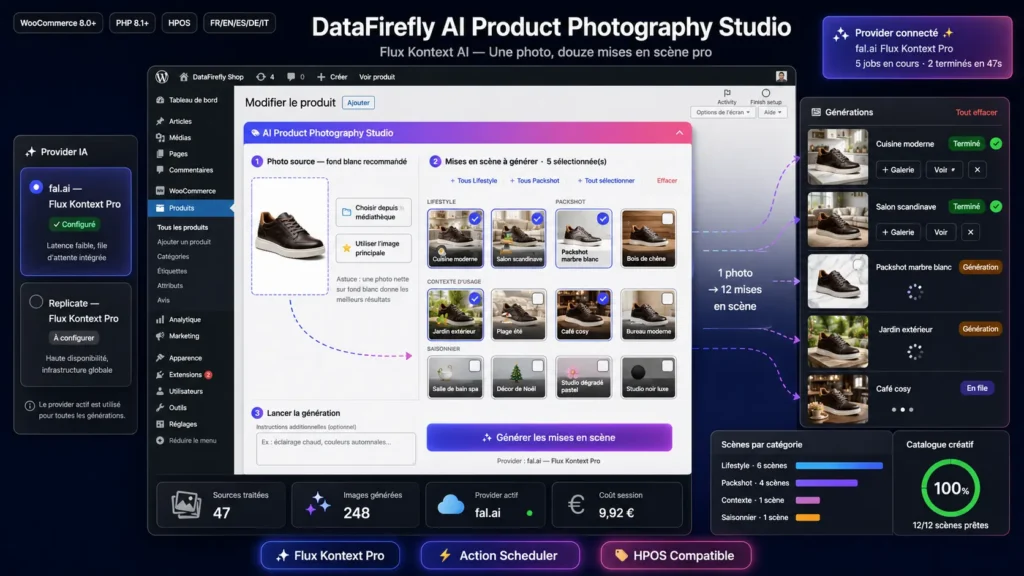
AI Product Photography Studio radically changes the equation. You take a single photo of your product on a white background — a recent smartphone is enough. The plugin then generates as many professional scenes as you need, in minutes, right from your WooCommerce product edit screen.
§ 03
Why Flux Kontext rather than another model?
Most AI image models work in text-to-image mode: they invent a new image from a description. Result: your product changes shape, color, detail between renders. Flux Kontext is different — a context-editing model designed specifically to modify the environment around an existing subject while preserving that subject faithfully. Your product stays rigorously identical from one scene to the next.
§ 04
12 ready-to-use scenes
Modern Scandinavian kitchen, hygge living room, garden in golden hour, summer beach, cozy café, productive office, spa bathroom, white Carrara marble, natural oak wood, pastel gradient, luxury black studio, Christmas decor. Each preset is prompt-engineered for Flux Kontext and produces predictable, magazine-quality results.
§ 05
Extend without limit
The "Custom scenes" tab accepts a JSON array where you describe your own scenes: icon, label, category, prompt. They appear immediately in every product selector alongside the 12 built-in presets.
§ 06
Ergonomic 3-step workflow
Step 1: choose the source image (media library or product featured image). Step 2: tick the scenes you want using quick category selectors (+ all Lifestyle, + all Packshot, etc.). Step 3: optionally add custom instructions and click Generate. The right column shows real-time status for each image, with previews as soon as they're ready.
§ 07
One-click product gallery
Every generated image lands in your WordPress media library and can be added to the WooCommerce product gallery with a single click on the « + Gallery » button. You can also enable automatic attachment in the settings for high-volume workflows.
§ 08
Choose your provider
The plugin offers two Flux Kontext Pro providers: fal.ai for low latency and built-in queueing — ideal in production; Replicate for its stable ecosystem and transparent pay-per-use billing. Switch between them from the settings without touching any code. Expect 4 to 6 cents per generated image.
§ 09
Production-grade architecture
The code follows modern best practices: PSR-4 under a dedicated namespace, no Composer dependency, strict layer separation (providers / queue / scenes / generation / admin), provider abstraction via interface to make future model additions trivial. The queue uses Action Scheduler, already present in WooCommerce, ensuring reliability and observability from WooCommerce → Tools → Scheduled Actions.
§ 10
Multilingual by design
The admin UI ships translated into French, English, Spanish, German and Italian (.po + compiled .mo). JavaScript strings are also internationalized via wp_set_script_translations. Polylang- and WPML-compatible for multilingual catalogs.
§ 11
Ideal use cases
Artisans who photograph their creations on a smartphone and want a professional finish. Dropshippers who only receive manufacturer packshots and need to stage them. Seasonal stores wanting to refresh their catalog (summer, autumn, Christmas) without reshooting. Large catalogs where shooting 500+ products is economically impossible. A/B testing different visual environments to optimize conversion rate.


There are no reviews yet.