
Everything you'd want to know before you install.
A detailed look at how DataFirefly Product Trash works, why we built it the way we did, and the thinking behind the features above.
A safety net against the irreversible
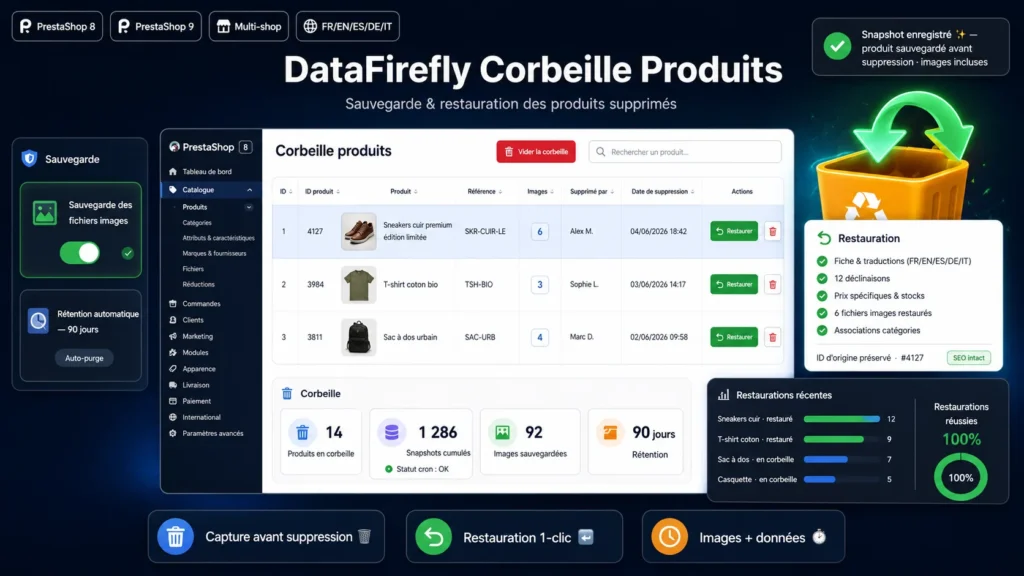
In PrestaShop, deleting a product is final and immediate. One click too many, a mistargeted bulk delete, an import that overwrites the catalogue or an overzealous script, and an entire record vanishes: descriptions written over hours, combinations, prices, stock, images, and the SEO that came with them. Natively, there is no way back. This module adds the missing piece: a trash bin that captures every product before it disappears and lets you bring it back exactly as it was.
How the capture works
The module hooks into the event PrestaShop fires just before a product is erased, at the precise moment when all its data is still intact in the database. It then serialises an exhaustive snapshot: the main record, its per-shop and per-language versions, the combinations and their attributes, specific prices, stock, category links, features, tags, suppliers, carriers, attachments, related products, packs, virtual products and customization fields. In parallel, image files in every size are copied to a protected backup folder. This capture is silent and never blocks the deletion: if anything fails, PrestaShop carries on normally.
A truly complete restore
Restoring a product is more than recreating a database row. The module re-inserts all linked tables in a single transaction, keeping the original IDs, then copies the image files back to their exact location and reruns search indexing. If any step fails, everything is cleanly rolled back: there is never a half-restored product. Your description HTML is preserved character for character, with no stripped tags. The product reappears in your catalogue just as it was before deletion.
SEO and URLs intact
This is the difference between a real restore and a mere recreation. By reinstalling the product with its original ID, the module guarantees that its canonical URLs, redirects and internal links stay valid. No new record with a new URL, no 404, no lost signals for Google. To prevent any damage, the restore is automatically blocked if another product already uses that ID, keeping you in full control.
Stay in control of disk space
A trash bin that grows endlessly eventually weighs on the server. The module offers a configurable retention in days: older backups are purged automatically, or kept indefinitely if you prefer. You can also delete a single backup or empty the whole trash in one click. The backup folder is protected by an htaccess and an index so no file is publicly accessible. You can even disable the image copy if you would rather back up data only.

There are no reviews yet.