
Everything you'd want to know before you install.
A detailed look at how DataFirefly Social Autopost works, why we built it the way we did, and the thinking behind the features above.
§ 01
Social distribution of your products, on autopilot
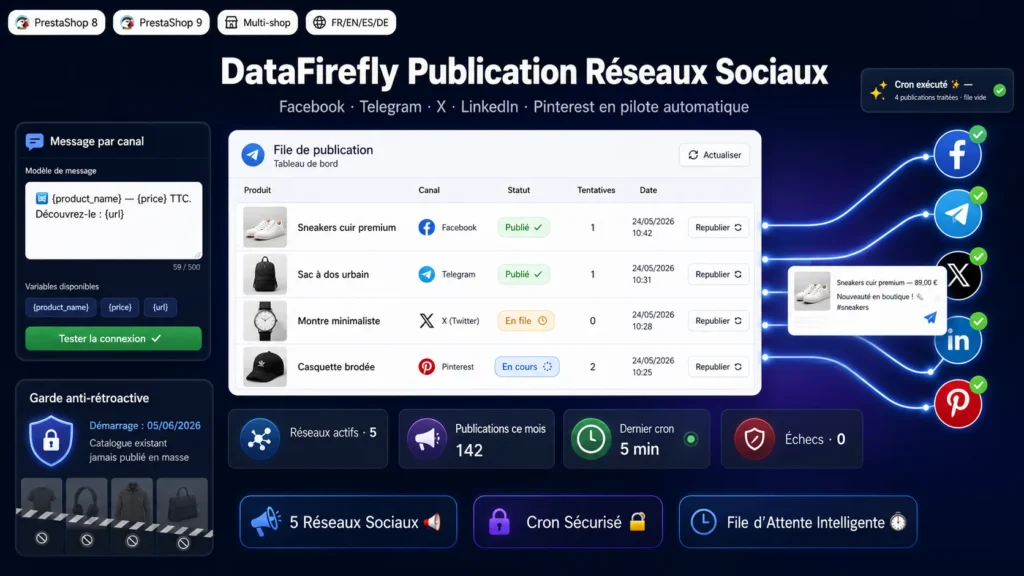
Posting every new arrival to Facebook, Telegram, X, LinkedIn and Pinterest is time-consuming and quickly forgotten. This module fully automates that distribution: as soon as a product is added or updated in your PrestaShop catalogue, it is queued and then published to the networks you have enabled, with its image, its price and the message of your choice. You gain consistency and social presence without doing anything more than your usual catalogue work.
§ 02
Five networks, each with its own settings
The module supports Facebook Page, Telegram, X (Twitter), LinkedIn and Pinterest. Each network is enabled independently and has its own credentials and its own message template. You can adopt a short, direct tone on X, a more visual one on Pinterest, a more institutional one on LinkedIn, all while posting the same product. A per-network connection test button instantly confirms that your credentials are valid.
§ 03
A reliable queue, processed by a secure cron
Rather than blocking a product save, the module queues each post. A cron protected by a secret token then processes the queue in the background, with retry and failure handling, so that a temporarily unavailable network does not block the others. You can also enable immediate best-effort posting, and trigger queue processing manually from the back office. Each row keeps its status, its attempts and the post identifier returned by the network.
§ 04
No mass posting of your existing catalogue
This is the number one fear with this kind of automation: seeing hundreds of old products suddenly go out on your networks. The module freezes a start date at install time and only posts products created or updated after that date. Your already-online catalogue stays silent, and you start distribution on a clean basis. Filters by category, active status and date further refine what is posted.
§ 05
Messages that match your brand, per network
For each network, you compose a message template with dynamic variables replaced at publishing time: product name, price incl. tax, price excl. tax, reference, short description, URL, category, manufacturer, quantity and shop name. The product cover image is sent automatically when the network allows it. You keep a consistent, personalised communication without writing every post by hand.
§ 06
Built for PrestaShop 8 and 9
The module respects the specifics of both major versions: translation calls adapted to PrestaShop 9, AJAX responses as direct JSON to avoid signature conflicts, and cleanly generated admin links. The architecture is PSR-4 without Composer, with one class per file and a dedicated autoloader, compliant with DataFirefly standards and shared-hosting constraints. Exchanges with the networks use their official APIs: Graph for Facebook, Bot API for Telegram, API v2 and OAuth 1.0a media upload for X, API v2 for LinkedIn and API v5 for Pinterest.


There are no reviews yet.