
The European Accessibility Act has applied since 28 June 2025. It explicitly covers e-commerce services, which includes an online shop, its checkout funnel and its contractual documents. It is not a recommendation: it is an obligation with a sanctions regime.
Most of the merchants concerned do not know it, or believe they are exempt when they are not. Let us start there.
Who is concerned
The text targets companies providing e-commerce services to consumers. An exemption exists for microenterprises providing services, defined as employing fewer than ten people and with an annual turnover or balance sheet total not exceeding two million euros.
Two clarifications that make the difference. The exemption is assessed on the whole company, not on the online activity. And it covers services: the obligations applicable to products fall under a separate regime.
One point of method: if you are close to the thresholds, do not build your planning on the exemption. Growth tips you over, and compliance work cannot be improvised in three weeks.
The applicable framework
The reference European standard points, for the web, to the criteria of the international accessibility guidelines at level AA. The harmonised standard EN 301 549 is its operational form, and national implementations provide testable criteria grids.
This point is useful in practice: rather than starting from the principles, start from the grid. It turns an abstract subject into a checklist.
The twelve most frequent blockers on a shop
In shop audits, the same points keep coming back. Here they are, in decreasing order of frequency.
- Insufficient contrast on secondary text, crossed-out prices and legal notices.
- Product images without alt text, or with alt text repeating the file name.
- Form fields without an associated label, especially in the checkout funnel where only a placeholder acts as a label.
- Invisible keyboard focus, often removed by the theme for aesthetic reasons.
- Impossible keyboard navigation on dropdown menus and variant selectors.
- Error messages not announced to assistive technologies: the field turns red, nothing is voiced.
- Carousels without controls, scrolling automatically with no way to stop them.
- Inconsistent heading hierarchy, with skipped levels or levels used for styling.
- Links that are not explicit out of context, like “learn more” repeated twenty times on a category page.
- Information conveyed by colour alone: availability in green, out of stock in red, without text.
- Videos without subtitles or transcript.
- Zoom blocked on mobile by a viewport configuration tag.
The first four represent the bulk of the anomaly volume, and they are all fixable without a redesign.
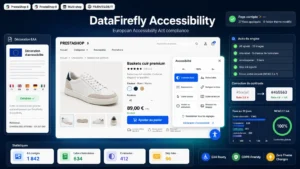 EAA Accessibility: Widget & Automatic WCAG FixesEAA compliance without a theme rebuild€79.00
A one-day audit method
A full audit is a project. A first assessment fits in one day and is enough to know where you stand.
Morning: automated tests. Run an analysis tool on five typical pages, home, category, product page, cart, checkout. Automated tools detect roughly a third of the criteria, essentially contrast, missing alternatives and form labels. It is little, but it is the biggest third by volume.
Early afternoon: the keyboard test. Unplug the mouse and place a complete order using only the tab and enter keys. This exercise, which takes twenty minutes, reveals more blocking problems than any tool.
Late afternoon: the screen-reader test. Turn on your system’s screen reader and go through a product page. The goal is not to fix everything but to observe: if the price, the availability and the buy button are not announced correctly, you know where to start.
At the end of this day, you have a prioritised list and a realistic idea of the remaining effort.
What a widget can do, and what it cannot
A necessary point of honesty, because the market cultivates confusion.
An accessibility overlay effectively handles a subset of criteria: contrast fixes, adding missing labels, restoring visible focus, comfort options such as text enlargement or line spacing. Of the twelve blockers listed above, it properly covers four to six.
It cannot repair an inconsistent heading structure, make a component keyboard-navigable when it is not, write relevant alt texts, or subtitle a video. No automated tool makes a site compliant, and presenting an overlay as full compliance is an argument to dismiss.
What it really brings: an immediate gain on the most numerous anomalies, while the in-depth remediation is planned on the theme.
The accessibility statement
An often ignored obligation: the entities concerned must publish a statement describing the compliance state of the service, the non-accessible content with its justification, and a contact channel to report a problem.
An honest statement mentioning partial compliance is better than no statement, and better than a full-compliance statement disproved by the first test.
Where to start
In order: contrast, which is massive and easy; the form labels of the checkout funnel, because an unusable funnel makes the service inaccessible in the strict sense; keyboard focus; then the alt texts of product images, a long but splittable job.
The EAA Accessibility module for PrestaShop acts on PrestaShop 8 and 9: automatic fixes for contrast, labels and focus, user comfort options, and a report of detected anomalies to scope the remediation left to do on the theme.