

On a shop distributing forty or a hundred brands, the page that lists them all is often a text list relegated to the footer. It is nonetheless a natural entry point: a visitor who knows their brand wants to go straight there, without going through the product tree.
This article covers the directory page. Optimising individual brand pages is a separate, complementary piece of work.
What a directory page is for
Three distinct functions, and they are not equally valuable.
Direct navigation. A customer loyal to a brand wants to find it in two clicks. On a catalogue of spare parts, tools or cosmetics, that is a major use.
Internal linking. The directory is the only page that links to all your brand pages. Without it, secondary brands have no incoming link outside product pages.
The range-breadth signal. Showing sixty recognised brand logos reassures visitors about the seriousness of the shop, particularly on a site they do not know.
The third function is the one people mention first and the one that counts least. The first two justify the page on their own.
The structure of the page
Four blocks, in this order.
A search field at the top, filtering instantly as the visitor types. Above thirty brands, that is their first reflex.
An alphabetical bar for jumping to a letter. It must grey out letters with no matching brand rather than showing them as clickable.
The list by letter, with a heading per section. Each brand appears with its name, and its logo if you have one for all of them.
A block of featured brands, optionally, placed above the alphabetical list. It serves your commercial priorities without breaking exhaustiveness.
Consistency point: either every brand has a logo, or none does. A list where a third of the entries show an image and the rest plain text looks unfinished.
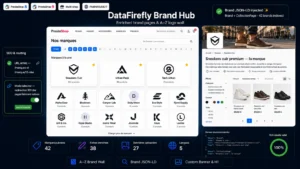 Brand Pages SEO — A–Z Brand WallYour brands deserve better than a manufacturer list€79.00
Instant search
Three requirements for it to be useful.
Filtering happens in the browser, on the already loaded list. A server request on every keystroke is pointless on a list of a hundred entries and adds latency.
The search tolerates variations: accents, hyphens, spaces. A brand written with a hyphen must be findable by typing the name without one.
The search also covers aliases. Some brands are known under several names, or by an abbreviation. A synonyms field per brand settles this and avoids fruitless searches.
Plan an explicit message when no brand matches, with a link to general product search: the visitor may be looking for a product rather than a brand.
Indexing the directory page
A frequent question, and the answer depends on what you make of it.
A directory page that is nothing but a list of links has little value of its own for search engines. It stays useful for linking, but it will not rank on any query.
Two additions make it indexable with real interest. An introduction explaining what your selection of brands represents, your positioning, your partnerships. And information per brand beyond the name alone: number of references available, speciality in three words.
Without those elements, leave the page indexable but expect nothing direct from it. Its value stays in the linking.
Linking to brand pages
That is the main function, and it rests on two technical conditions.
The links must be real links in the HTML, not clickable elements driven by script. A list built in JavaScript after loading passes value poorly.
The page must be reachable from the main menu, not only from the footer. A directory page four clicks from the home page does not fulfil its distribution role.
A third point, often forgotten: the return link. Each brand page must link back to the directory, which creates a circuit and lets the visitor move from one brand to another.
Brands with no products
A systematic situation on a live catalogue: a brand whose products are all out of stock or withdrawn.
Three treatments, depending on the case.
If the shortage is temporary, keep the brand in the directory with a restocking note, and leave its page accessible with an alert form.
If the brand is permanently dropped, remove it from the directory and redirect its page to the replacement category or brand.
If you do not know yet, hide it from the directory but keep the page while you decide. A brand page with no products and no content is an empty page, and it must be dealt with within a reasonable time.
In every case, plan an automatic filter: a brand with no active product should not appear in the directory without an explicit decision.
Measuring
Three indicators.
The usage rate of the search field on the page. If it is high, your list is too long to be scanned and search is the real entry point.
The click-through rate to brand pages, which measures the directory’s effectiveness as a distribution point.
The distribution of clicks between brands. It often reveals a gap between the brands you promote and the ones your customers actually look for, which is directly actionable commercial information.
The SEO Brand Pages and Brand Wall module sets this up on PrestaShop 8 and 9: an A to Z directory with instant search tolerant of variations, an alphabetical bar, automatic filtering of brands with no active product, and linking to brand pages and from product pages.