
Everything you'd want to know before you install.
A detailed look at how Advent Calendar for PrestaShop 8 & 9: Daily Discount Codes works, why we built it the way we did, and the thinking behind the features above.
Why an advent calendar works
December accounts for a large share of the year's sales, and every competitor sends the same newsletter. An advent calendar creates a daily appointment: customers come back each morning to discover their door, and every visit is a chance to buy. It is also a simple way to grow your email list, since taking part requires a sign-up with consent.
A polished calendar page, without touching your theme
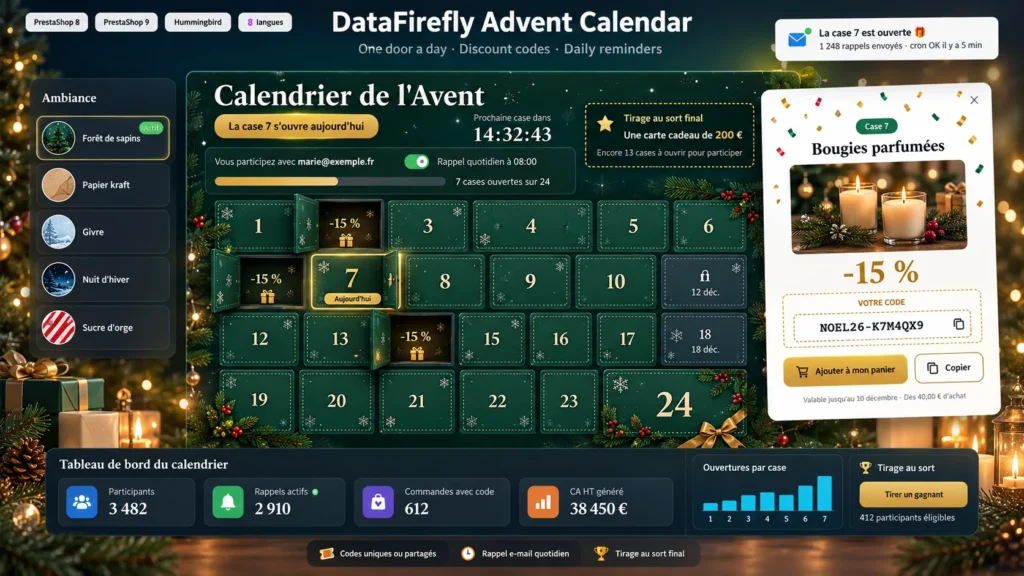
The module adds a dedicated page at an address you choose. Doors look like a cardboard calendar with die-cut edges and swing open in 3D. Today's door is ringed, a countdown announces the next one and past doors show their content. Five looks are ready to use, and custom colour mode follows your brand guidelines. The grid adapts to 6, 4 or 3 columns and always fills without gaps, even with doors of different sizes.
Every door can sell
A door can hold a simple message, a featured discount code, or a revealed product with its price and an add to cart button. Rewards cover percentage or fixed amount discounts, free shipping and free gift products, with a minimum order amount if needed. The code is added to the cart in one click, and if the cart is still empty it is kept and applied with the first product added.
Participants who stay until the 24th
Sign-up is by email with a consent checkbox covering the daily reminder, plus an optional newsletter checkbox. Every morning at the set hour, a short email announces today's door to participants who have not opened it yet. The unsubscribe link stops reminders in one click. To keep interest high until the end, you can offer a final prize drawn among those who opened a minimum number of doors; the draw is run from the dashboard and every result is logged.
Measure what each door brings in
The calendar dashboard shows participants, confirmations, active reminders and newsletter opt-ins, then, for each door, the number of openings, the orders placed with its code and the matching revenue excluding tax. Alerts flag a cron task that has stopped or doors left empty. To prepare the season, a ready-made plan fills empty doors, the day-by-day preview shows the calendar as customers will see it, and duplication saves you all the setup work the following year.


There are no reviews yet.