PrestaShop Checkout & Payment

Chilled & Dry Shipping for PrestaShop 8 & 9: Postcode Shipping Rates and Separate Cold Chain Parcels

One cart, one shipping fee, and the chilled goods travel in their own parcel.

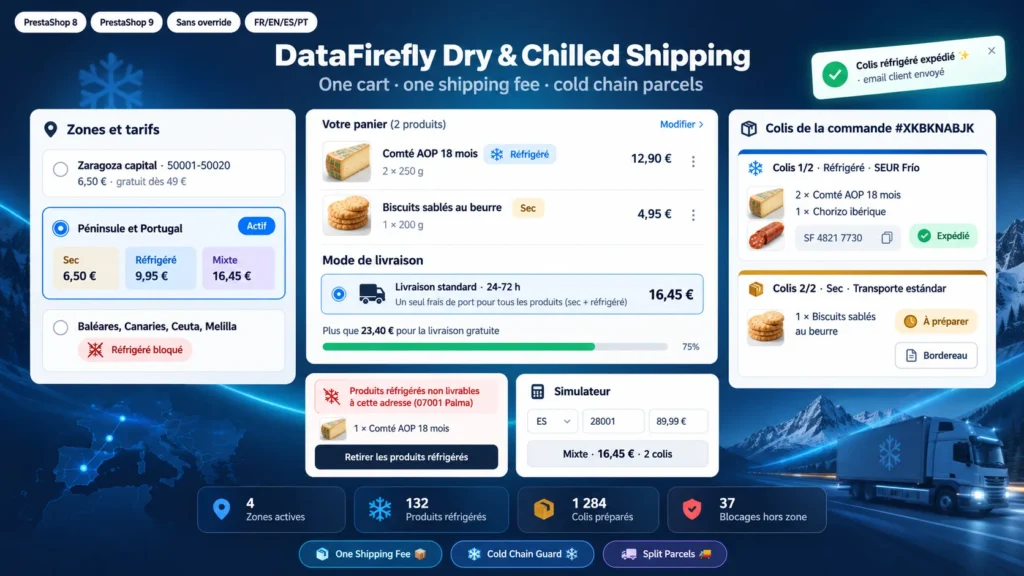
A cheese shop sells cheese and cured meats, which leave with a refrigerated carrier, and grocery items, which leave in a standard parcel. Without a module, you need two orders or the shipping fee is wrong. With this module, the customer pays one fee based on their postcode and what they buy, cannot order fresh goods to an island you do not serve, and after checkout you see two parcels to prepare, each with its own carrier and tracking number.

At a glance
  • One cart, one payment, one order and a single shipping fee
  • Rates per postcode zone: ambient only, chilled only or both, with a free shipping threshold
  • Chilled products blocked server side outside the zone, guest customers included
  • Order split into a chilled parcel and an ambient parcel, tracking and email per parcel
  • Simulator, setup diagnostics and a printable packing slip per parcel
PrestaShop 8 & 9 Cold chain Postcode rates No override
  • 30-day refund
  • 12 months updates
  • 24h support
www.datafirefly.com/en/
Chilled & Dry Shipping for PrestaShop 8 & 9: Postcode Shipping Rates and Separate Cold Chain Parcels
v1.0.2 · updated 2026-10-12
What it does

The short version.

01

One fee, based on what the cart contains

Each zone has three rates, tax included: ambient only, chilled only, ambient and chilled, plus a free shipping threshold. The customer sees one carrier and one fee, pays once, and PrestaShop creates one order. Prices are entered tax included and the displayed fee stays the same whatever the VAT rate of the country.

02

Fresh goods are never sold where they cannot arrive

For each zone you decide whether chilled products can be delivered. As soon as the address is known, the delivery options are removed server side when the cart holds chilled products for a zone outside the cold chain. Without a carrier the order cannot be paid, whatever checkout you use. The customer sees why and can remove those products in one click.

03

Guest customers are warned before checkout

A notice appears on chilled product pages. In the cart, a postcode checker tells the customer straight away whether chilled goods can be delivered and what shipping will cost. The postcode typed there is also used to estimate shipping before the address is entered.

04

Two parcels, two carriers, one clear view for the customer

When the order is placed it is split into a chilled parcel and an ambient parcel, or kept as one shipment for local delivery zones. The order page shows each parcel with its products, carrier, tracking number and status. The customer gets one email per parcel and sees the parcels in their order history.

The long version

Everything you'd want to know before you install.

A detailed look at how Chilled & Dry Shipping for PrestaShop 8 & 9: Postcode Shipping Rates and Separate Cold Chain Parcels works, why we built it the way we did, and the thinking behind the features above.

§ 01

Why PrestaShop cannot sell ambient and chilled goods together

PrestaShop calculates shipping per carrier, by weight or by price. It does not know that a cheese travels with a refrigerated carrier and a box of biscuits in a standard parcel. The usual workarounds force two orders, or restrict products to carriers, which splits the cart into several orders with two shipping payments. This module keeps one cart and calculates one fee that reflects what the customer buys.

§ 02

Zones that follow your real rates

A zone combines countries and postcodes. A city can have local delivery with a low free shipping threshold, the mainland a rate per content type, and the islands a rate for ambient goods only. Zones are read by priority: the first one matching the country and postcode applies. The simulator shows the result for any destination before you go live.

§ 03

A block that holds even with a one page checkout

The check does not rely on the browser. When the cart holds chilled products and the delivery address is outside the cold chain, the module removes the delivery options from the list PrestaShop builds for every checkout. Without a delivery option no payment can go through. The customer message is shown through the native checkout hook and injected into one page checkouts that reload their carriers with AJAX.

§ 04

After the order, each parcel has its own life

The chilled parcel leaves with your refrigerated carrier, the ambient parcel with your usual carrier. Each parcel has its printable packing slip, tracking number and status. When you mark it as shipped, the customer receives an email with the parcel contents and the tracking link. The module does not create labels: you print them with your carriers as you do today, and the module tells you what goes in each box.
€99.00
One-time · 12 months updates
Read the docs
  • Unlimited dev & staging installs
  • Source code included
  • 30-day refund
  • 24h support · EN / FR
5.0/5 19 reviews