
Everything you'd want to know before you install.
A detailed look at how Notification Center works, why we built it the way we did, and the thinking behind the features above.
§ 01
A bell your customers already know
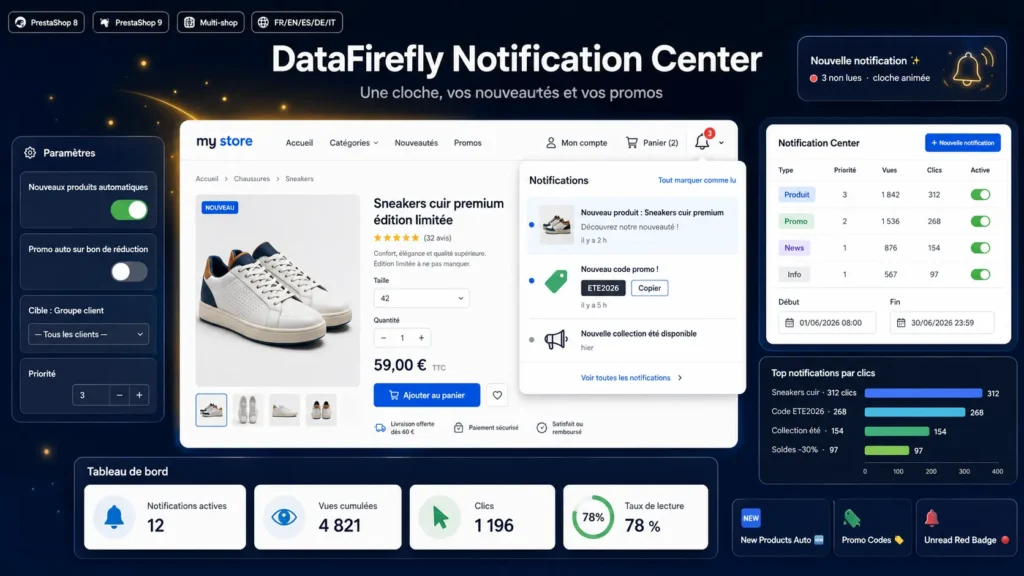
The notification-bell reflex is something your visitors have on every social network. This module brings it into your PrestaShop header, right next to the cart. A red badge flags unread messages and naturally invites a click — no intrusive pop-up, no banner getting in the way.
§ 02
Your new arrivals sell themselves
Every time a product is published, a notification appears automatically in the bell, with the cover image and a link to the product page. The image and link are recomputed at display time: even if you edit the product later, the notification stays correct. You can limit it to active products and set an automatic lifetime.
§ 03
Promo codes that reach the cart
Create a promo-type notification, enter your code, and it shows up on the customer side with a Copy button. One click, the code is in the clipboard, the customer goes back to the cart. Optionally, a promo notification can be created automatically as soon as you publish a new cart rule.
§ 04
You stay in control
Each notification can be scheduled (start and end dates), targeted at a customer group, prioritised and switched off in one click. View and click counters tell you what works. Bell sound and animation can be enabled to match your style.
§ 05
Built for PrestaShop 8 and 9
Native code, no override, compatible with PrestaShop 8 and 9. Multilingual and multistore out of the box, shipped with all five languages FR, EN, ES, DE, IT. Simple install and clear configuration from the back office.



There are no reviews yet.