
Everything you'd want to know before you install.
A detailed look at how Bidirectional Google Sheets Sync — Edit prices, stock & titles in a Sheet, auto-sync to PrestaShop (PrestaShop 8 & 9) works, why we built it the way we did, and the thinking behind the features above.
Your PrestaShop catalog, driven from a Google Sheet
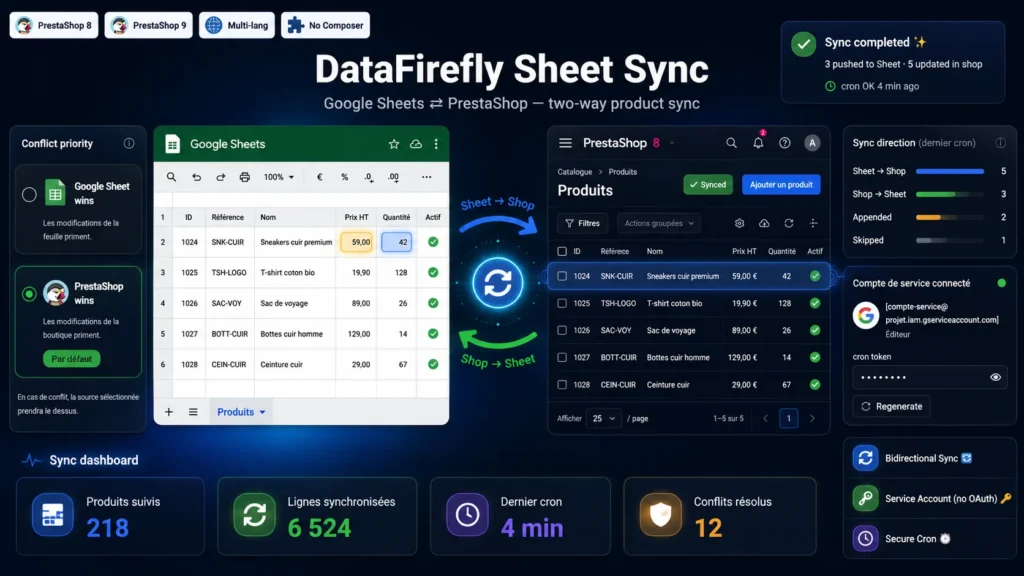
Editing a price, adjusting stock or fixing a product title shouldn't force an entire team through the back office. This module exposes your products — title, price excluding tax, stock quantity and active/inactive status — in a shared six-column Google Sheet. Everyone edits in the spreadsheet they already know, many hands at once, and the module takes care of pushing the changes into PrestaShop. The Sheet becomes a real bulk-editing interface, accessible without an administrator account.
Truly two-way synchronization
Most connectors only go one way. This one works both ways: a change entered in the Sheet flows down to the shop, and a change made in the PrestaShop back office flows back up into the Sheet automatically. The spreadsheet and the shop stay a permanent reflection of each other, with no manual re-import and no CSV file to regenerate. You work wherever is most convenient at the moment.
Smart: it only touches what moved
On every synchronization, the module compares each product's current state to the fingerprint of its last synchronized state, stored in the database. It figures out exactly what changed, and on which side, then writes only those rows — in the right direction. On a catalog of several thousand references, this avoids rewriting everything on each run and keeps syncs fast. Writes to Google are also batched to respect the API quotas.
Conflicts, handled cleanly
What happens if the same product has been edited on both sides since the last sync? Nothing is lost at random: you define a priority rule — the Google Sheet wins, or PrestaShop wins — and the module applies it systematically, logging the decision. You keep control over the source of truth, product by product and run by run.
Friction-free setup in minutes
No OAuth flow or Google consent screen to get through. You create a service account in the Google Cloud console, paste its JSON key into the module configuration, and share your sheet with the service account e-mail address as an editor. The module signs its own requests to the Google Sheets API (JWT RS256 in native PHP), with no Composer library to install on your server. A status panel shows the connected account, the cron URL and the last synchronization date.
Automatic, secure and predictable
A cron endpoint protected by a regenerable token triggers the synchronization every few minutes, via your server scheduler or an external service. You can also run a manual synchronization in one click from the configuration, or reset the sync state to start over with the shop as the reference. Data entered in the Sheet is validated before writing: an empty or invalid name, a negative price, and the offending row is simply skipped and logged — the synchronization of the other products is never interrupted. No core override, clean uninstall: the module meets the standards of a production shop.


There are no reviews yet.