
Everything you'd want to know before you install.
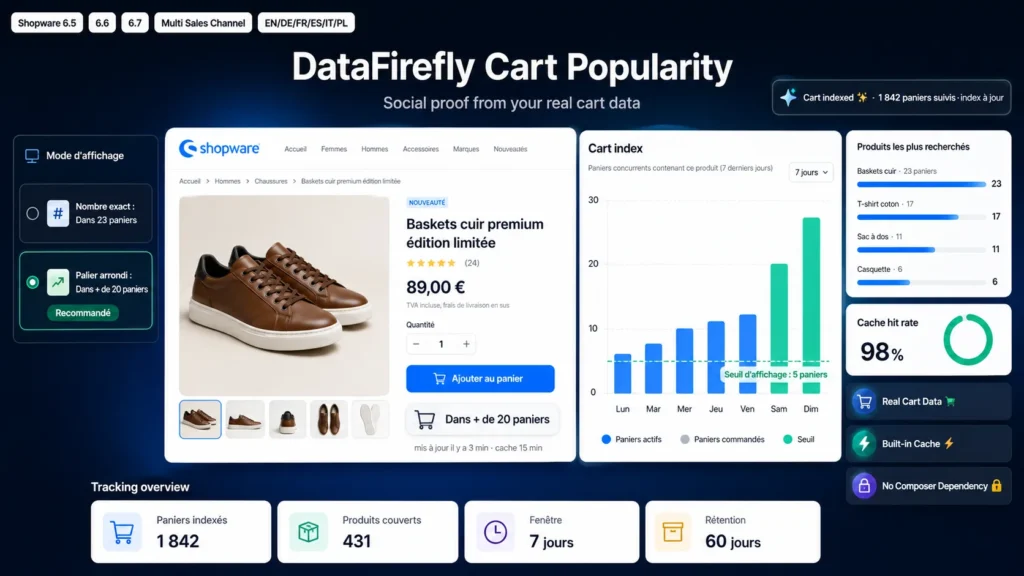
A detailed look at how Cart Counter for Shopware 6: social proof badge "In more than 20 carts" on the product page works, why we built it the way we did, and the thinking behind the features above.
Why this module does not exist natively on Shopware
On PrestaShop, counting the carts that contain a product is a join on the cart line table. On Shopware that table does not exist: the whole cart is serialized into a payload column of the cart table, often compressed. A SQL query therefore cannot know what a cart contains without deserializing it, and deserializing several thousand carts on every product page view is not an option. That is why this kind of social proof is common on PrestaShop and rare on Shopware.
The solution: an index fed by events
The plugin creates a df_cart_popularity table mapping a cart token, a product id, a sales channel, a quantity and an ordered flag. That index is updated on every cart persistence through CartSavedEvent: added products, changed quantities, removed lines, everything is synchronized in two queries. Counting then becomes a plain COUNT DISTINCT over a composite index, executed once per cache lifetime and per product. The overhead on the cart side is about two indexed queries per change, invisible in a performance profile.
Two ways to display the number
Tier mode rounds the counter down using the step you define, for an "In more than 20 carts" effect that stays credible and moves by brackets. Exact mode shows the real figure for shops that prefer full transparency, with a singular variant handled automatically. All three wordings live in Shopware snippets and are edited per language from the administration, with no code change and a dynamic placeholder for the number.
An honest, configurable count
The time window limits counting to recently updated carts, which avoids piling up ghost carts several months old. The active carts only option excludes carts already turned into orders, detected through CartConvertedEvent. Sales channel scoping prevents a spike on your German shop from inflating the counter on the French one. Each of these options can be overridden channel by channel from the plugin configuration.
6.5 to 6.7 compatibility with no compromise
The template extends the outer block of the buy widget only and calls its parent, which makes it immune to the inner block renamings that happened between 6.5 and 6.7 and compatible with themes that customise the buy box. Retention housekeeping runs without a scheduled task or message queue, because the task handler signature changed between 6.5 and 6.6: it runs at most once an hour, or on demand through the CLI command. The display struct is attached both to the product entity and to the page, which covers rendering through the Shopping Experiences buy box element as well as the quick view.
DataFirefly standards
Plugin developed with no Composer dependency, server side rendering, no external JavaScript library, no outbound network call. A single table created, dropped on uninstall when you choose not to keep the data. No personal data recorded: the index only holds the pseudonymous cart token and the product reference, with a configurable retention. Unobfuscated PHP and Twig source code, perpetual licence, 12 months of updates included.

There are no reviews yet.