Shopware Marketing & Promotions

Shopware 6 Loyalty Program — Points, Tiers & Reward Vouchers

Points, tiers and native reward vouchers for Shopware 6

Turn every order into a repeat purchase. Your customers earn points, climb tiers and convert them into discount vouchers — all backed by Shopware's native promotion system, with no external service and no subscription.

At a glance
  • Automatic points on every paid or completed order
  • 3 configurable tiers with point multipliers
  • Conversion into vouchers through native Shopware promotions
  • Full customer account page with history, in 5 languages
  • Compatible with Shopware 6.5, 6.6 and 6.7 — ZIP install, no build
Shopware 6.5 → 6.7 No build step Storefront ×5 languages Native promotions
  • 30-day refund
  • 12 months updates
  • 24h support
www.datafirefly.com/en/
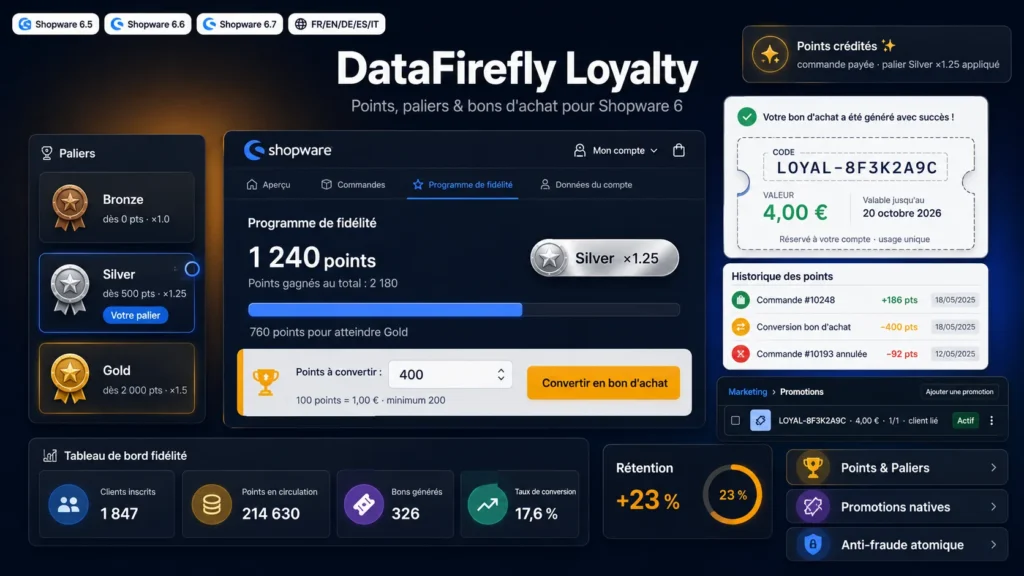
Shopware 6 loyalty programme with points, tiers and vouchers
v1.0.0 · updated 2026-07-22
What it does

The short version.

01

Automatic points

Awarding triggered on payment or order completion, your choice. Configurable rate per currency unit, gross or net basis, shipping included or excluded. Each order is credited exactly once, even if the state event fires multiple times.

02

Tiers and multipliers

Three fully configurable tiers (name, threshold, multiplier) computed from lifetime earned points. Defaults: Bronze ×1, Silver ×1.25 from 500 points, Gold ×1.5 from 2000 points. The multiplier boosts all future earnings.

03

100% native vouchers

Redemption creates a standard Shopware promotion: unique code, bound to the customer, single use, fixed cart discount, configurable validity period. Visible and manageable under Marketing, Promotions — no parallel discount mechanics.

04

Fraud-proof by design

Atomic point debit at database level: double-spending is impossible, even with simultaneous requests. Append-only transaction ledger, voucher creation and ledger write in the same SQL transaction.

05

Automatic revocation

Order cancelled or payment refunded: the points earned on that order are automatically revoked, exactly once, with a trace in the customer's history.

06

Integrated account area

Dedicated page in the customer account: balance, tier with progress bar, redemption form and history of the last 50 operations. Menu entry added to the account sidebar. FR, EN, DE, ES, IT translations included.

The long version

Everything you'd want to know before you install.

A detailed look at how Shopware 6 Loyalty Program — Points, Tiers & Reward Vouchers works, why we built it the way we did, and the thinking behind the features above.

§ 01

A loyalty program, not a gimmick

Shopware 6 ships with no native loyalty program. This extension fills that gap with a serious transactional approach: every point earned, redeemed or revoked is written to an append-only ledger attached to the customer's loyalty account. You always know where every point came from and where it went.

§ 02

Points that follow your business logic

You choose when points are awarded (payment captured or order completed), the calculation basis (gross or net, with or without shipping) and the point rate. Tiers reward your best customers with a permanent multiplier: a Gold customer earns 50% more points on every order — a direct incentive to concentrate their purchases with you.

§ 03

Redemption relies on Shopware promotions

When a customer redeems points, the extension creates a native promotion: unique code, restricted to that customer, single use, with an expiry date you control. Your team finds it in the standard administration, and your accounting exports see it as any other discount. No parallel discount machinery to maintain.

§ 04

Built to survive edge cases

Double click on the redeem button, order events firing twice, refund after points were awarded: these scenarios are neutralised by design. The point debit is atomic at database level, and awarding and revocation are idempotent per order. No ghost points, no double spending.

§ 05

Installed in 2 minutes, on all three major branches

The extension contains no administration code to compile: all configuration goes through the standard extension settings, per sales channel. The same ZIP installs on Shopware 6.5, 6.6 and 6.7, via the command line or the administration.