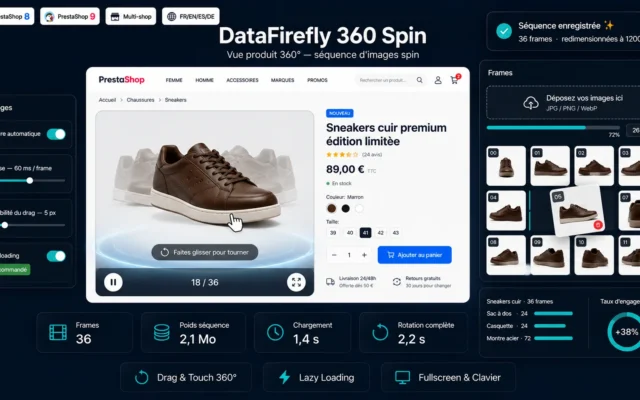
The 360 view has been presented for fifteen years as the answer to the return rate. The promise is overstated, but the effect exists on certain product families and is nil on others. Before photographing anything, you need to know which case you are in.
When it is worth it, and when it adds nothing
Three criteria determine the real value.
The shape of the product carries information. A handbag, a shoe, a piece of furniture, a mechanical part: rotation reveals details no still photo shows. A book, a cylindrical bottle, a garment laid flat: it reveals nothing.
Returns are expensive. On a 40 euro basket with a 6 euro return, the investment in the shoot does not pay for itself. On furniture or equipment, where a return runs into tens of euros, the calculation changes completely.
The product stays in the catalogue. A 360 sequence represents half an hour to an hour of shooting and processing per reference. On a catalogue renewed each season, the cost is prohibitive. On a permanent catalogue, it amortises.
The practical conclusion: never do the whole catalogue. Take the twenty to fifty references that generate the most revenue and the most returns, and stop there.
The shoot
A 360 sequence is a series of still images, not a video. The number of images determines the smoothness.
24 images, one shot every 15 degrees. Jerky rotation, acceptable on simple shapes. This is the usable minimum.
36 images, every 10 degrees. The right compromise for most products.
72 images, every 5 degrees. Reserved for products with complex geometry, where every angle counts. The weight doubles, for a limited perceptual gain.
Three technical constraints to respect, or you end up with an unusable sequence.
The lighting must stay strictly identical throughout the rotation. A turntable with fixed lighting gives that result. Moving the camera around the product never does.
The centre of rotation must be stable. A product badly centred on the turntable produces a very noticeable wobble.
The framing must be constant, with focus and zoom locked. Autofocus that resets between two images produces flickering.
 360° Product View PrestaShop — Spin Viewer from Image SequenceInteractive 360° product view from an image sequence: mouse and touch drag rotation, autoplay, fullscreen and lazy loading.€79.00
Weight, which is the real subject
This is the point that makes most 360 integrations fail.
Thirty-six images at 1200 pixels wide, properly compressed as WebP, represent between 1.5 and 3 megabytes. Loaded when the page renders, they destroy the display time of the product page and the performance score that goes with it.
Four rules, in order.
Load nothing before interaction. The page shows the classic main image. The sequence only loads when the rotation button is clicked. This is the most important rule, and the one that settles 90 % of the problem.
Load in stages. Twelve images first, which allows immediate rotation even if it is coarse, then the remaining twenty-four in the background.
Serve WebP or AVIF, with a JPEG fallback. The gain on a full sequence is in the order of 30 to 50 % against JPEG.
Limit the resolution to what is displayed. A viewer 600 pixels wide does not need images at 2400. Zoom, if it exists, should draw from a separate set and on demand.
Integrating with the existing gallery
Two approaches, with different consequences for the experience.
The 360 as an extra thumbnail in the gallery, with a rotation icon. The visitor discovers it while browsing the images. Discreet integration, low adoption: a minority of visitors click.
The 360 as the default view, with the still photos secondary. Much better adoption, but it forces you to load the sequence at render or to show a convincing first static image in the meantime.
The intermediate solution that works best: the first image of the sequence serves as the main image of the page, with an explicit visual cue along the lines of “drag to rotate”. The visitor understands the interaction without a single extra image having been loaded.
A point of caution on variants: if the product exists in five colours, you need five sequences, so five times the shooting cost. Many stores only handle the main colour, which is a defensible choice provided you say so.
Touch behaviour
On mobile, rotation happens by dragging a finger, which conflicts directly with vertical page scrolling.
Three rules to avoid the classic trap of the visitor stuck on the product page.
A horizontal drag rotates, a vertical drag scrolls the page. Direction detection must happen over the first twenty pixels of the gesture, then lock.
A permanent rotation indicator, not only on first load. Without it, most mobile visitors never discover the feature.
An obvious exit to full screen, where the gesture conflict disappears.
Measuring the real effect
The return rate is the indicator that justifies the investment, but it is slow and noisy. Three intermediate measures give a faster signal.
The interaction rate with the viewer, as an event. If fewer than 10 % of visitors to the page rotate the product, the problem is first a visibility problem for the feature, not a quality problem with the sequence.
The time spent on the page for visitors who interacted, compared with the others.
The add-to-cart rate on equipped pages, compared with a control group of comparable pages without it. That is the only comparison worth anything, and it requires not equipping the whole catalogue at once.
On the return rate itself, allow at least a quarter of hindsight and sufficient volume. A two-point difference over thirty orders means nothing.
For the still-image counterpart, the article on HD zoom covers the other frequent need on detailed pages, that of material and finish.
The 360 Product View module for PrestaShop handles this chain on PrestaShop 8 and 9: importing a sequence per product or per variant, deferred and staged loading, automatic WebP conversion, gesture direction detection on touch and full-screen mode.