
Everything you'd want to know before you install.
A detailed look at how PrestaShop Buying Guide Module 8 & 9: "Which Product to Choose" Pages Built from Your Catalog works, why we built it the way we did, and the thinking behind the features above.
Why buying guides belong on a shop
Searches such as "which robot vacuum to choose", "best drill for beginners" or "which mattress for back pain" come from customers who have decided to buy but not yet what. Category pages do not answer them, and a hand-written blog post ages fast: the recommended product goes out of stock, another one drops in price, and the page becomes wrong without anyone noticing.
A ranking calculated on your features
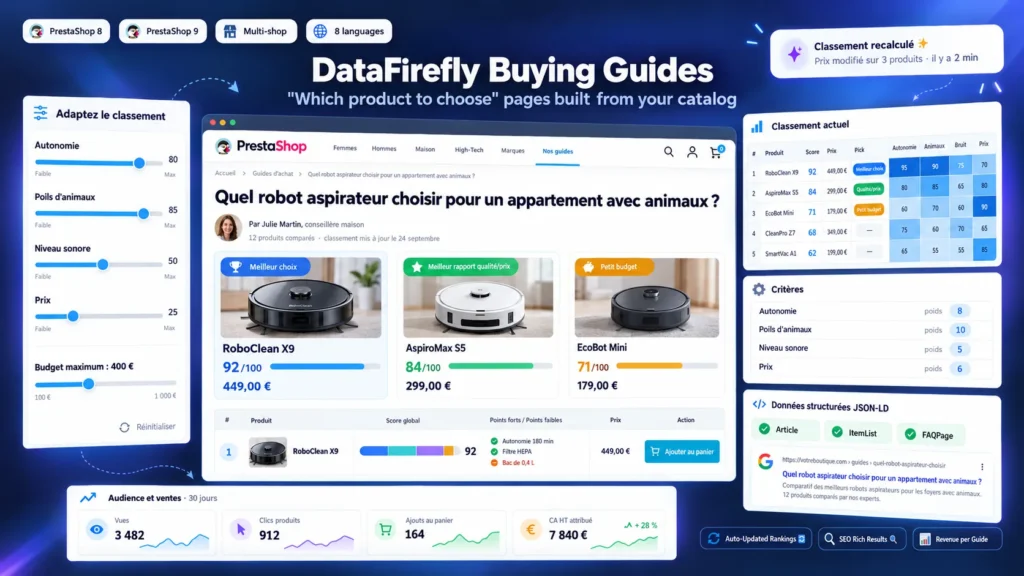
For each guide, you choose the categories compared, an optional price range, then the criteria. A "values" criterion gives points to each value of a feature, a "numeric" criterion compares the numbers read in the values (battery life, power, weight), and price, sales and date added complete the picture. Scores are brought back to 100 and weighted by the importance you give to each criterion. The back office preview shows the ranking and the score of each product on each criterion before publication.
What the visitor sees
The page starts with your introduction and the number of products compared, then the three picks with the reason for each. The numbered ranking shows, for each product, its score, the share of each criterion, its strengths and points to consider, with the price and the cart button. Then come the comparison table, a "How to choose" section per criterion based on the figures of your catalog, your conclusion and a FAQ. The visitor can also set the importance of the criteria and a budget: the ranking reorders in the page.
SEO
Each guide has its own URL, meta title, meta description, canonical and hreflang. Article, ItemList and FAQPage structured data are generated, with the author when filled in. Guides are added to the sitemap of the gsitemap module with their last modification date, which matches the last real change of recommendation. The related categories show a link to their guides, which creates internal links in both directions.
Measure what each guide brings in
The module counts views (one per visitor and per day, bots excluded), clicks to products and add to cart clicks. A product clicked from a guide is remembered for 30 days: if it is ordered, the order and the revenue excluding tax of that product are attributed to the guide, including when the payment is confirmed by a webhook. You see which guides deserve more work and which ones bring nothing.

There are no reviews yet.