PrestaShop Catalogue Management

Sell Refurbished Products on PrestaShop 8 & 9: Condition Grades, Serial Numbers and Unique Items

Every device has its sheet, every grade its price, and the stock follows what is really on the shelf.

A refurbisher has 40 smartphones of the same model, each with its own condition, battery and scratches. Without a module, they create one combination per device or describe everything in the product text, and the stock never matches the devices on the shelf. With this module, each device is a unit with its serial number and photos, the stock of each grade is calculated automatically, and the customer chooses a grade or the exact piece they will receive.

At a glance
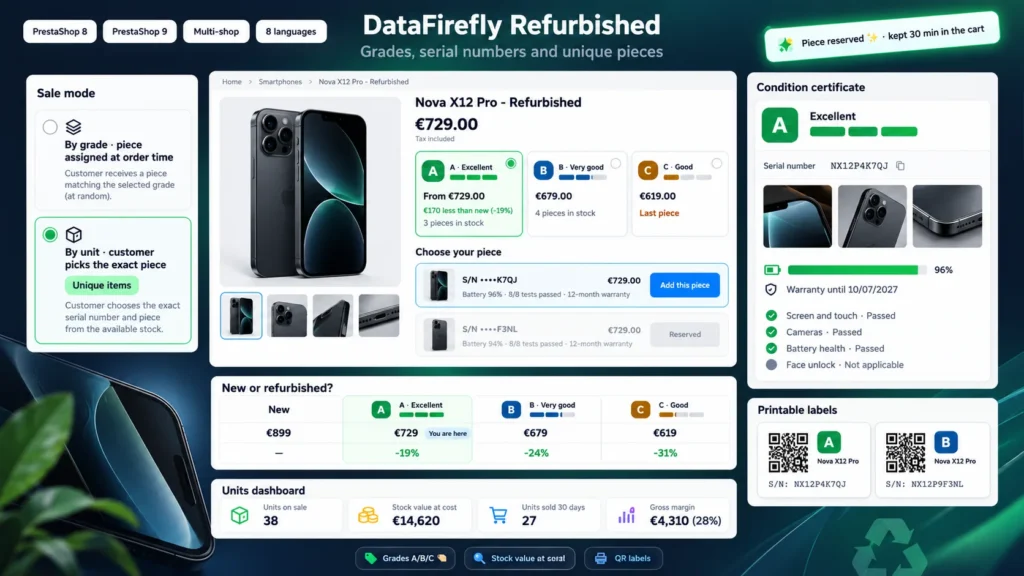
  • Grades A, B, C (and more) carried by native combinations: cart, order, invoice and stock stay native
  • One sheet per serial number: photos, battery health, test checklist, notes, history
  • Stock of each grade equals the number of available units, piece reserved in the cart
  • Sell by grade or by piece, with an own price per piece for unique items
  • New vs refurbished comparison, condition certificate for the buyer, QR labels and margin tracking
PrestaShop 8 & 9 Serial numbers Unique items 8 languages
  • 30-day refund
  • 12 months updates
  • 24h support
www.datafirefly.com/en/
Sell Refurbished Products on PrestaShop 8 & 9: Condition Grades, Serial Numbers and Unique Items
v1.2.1 · updated 2026-10-07
What it does

The short version.

01

Grades that stay native

Each grade is an attribute value of a group created at installation. A product becomes "128 GB Black, grade A", "128 GB Black, grade B" and so on. Cart, order, invoice, credit slips and feed modules see ordinary PrestaShop combinations. One button creates the grade combinations and another applies prices (percentage per grade or amount per product).

02

One sheet per device

Each unit has its serial number, photos, battery health, warranty, refurbishment date, a test checklist (OK, defect, not applicable) and public notes. Cost price, origin and internal notes stay in the back office. Every change is written to the unit history.

03

The customer picks a grade or a piece

In grade mode, the customer picks A, B or C and the piece is assigned at order time. In unit mode, they see every available device with photo, battery and tests, and add to the cart the one they will receive. The piece is reserved for them for 30 minutes and can have its own price.

04

New and refurbished side by side

Link the refurbished product to its new equivalent: the page shows the saving on each grade and a comparison table of price, condition, warranty and availability. On the new product page, a box offers the refurbished option from the cheapest grade.

The long version

Everything you'd want to know before you install.

A detailed look at how Sell Refurbished Products on PrestaShop 8 & 9: Condition Grades, Serial Numbers and Unique Items works, why we built it the way we did, and the thinking behind the features above.

§ 01

Why PrestaShop alone is not enough for refurbished goods

PrestaShop knows the "refurbished" condition of a product, but not the condition of each device. A refurbisher sells pieces that each have a serial number, a battery, scratches and a history. This module adds that unit level without leaving the native model: grades are combinations, and each grade combination has a stock equal to the number of available devices.

§ 02

Grades, prices and stock

Grades A, B and C are created at installation with their color, description and default price impact (0, -10 and -20%). You can add more, rename them in each language or deactivate them. On each product, one button creates the grade combinations from the existing combinations (capacity, color) and another applies prices. Stock is no longer typed by hand: it follows the units.

§ 03

Selling by grade or by piece

For a catalog of comparable devices, grade mode is enough: the customer chooses a condition and the unit is assigned when the order is validated. For unique pieces, unit mode shows each device with its photos and tests; the customer adds the exact piece to the cart, it is reserved for them, and it can have its own price. The serial number is added to the order line and the invoice.

§ 04

Buyer confidence

Each unit has a public sheet with photos, battery and checklist, with the serial number masked. In their account, the buyer finds a condition certificate with the full number and the warranty end date, which they can print. The guide window explains what each grade means and which checks are made on every device.

§ 05

Day-to-day in the workshop

Units are added one by one (the serial number field accepts a barcode scanner) or by CSV import. The list shows the photo, grade, status and own price, with bulk actions. The dashboard gives the stock value at cost price, the average age of the stock, devices on sale for more than 60 days and the gross margin of the last 30 days. QR labels print on standard A4 sheets.