
Everything you'd want to know before you install.
A detailed look at how Catalog Mode & Dealer Locator for PrestaShop 8 & 9 (Where to Buy) works, why we built it the way we did, and the thinking behind the features above.
For brands that sell through their network
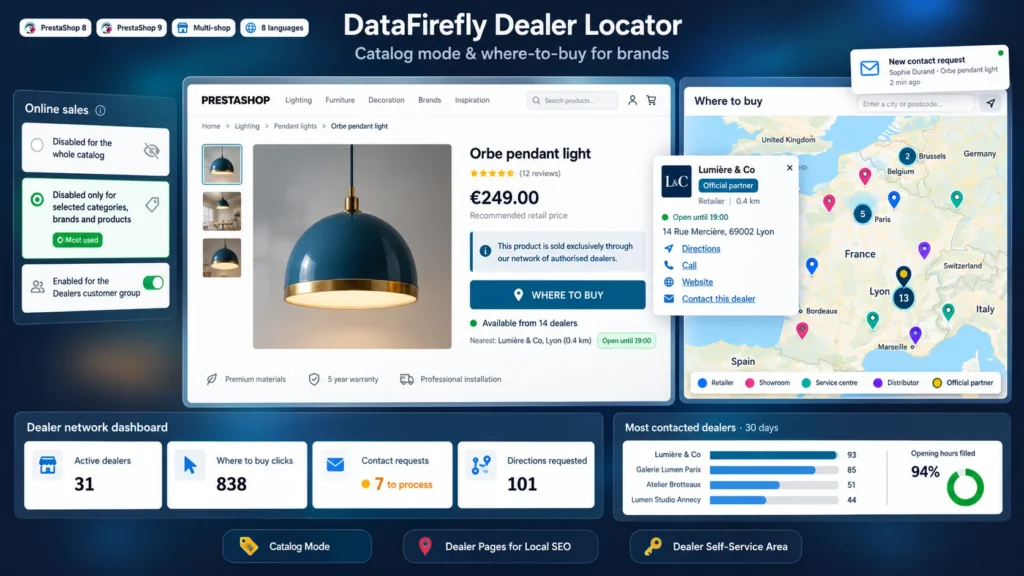
Manufacturers, furniture, lighting, tool or cosmetics brands: your site presents the collection, but sales happen at your dealers. The native PrestaShop catalog mode hides the cart without telling visitors where to buy. This module fills that gap: it disables online sales where you decide and turns every product page into an entry point to your network.
A precise catalog mode, without side effects
Disable sales on the whole catalog, on a selection of categories, brands and products, or on everything except that selection. Customer groups you exempt, such as a Dealers group, keep ordering their stock online. Prices stay visible with a Recommended retail price label, or are hidden. The cart is blocked server side and the native PrestaShop setting is never changed.
A Where to buy button that leads to the right shop
On the product page, the button opens a map of the dealers carrying that exact product, sorted by distance from the city typed or the visitor position. Each result shows the distance, the Open now badge, directions, call, website and a contact form. Online shops are listed apart with a direct link to the product on their site, built from the reference, the EAN13 or the name.
A directory that also works for your local SEO
The public directory lists your dealers by country in an index Google can read, and each dealer has a dedicated page: address, map, weekly opening hours, description, contact and nearby dealers, with Store structured data and schema.org opening hours. URLs are rewritten in each language, redirected with a 301 when the name or city change, and added to the Google sitemap.
A network that is easy to maintain
Import your dealers from CSV, place them on the map in one click with batch geocoding, and adjust a position by dragging the marker. For opening hours, delegate: each dealer linked to a customer account updates its information from My account, reads its contact requests and follows its statistics. You keep control over the address, the position and the range carried.
There are no reviews yet.