
Everything you'd want to know before you install.
A detailed look at how Real Profit & Margin Dashboard for WooCommerce works, why we built it the way we did, and the thinking behind the features above.
The problem WooCommerce does not solve
The WooCommerce dashboard shows your revenue, your order count and your average cart. But none of these numbers tells you whether you are actually making money. A 120-euro order can generate 30 euros of profit, or cost you 15 euros, depending on product cost, payment gateway fees, real shipping cost and the ad spend that brought the customer in. Most e-merchants steer their store by revenue and discover at quarter-end that the real margin is very different from what they thought.
An exact measurement, order by order
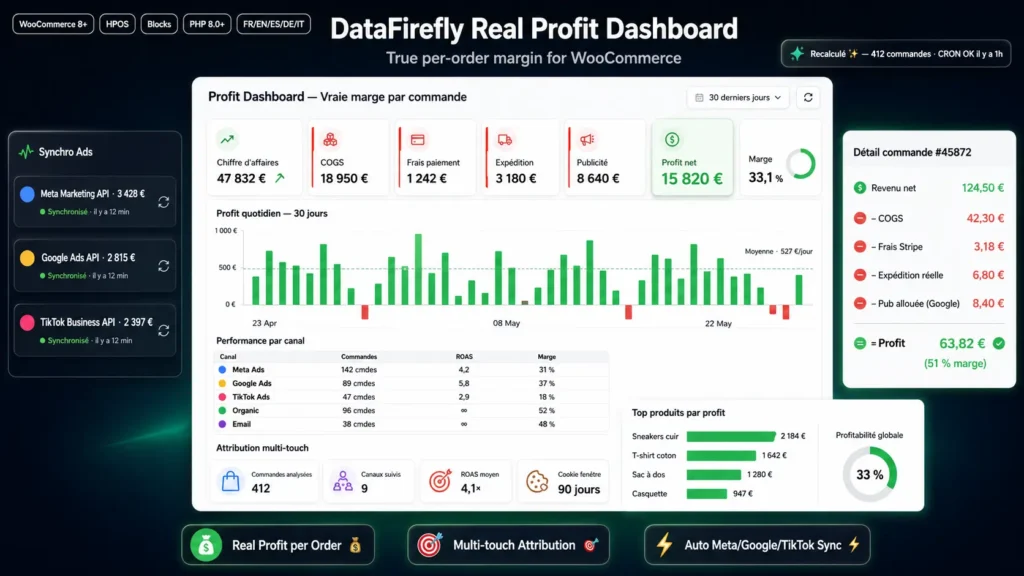
Real Profit Dashboard computes for every order: net revenue (excluding taxes and refunds depending on your setting), minus COGS for each line item (dedicated field, with variations), minus actual payment gateway fees (read from Stripe, PayPal Payments, Mollie or applied via your scheme), minus the real shipping cost (per zone or manually entered), minus an allocated share of the day's ad spend, minus any other costs. The result is stored in a dedicated table and recalculated automatically on every order update.
Three native ad integrations
The plugin connects directly to the Meta Marketing, Google Ads and TikTok Business APIs. Every hour, a CRON retrieves the spend of the last seven days, campaign by campaign, and stores it in a dedicated table. A multi-touch attribution model (first-touch and last-touch cookies over 90 days, with UTM and click identifier capture) ties each order to a channel. Ad spend is then allocated order by order, either by dividing the daily channel spend by the number of orders that day, or pro-rated by revenue.
A dashboard that reads itself
Seven key indicators at the top of the page: revenue, COGS, payment fees, shipping, advertising, net profit and margin. A daily profit bar chart, a per-channel performance table with ROAS and margin, and a top products list by revenue. Seven predefined ranges (today, seven days, thirty days, ninety days, month to date, year to date, custom) with a single dropdown change to compare.
Built for production
Compatible with WooCommerce High-Performance Order Storage (HPOS), Cart & Checkout Blocks, WooCommerce Subscriptions and WordPress Multisite. Three custom tables optimized for aggregation queries. REST API under /wp-json/dfrealprofit/v1/ to query metrics from Looker Studio or any third-party tool. Full sync log with error handling. Admin interface translated into five languages.

There are no reviews yet.