
Everything you'd want to know before you install.
A detailed look at how 30-Day Lowest Price for WooCommerce (Omnibus Directive Compliance) works, why we built it the way we did, and the thinking behind the features above.
What the Omnibus Directive actually requires
Since Directive 2019/2161 came into force, any announcement of a price reduction addressed to a consumer in the European Union must state the lowest price charged during the 30 days preceding the application of that reduction. The obligation covers product pages, category pages, banners and promotional campaigns, with no revenue threshold. National enforcement bodies act on inaccurate claims, and fines scale with turnover.
Why a rolling minimum is not compliant
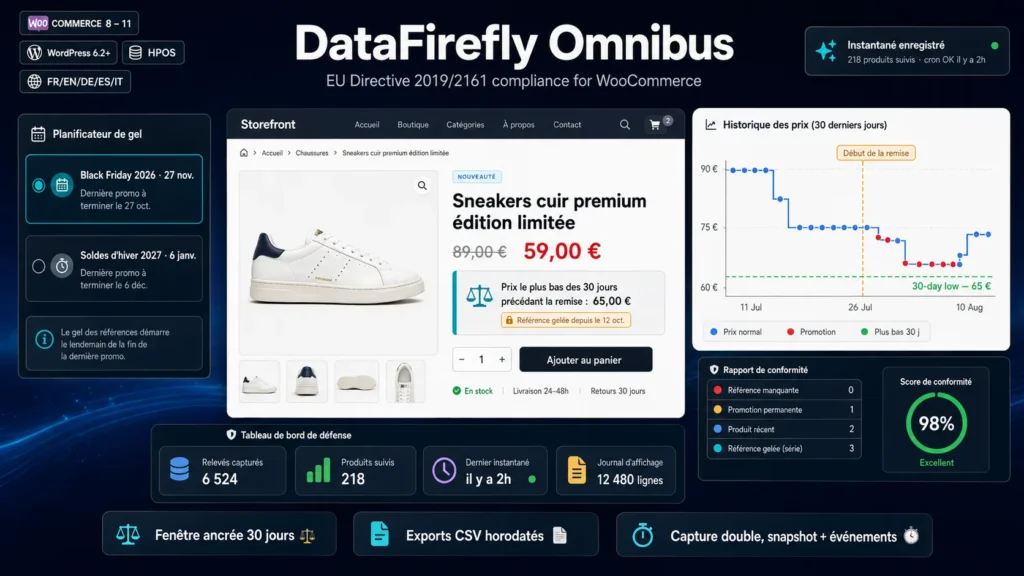
Most tools record a price history and display the minimum of the last 30 days counted from today. The text asks for something else: the window stops when the reduction begins. A rolling minimum gradually pulls the promotional price itself into the window, which drags the displayed reference down day after day and produces a claim that no longer matches anything. This plugin anchors the window at the start of the reduction and keeps it stable for the whole duration of the promotion.
Back-to-back reductions, the case everyone misses
A back to school discount followed by an autumn campaign, then Black Friday, forms a series of reductions. The reference to display remains the price charged before the first promotion of the series, otherwise each new discount compares itself to the previous one and the announced saving becomes artificial. The engine detects series, freezes the reference price, and shows the freeze date and the reason in the back office, with a series boundary set to 60 days by default and adjustable.
Automatic capture, from install and without intervention
Two mechanisms work in parallel. A scheduled daily snapshot walks the catalog and records the state of prices, with automatic catch-up when the last run is more than 24 hours old, which protects low-traffic stores where cron fires unreliably. Alongside it, event capture reacts to every real change: saving in the product editor, bulk edit, catalog import, start and end of scheduled sales. Duplicates are discarded, so one history row means one actual price change.
A defense panel, because compliance has to be proven
Displaying the right line is not enough if you cannot demonstrate what your visitors saw. Every served display is logged and aggregated by day, product and reference price. The defense dashboard gives compliance status product by product, and timestamped CSV exports are generated as a stream, without saturating memory, even on a large catalog. You end up with a dated file, ready to submit during an inspection or a customer complaint.
Freeze planner for your commercial peaks
A price increase too close to a commercial campaign sabotages the reference: the price recorded during the previous 30 days stays low, and the announced saving loses its appeal. The planner computes, for each event, the last date beyond which a price change becomes counterproductive, roughly a month before the campaign starts. You prepare Black Friday, seasonal sales and your own operations with a coherent price calendar instead of improvising the day before.
Light on the front end, restrained in the database
The reference price computation is cached, reads rely on composite indexes and nothing is written during display. The 30-day history chart is rendered by a vanilla JavaScript canvas of roughly 3 KB, with no external library, no CDN and no third-party cookie. The reference line is inserted under the price through standard WooCommerce hooks, and variable products recompute their reference when the visitor switches variation.
Install, early days and migrating existing data
Installation takes a few minutes: you upload the archive, the plugin creates its tables, schedules the daily snapshot and seeds history with the current state of the catalog. While history does not cover the required window, no reference line is displayed, and dedicated wording flags recently listed products. Install before your promotions rather than on the day itself. If price history already exists in another extension, the importer detects it from the table structure and migrates the data without creating duplicates.
Auditable code and a clear license
Code ships unencrypted, with a clean namespace, an in-house class loader and no production dependency to install. Admin actions are protected by security tokens and capability checks, queries are prepared, and no secret is hard coded. The license covers one production store and includes 12 months of updates. On uninstall, settings are removed but price history is kept by default, since it is your legal evidence, with an explicit purge option if you want everything erased.
There are no reviews yet.