WordPress WooCommerce

WooCommerce Deal of the Day: Automatic Daily Deals Rotation, Badge and Countdown

Daily deals that rotate by themselves following your rules, with a badge and a countdown on every product

  • 30-day refund
  • 12 months updates
  • 24h support

Set the number of products, the discount and the exclusions once: every day, new deals go live on time.

At a glance
  • Deals of the Day page created on activation (Gutenberg block or shortcode)
  • Automatic rotation every day, every X hours or every week, in the shop timezone
  • Fixed discount or random in steps, cap per unit, units per deal and maximum per order
  • Exclusion rules: categories, tags, brands, products, price, stock, running sales, new arrivals, cooldown
  • Badge and countdown on the product page and in listings, catalogue prices never modified
WooCommerce HPOS compatible Cart & Checkout blocks Block and classic themes EU Omnibus EN / FR
WooCommerce Deal of the Day: Automatic Daily Deals Rotation, Badge and Countdown
v1.0.0 · updated 2026-11-19
WooCommerce Deal of the Day: Automatic Daily Deals Rotation, Badge and Countdown €79.00
What it does

Overview WooCommerce Deal of the Day

01

Deals that change by themselves

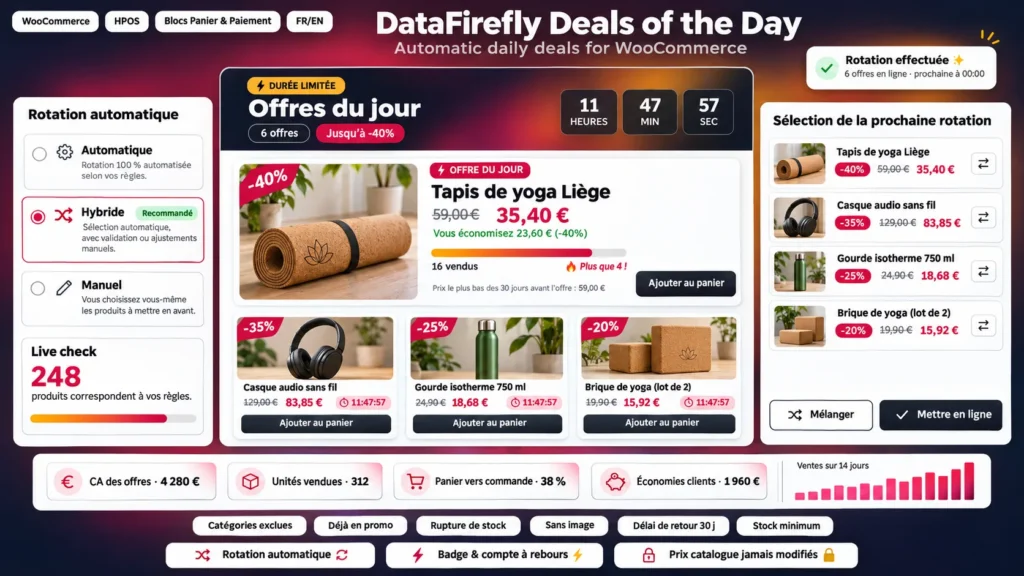
Every day at midnight, every 6 hours or every Friday at 6:30 pm: the plugin picks the products, applies the discount and ends the previous deals, with no manual work.

02

Complete exclusion rules

Categories (sub-categories included), tags, brands, specific products, product types, products already on sale, out of stock, without image or hidden, price range, minimum stock, new arrivals and a cooldown before a product can come back.

03

Tomorrow's lineup, visible today

The next rotation is planned in advance: you see the planned products and prices, swap one in a click, shuffle or go live right away. A live counter shows how many products match your rules.

04

Badge and countdown on the product page

The badge replaces "Sale!" on the image (pill, ribbon, corner or sticker). Under the price, a panel shows the countdown, the amount saved, the "Only 4 left!" stock bar and the limit per order.

05

Your prices are never touched

The deal price is computed on the fly while the deal lasts. When it ends, or when the planned units are sold, the regular price comes back by itself. Rounding (.99, .95, .90 or whole number) always goes down.

06

A polished deals page

Header with a countdown to the next deals, a large featured deal, grid or list, stock bars, a blurred teaser of upcoming deals and automatic refresh when the countdown ends. Six colour palettes and a live preview.

The long version

Everything you'd want to know before you install.

A detailed look at how WooCommerce Deal of the Day: Automatic Daily Deals Rotation, Badge and Countdown works, why we built it the way we did, and the thinking behind the features above.

§ 01

Set it once, deals rotate by themselves

Choose the mode, the rotation time, the number of products and the discount. At the scheduled time, the current automatic deals end and the new lineup goes live. Each automatic deal lasts until the next rotation. If WP-Cron is disabled, the rotation happens on the first visit after the scheduled time.

§ 02

Exclusions that protect your margins and new arrivals

Keep out the categories, tags, brands or products you never want to discount, products already on sale, out of stock or without image, those priced outside your range, with stock too low or just published. The cooldown stops a product from coming back too soon; 30 days keep a clean EU Omnibus reference price.

§ 03

Hybrid mode: your favourites first

Schedule manual deals in advance with a percentage, an amount or an exact price. In hybrid mode, the rotation only fills the slots they leave free, and a manual deal always wins over an automatic one on the same product.

§ 04

Urgency on the product page and in the shop

The badge replaces the "Sale!" badge on the image, on the product page and in listings, with block themes and classic themes. The deal panel shows the time left, the amount saved, units sold and left, the limit per order and the reference price of the last 30 days.

§ 05

Exact prices, reliable numbers

The deal price is applied on the fly and never touches your catalogue prices. Unit and per-order limits are checked in the cart, including the Cart and Checkout blocks. Every sale at a deal price is recorded, then removed if the order is cancelled or refunded, so the dashboard reflects your real sales.
€79.00
One-time · 12 months updates
Read the docs
  • Unlimited dev & staging installs
  • Source code included
  • 30-day refund
  • 24h support · EN / FR
5.0/5 25 reviews
All customer reviews