
Everything you'd want to know before you install.
A detailed look at how B2B Quick Order Module PrestaShop 8 & 9 — SKU Entry, CSV Import & Re-order works, why we built it the way we did, and the thinking behind the features above.
§ 01
B2B ordering the way your customers want it
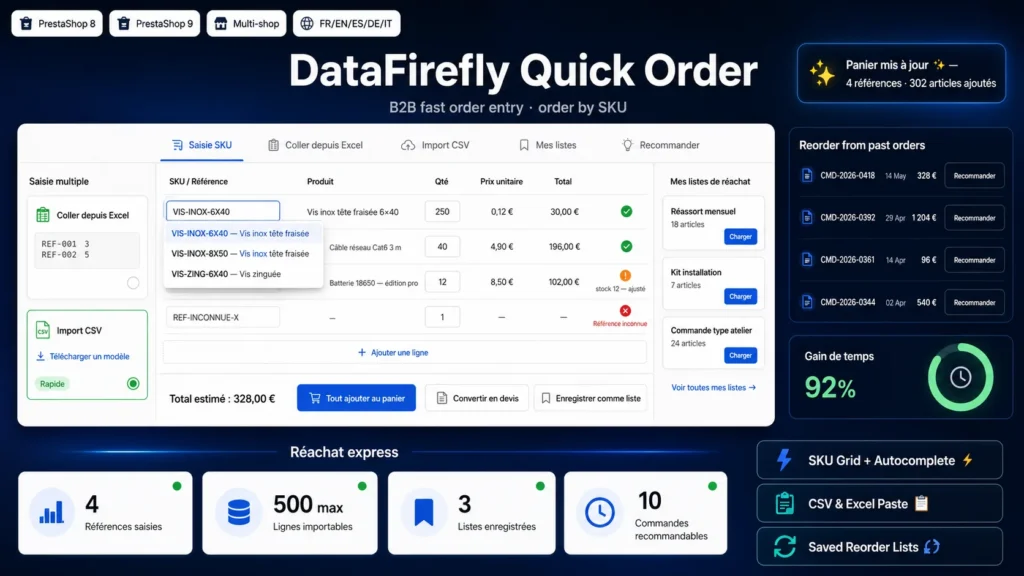
A professional buyer who knows their references doesn't want to browse the catalogue page by page. They want to type their SKUs, set the quantities and order. Quick Order gives them exactly that: an entry grid where they type or paste their references and immediately get the matching product, its price for their group, its stock and its minimum quantity, ready to go to the cart.
§ 02
Type, paste, import: three ways to go fast
The customer types their references one by one with autocomplete, pastes two columns straight from their Excel spreadsheet, or imports a CSV file (a template is provided, the separator is configurable and the header detected). Each line is parsed and resolved, with a clear status: valid line, quantity adjusted to stock or to the minimum quantity, out of stock, or unknown reference — without ever blocking the rest of the grid.
§ 03
Combinations, B2B prices and stock handled natively
Resolution recognises combination references and returns the correct combination with its own attribute label, price and stock; the EAN13 barcode is also accepted. The unit price is computed according to the tax method of the customer's group (excl. or incl. tax), and the estimated total updates live.
§ 04
Reorder lists and one-click re-order
For recurring restocking, a logged-in customer saves their grid as a named list ("Monthly restock", "Workshop kit"…) and reloads it whenever they want. They can also re-order a past order: all references and quantities are reloaded into the grid, ready to be adjusted before being added to the cart.
§ 05
Built for B2B, built for PrestaShop 8 and 9
Reserve quick order for your professional groups with a single setting. Connect it to your quote range: if dfb2bquote is active, a "Convert to quote" button appears. On the technical side, the grid is in native JavaScript with no dependency, AJAX responses are strict JSON, and the module is compatible with PrestaShop 8 and 9, in single shop and multistore, across the five catalogue languages.





There are no reviews yet.