
“Second item at 50% off” is a bundle mechanic dressed up as a discount. It works well on products people naturally buy in pairs or in batches: socks, cartridges, filters, cosmetics, accessories. Setting it up on PrestaShop runs into two obstacles: the pricing engine cannot apply a discount to a single unit, and the promo code reflex costs more than it brings in.
Why not to go through a promo code
A promo code assumes the customer knows it, types it, and does not get it wrong. Three negative effects follow mechanically.
- The “promo code” field in the cart sends part of your visitors off to look for a code elsewhere. A non-negligible share does not come back, or comes back through a coupon site to which you pay a commission on a sale you had already won.
- Customers who did not see the code pay full price and discover the offer afterwards, which generates goodwill requests to customer service.
- You cannot credibly announce the offer on the product page, since applying it depends on a manual action at the end of the journey.
A bundle mechanic has to apply on its own, the moment the second unit lands in the cart.
The real arithmetic, and why it matters
On a product at 40 euros, “second at 50% off” gives 40 + 20, or 60 euros for two units. The average unit price falls to 30 euros, which is a 25% discount on the bundle, not 50%.
That difference explains why the mechanic is more profitable than it looks. You announce a striking two-digit figure, you concede half of it. It is also what makes it hard to reproduce with the native tools.
A quantity-based specific price does something else
In a product’s Prices tab, a specific price triggered from 2 units applies the discount to every unit in the batch. A 25% discount from 2 units does give 60 euros for two, the result is identical. But the displayed unit price drops to 30 euros, and that is the price the customer sees, not the mechanic.
The consequence is twofold. You lose the psychological effect of “second one half price”. And you create a new price applied that enters your pricing history, with the display obligations that come with it.
A cart rule is no better suited
A cart rule applies a percentage to a product selection or to the whole cart, never to one designated unit inside a line. On a cart holding three units of the product, the discount would cover all three, which is not the mechanic.
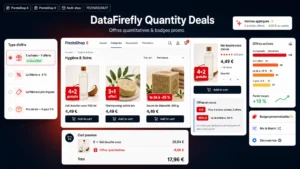 PrestaShop 8 & 9 Quantity Discount Module — Buy X Get Y Free & Promo BadgesFive quantity promotion mechanics, each with the badge that sells it on the product thumbnail.€79.00
The decisions to make before configuring
Four points determine how the offer behaves and have to be settled upfront.
- Repetition. On four units, does the customer get two discounts or one? Bundle logic says two, one per pair. Simple promotional logic says one.
- Odd numbers. Three units give one discounted pair and one full-price unit. That is the standard rule, but it has to be visible in the cart, otherwise it reads as a calculation error.
- Scope. Two units of the same product, or two products from the same category? The second case is more attractive but requires designating the discounted unit, generally the cheapest one.
- Stacking. Does the offer apply to a product already on promotion? Stacking produces effective discounts of 40% and above, to be checked product by product.
Display and the compliance point
A bundle mechanic does not change the reference unit price as long as the first unit is still sold at the usual rate. So you do not have to move your reference price under the Omnibus Directive, unlike a classic percentage discount.
Three elements still have to appear:
- on the product page, the offer announced at the height of the quantity selector, with the bundle price stated plainly;
- in the cart, a separate line for the discount applied, with its label, rather than a bare difference in the total;
- the terms of the offer, period and products concerned, reachable from the page.
On the invoice, the discount has to appear as a reduction on the bundle and not as a modified unit price. That distinction avoids accounting reconciliation errors and disputes on partial returns: if the customer sends back one of the two units, the refund covers the price actually paid, not the catalogue price.
The return case
This is the scenario most shops discover too late. A customer buys two units at 60 euros, returns one, and asks for 40 euros. Decide in advance, and write it into your terms: either the refund is pro rata to the amount actually paid, or returning one unit cancels the offer and the customer keeps the second at full price. The first option is easier to defend.
Putting the offer in place
The mechanic needs an engine able to reason by pairs inside a cart line, to repeat the discount as many times as necessary, and to announce it before the cart. The Quantity Promotions module for PrestaShop covers those three needs on PrestaShop 8 and 9, with the badge on the product page and in the listing, handling of odd quantities and stacking configuration.