



Everything you'd want to know before you install.
A detailed look at how PrestaShop 8 & 9 Quantity Discount Module — Buy X Get Y Free & Promo Badges works, why we built it the way we did, and the thinking behind the features above.
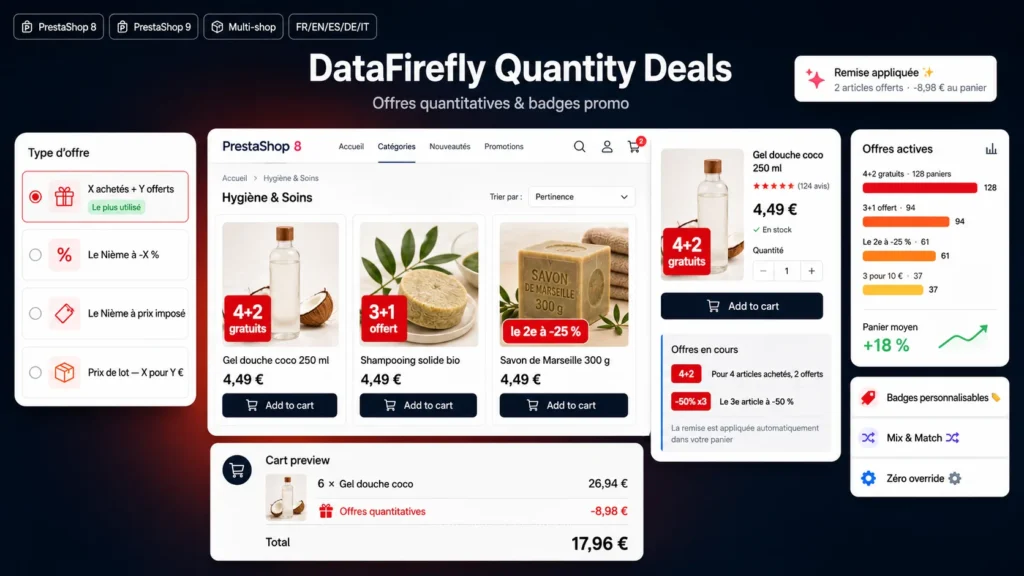
The badge makes the sale, not the cart rule
A discount configured in PrestaShop stays invisible until the customer has reached the quantity. The badge reverses that: it announces the offer while the customer browses the category, at the exact moment the quantity decision is made. That is why the module treats display and calculation as one object. You create an offer, and both the badge and the discount follow from it.
Six mechanics covered
Buy X get Y free covers 2+1, 3+1 and 4+2. The discounted Nth item covers 2nd at -25%, 3rd at -50% and every other rank. Two variants complete that format: a fixed amount off the Nth item, or an imposed price such as the 2nd at 1 euro. The fifth type is pack pricing, 3 for 10 euros, useful when you would rather advertise a round price than a percentage. The sixth is the tiered discount, which rewards volume across the whole cart rather than on a single item.
Tiered discount across a whole category
You set quantity thresholds, for example -5% from 2 items and -10% from 3. The highest tier reached applies to every item in the offer: with 4 items, all 4 are at -10%, not just the last one. In mix and match mode, quantities from every product attached to the offer add up, so a customer who takes two different references from the same category reaches the 2-item tier. A native catalogue price rule cannot add quantities up this way: it counts them product by product. In the cart, the customer sees how many items are missing to reach the next tier.
Already discounted products: stack or not
For the tiered discount, a per-offer setting decides what happens to products that already carry a specific price or a catalogue price rule. In stacking mode, the tier applies to the already discounted price. In non-stacking mode, the tier is calculated on the price before reductions and the customer pays the lower of the two prices: a product already at -20% stays at -20% with a -10% tier, a product at -5% moves to -10%. The other offer types keep the option that leaves products on sale out entirely.
Negotiated prices and B2B customers
On a shop that sells to professionals, some customers already have a negotiated rate, set as a specific price on their account or on their group. The option to exclude customers with a specific price leaves them out of the offer product by product: no discount in the cart, no badge on the thumbnail. Only the customer's default group is taken into account, as in PrestaShop's price calculation, and specific prices open to all customers do not trigger the exclusion.
Which item is free
The engine sorts eligible cart units by descending price and applies the benefit to the cheapest of each set. That is the rule supermarkets use and the one customers expect. On a 3+1 set made of items at 20, 15, 10 and 5 euros, the free item is the one at 5 euros. The tiered discount, on the other hand, applies to every item.
How quantities are grouped
Three grouping modes are available. Per product, all combinations together: six bottles of the same shower gel trigger the offer even across three different scents. Per combination: each variant counts on its own. Mix and match: every unit of the products attached to the offer feeds the same count, which lets you run a 4+2 across a whole range rather than a single reference.
Priority and unit consumption
When several offers target the same product, priority decides the order of application. A unit already consumed by one offer leaves the calculation for the next ones, so the same item is never given away twice. With seven items and a 4+2 offer, six units are consumed and the seventh stays available for another offer.
What happens in the cart
On every cart change the engine recalculates the discount total and syncs a private cart rule whose internal code starts with DFQD. The customer sees a single discount line and has no code to enter. The per-offer breakdown folds into an accordion under the Discount(s) line, and each product line concerned shows the deal badge, its original price struck through and the discounted price. When only a few items are missing to trigger an offer or reach the next tier, a panel says so, with a button that adds the missing units. When the order is placed, the rule is deactivated and detached from the module, but stays attached to the order for your accounting exports and credit notes.
Badge customisation
The badge text accepts variables carrying the offer values: purchased quantity, free quantity, rank of the discounted item, discount value and its formatted price equivalent. You write "buy 4 get 2 free" or "2nd item at -25%" directly, in each shop language, or leave the field empty for automatic generation, "Up to -10%" for a tiered discount. Background colour, text colour, shape and position are set offer by offer, which lets you tell a seasonal operation apart from a permanent one.
Technical integration
Badges are placed by a front script from a single Ajax call, so the module does not depend on the displayProductPriceBlock hook, which many custom themes no longer call. The placement is replayed after Ajax refreshes from faceted search, pagination and quick view. If you want full control, the dedicated displayDfQdBadge hook can be called from any template, and a setting switches off automatic injection to avoid duplicates. The deals block is rendered through displayProductAdditionalInfo, then moved in the browser to the placement you chose. No class or controller override is installed, and the CSS is namespaced under the dfqd prefix.

There are no reviews yet.