
Everything you'd want to know before you install.
A detailed look at how Automatic Internal Linking works, why we built it the way we did, and the thinking behind the features above.
§ 01
Internal linking that works for your SEO
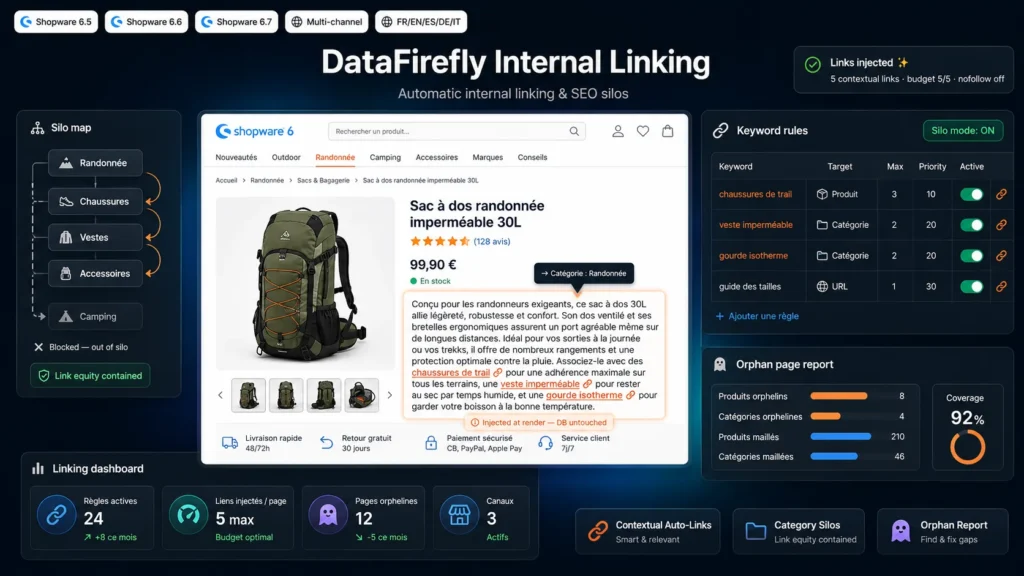
Internal linking is one of the most underused SEO levers on Shopware. This plugin fully automates the process: you define keyword rules, and every product or category description becomes a network of contextual links pointing to the right pages, using each sales channel's canonical SEO URLs.
§ 02
Clean SEO silos
Silo mode ensures links stay inside a single category branch. A page in the Hiking branch is only linked to other pages in that branch, which concentrates link equity and reinforces thematic relevance in Google's eyes.
§ 03
Safe injection, content untouched
Unlike approaches that rewrite your descriptions in the database, this plugin injects links only at render time. Your original content stays strictly intact. HTML parsing only processes text nodes and skips existing links, headings, scripts and buttons, with Unicode word boundaries to avoid any partial replacement.
§ 04
Leave no orphan page behind
The built-in report lists active products and categories that no rule targets. You immediately identify pages with no incoming link and can create the rules needed to bring them back into your internal linking.
§ 05
Full control
A link budget caps how many links are injected per page, globally and per rule. Each rule can be restricted to a language and a sales channel. You choose the nofollow attribute and the CSS class of generated links.



There are no reviews yet.