
Everything you'd want to know before you install.
A detailed look at how Birthday Coupon Email for PrestaShop 8 & 9: Automatic Discount Codes and Revenue Tracking works, why we built it the way we did, and the thinking behind the features above.
Why the birthday email pays off
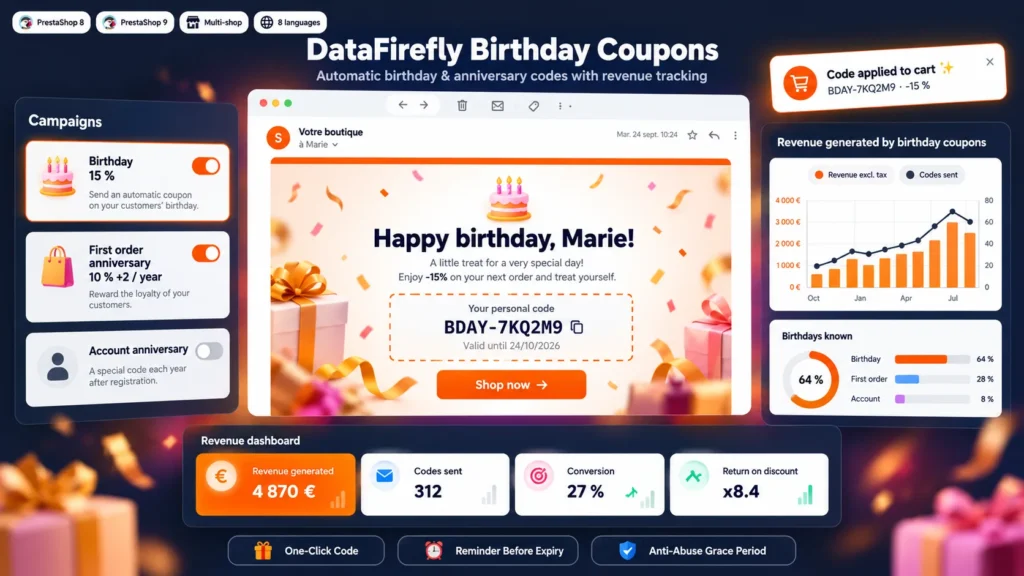
On their birthday, customers read their emails more attentively and are happy to treat themselves. A personal code, dated and limited in time, gives them a precise reason to come back to your store. The anniversary of the first order plays the same role for your loyal customers: it reminds them how long they have been buying from you and thanks them in a concrete way. PrestaShop cannot send either of these messages; this module automates them.
An offer set occasion by occasion
Each occasion has its own settings: discount type, value, free shipping, minimum order, validity, sending a few days early, customer groups, minimum number of orders and code prefix. For order and account anniversaries, the discount can grow with seniority, for example 10% the first year then 2 more points each year up to 20%. Each code is a native cart rule, reserved for the customer and usable once.
A polished email, and a code that applies itself
The email is translated into the 8 languages of the module and uses your logo and accent colour. You edit the subject, headline and message language by language, with a live preview showing the actual discount, and send yourself a test before enabling the campaign. The email button applies the code to the cart: the customer has nothing to copy, even if they must log in first. A few days before expiry, a reminder goes out if the code has not been used.
Revenue measured, not estimated
The dashboard adds up valid orders placed with a code, excluding and including tax, converted into the default currency. It shows the usage rate, average basket, actual cost of the discount and the return on each euro of discount, per occasion and per month. Orders placed without the code while it was valid are counted separately. The code list can be filtered by occasion, status and period, and exported to CSV.
More known birthdays
The module cannot send anything to a customer whose birthday it does not know. It therefore shows the share of known dates on the dashboard, asks for the date on the order confirmation page when it is missing, and adds a page to the customer account with active codes, upcoming dates and the date of birth form. A waiting period prevents entering a date on the day itself to get a code.
Reliable even when the scheduled task misses a day
A token-protected URL, called once a day, creates the codes and sends the emails. If it does not run one day, the missed dates are caught up the next day. Without a scheduled task, the module runs on store visits, at most once an hour and after the page has been displayed. A simulation shows who will receive a code today without sending anything, and expired unused codes are deleted to keep the discount list readable.
There are no reviews yet.