
Everything you'd want to know before you install.
A detailed look at how DataFirefly Odoo Connector — Shopware ↔ Odoo works, why we built it the way we did, and the thinking behind the features above.
§ 01
Why a native XML-RPC connector?
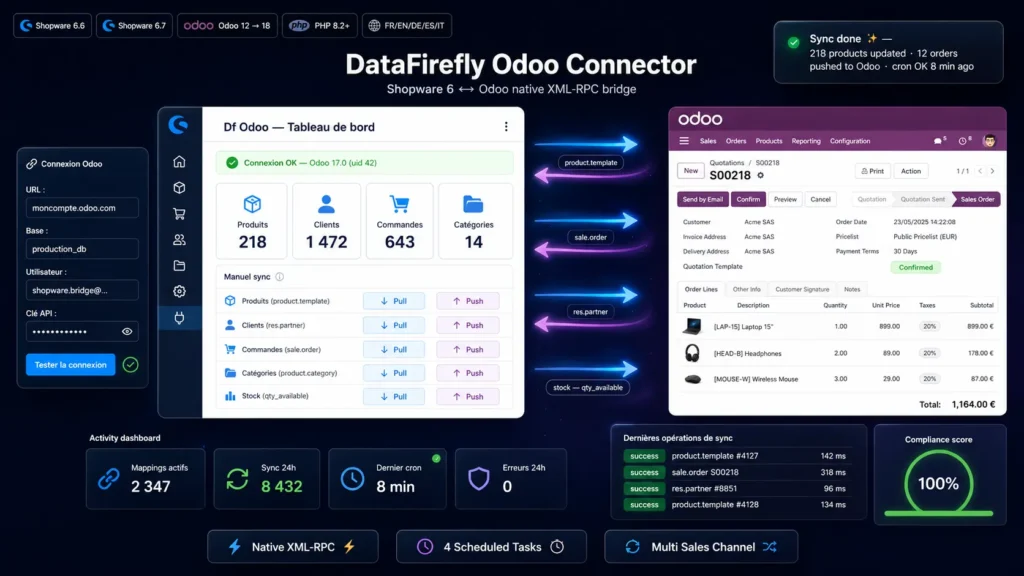
Odoo natively exposes a stable XML-RPC API since version 8, fully documented and usable without installing anything on the Odoo side. Instead of going through a paid middleware, a SaaS connector or Zapier billed per call, this plugin speaks XML-RPC directly from Shopware. No recurring cost, no external queue, no data leak. The XML-RPC client is written in native PHP (DOMDocument and SimpleXML), without any third-party library.
§ 02
Product synchronization
Three matching strategies to choose from: by SKU (Shopware productNumber ↔ Odoo default_code, default), by Odoo ID, or by barcode (EAN). Once linked, products stay paired through a persistent mapping table, even if the SKU later changes. Hash-based change detection avoids unnecessary writes. Products pushed to Odoo are created as product.template with category, price, description, weight and taxes.
§ 03
Stock always up to date
Stock is pulled from Odoo every 15 minutes in optimized batches. The plugin reads product.product variants in batches of 100 by template id, aggregates qty_available or free_qty (configurable), and writes the result to Shopware in a single DAL request. Ideal for stores where Odoo is the source of truth for physical stock.
§ 04
Orders pushed at checkout
As soon as an order is placed (CheckoutOrderPlacedEvent), it is immediately transformed into an Odoo sale.order: partner_id resolved through the customer mapping (automatically created if missing), order_line using Odoo's tuple syntax, shipping costs as an extra line, taxes correctly mapped. Options: automatic confirmation (action_confirm), invoice creation (_create_invoices). If Odoo is unreachable, checkout is never blocked — the failure is logged and the order is retried by the scheduled task.
§ 05
Customers and addresses faithful to Odoo
Customers are pushed as res.partner records with email-based deduplication. Billing and shipping addresses are created as child partners (parent_id, type='invoice' or 'delivery'), the intracom VAT is reported on the vat field, and country and state are resolved by ISO code with in-memory caching.
§ 06
Multi sales channel
Each Shopware sales channel can point to a different Odoo instance. Ideal if you operate several brands on Shopware and several Odoo databases (e.g. B2C and B2B). Settings are inherited from the global channel or overridden per channel using Shopware's native system.
§ 07
Dedicated admin module
A new Df Odoo section appears under Settings → Plugins with four pages: dashboard (mapping counters, 24h activity, manual sync per entity), settings (full form with one-click connection test), logs (filters by status, type, direction with server-side pagination), and mappings (view on the df_odoo_mapping table).
§ 08
Security and compliance
Authentication via Odoo API key (safer than a password because individually revocable and limitable per user). No customer data passes through a third party — exchanges happen directly between your Shopware and your Odoo over HTTPS. Operation payloads are stored as JSON in the journal for audit, and purged on uninstall unless data retention is explicitly enabled.
There are no reviews yet.