
Everything you'd want to know before you install.
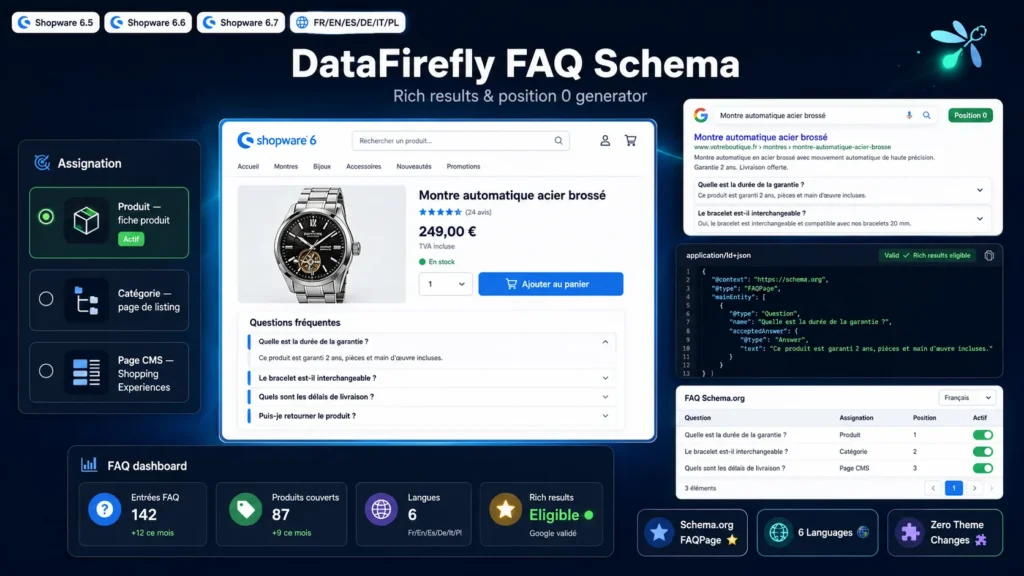
A detailed look at how FAQ Schema.org Generator — Rich results and position zero for Shopware 6 works, why we built it the way we did, and the thinking behind the features above.
Why structure your FAQs with Schema.org?
Frequently asked questions answer your customers' objections at the decisive moment of purchase: warranty, shipping, returns, compatibility. Marked up as FAQPage, they also become usable by Google for rich results and position zero answers, and by AI assistants that rely on structured data. This plugin combines both: a readable accordion for your visitors and clean JSON-LD for search engines.
Centralized management in the administration
The FAQ Schema.org module is added to the Content section of your Shopware administration. Each entry has a question, a rich text answer, a display position and an active status. You assign it to a product, to a category, or keep it for Shopping Experiences layouts. The listing shows the assignment of every entry, keeping a clear overview even with hundreds of questions.
Three display points in the storefront
On a product page, the accordion appears below the main content with the entries assigned to that product. On a category page, it renders below the listing. In Shopping Experiences, the FAQ CMS element lets you pick exactly which entries appear on each layout, homepage included. In all three cases rendering relies on native Bootstrap collapse: no additional JavaScript is loaded.
Markup that follows Google's guidelines
The FAQPage JSON-LD is generated from the entries actually displayed on the page, never from hidden content. That is the condition Google sets for rich results eligibility. For products and categories the script is injected into the document head through the layout meta template. For the CMS element it renders inline, which is equally valid.
Multilingual end to end
Questions and answers are translated directly from the detail page using the administration language switch. The storefront block heading ships in English, French, German, Spanish, Italian and Polish. The JSON-LD is generated in the language of the visited page, so you can target rich results in every market you serve.
Safe installation for your theme
The plugin installs like any Shopware extension and requires no theme changes: templates hook into standard blocks through Twig inheritance. The configuration lets you switch off the product or category display per sales channel. On uninstall, tables and configuration are removed cleanly, unless you choose to keep your data.
There are no reviews yet.