


Everything you'd want to know before you install.
A detailed look at how Featured product per category works, why we built it the way we did, and the thinking behind the features above.
Draw the eye to the right product, category by category
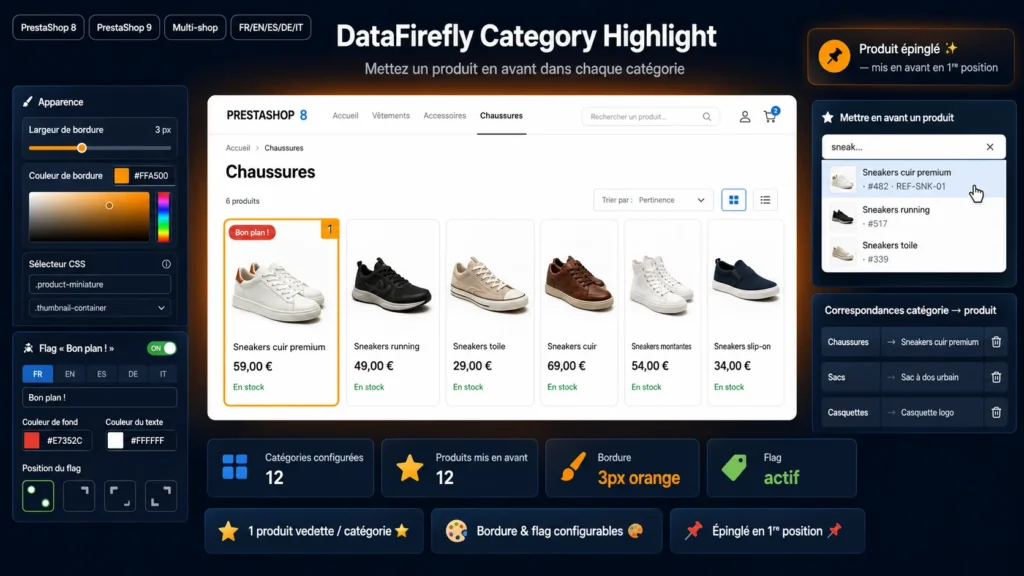
This PrestaShop module lets you designate a featured product in each of your categories. That product stands out immediately thanks to a coloured border, a promotional flag and a position at the top of the list — three visual levers to steer your visitors' attention and clicks toward the offer you want to push.
A fully configurable border
Choose the border width (from 1 to 50 pixels) and its colour, as a hexadecimal value or a CSS colour name. A configurable CSS selector lets you target the full miniature, the thumbnail container, or any element of your theme through an advanced placeholder. The rule is automatically scoped to the featured product only.
A "Great deal!" flag in the spirit of major marketplaces
Add an eye-catching badge on the featured product. Its text is translatable into each of your languages, its background and text colours are free, and you place the flag in the corner of your choice. The rendering is purely CSS: no theme conflict, no file to override.
The featured product always in first position
Beyond the visual aspect, the module moves the chosen product to the top of its category listing, including when the current sort or pagination would have pushed it lower. The product is presented exactly like the others, for a consistent display.



There are no reviews yet.