
Everything you'd want to know before you install.
A detailed look at how Pre-order Manager for WooCommerce works, why we built it the way we did, and the thinking behind the features above.
§ 01
Why a real pre-order plugin?
WooCommerce offers no native pre-order management: no deposit, no ETA, no automatic conversion. Workarounds (On hold status, backorder product) offer neither partial payment, clear availability date for the customer, nor accounting traceability. Pre-order Manager fills this gap with a complete professional workflow, from the first order to balance payment.
§ 02
Deposit or full payment — you choose
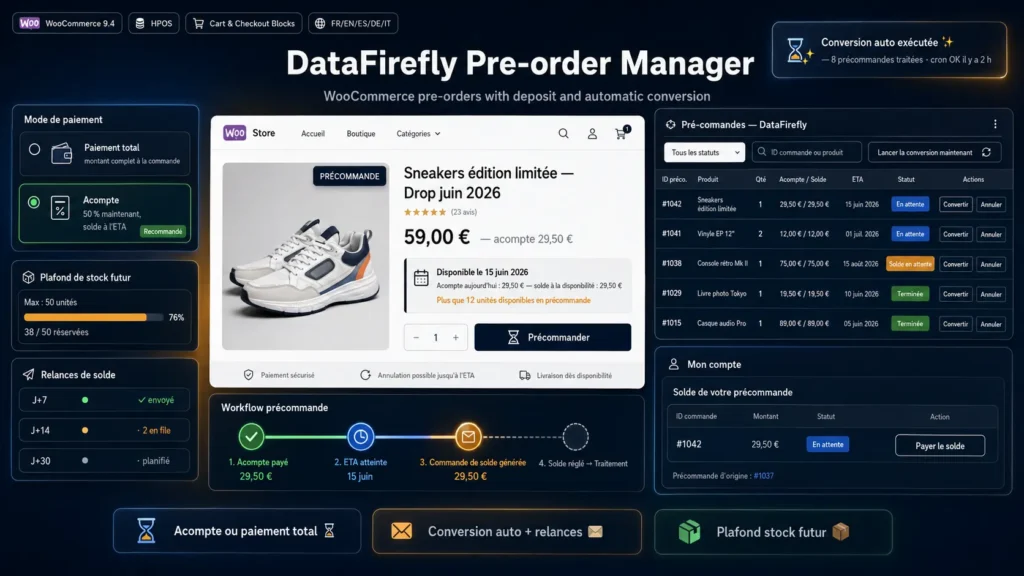
For each product, configure the mode: full payment at order time, or deposit as a percent (10%, 30%, 50%, etc.) or fixed amount. The deposit is collected via your usual payment gateway. The balance is billed automatically at availability via a new WooCommerce order with a secure payment link sent by email.
§ 03
ETA visible everywhere, at every step
The availability date (Estimated Time of Arrival) is shown on the shop, product page, cart, checkout, emails and My Account page. It can be overridden per variation. The text is fully customizable, and a free-form label lets you display a string like Available early July instead of a specific date.
§ 04
Automatic conversion, no intervention
A daily cron at 3:00 AM (site time) detects pre-orders whose ETA has been reached and triggers conversion: for full payments, the order moves to processing; for deposits, a balance order is created automatically with a payment link, and the customer receives an email. A configurable grace period delays conversion if actual availability slips slightly.
§ 05
Automatic reminders for unpaid balances
If the customer does not pay the balance, the plugin automatically sends email reminders at the thresholds you configure (D+7, D+14 and D+30 by default). Each threshold is sent only once per order, with tracking stored in the database. You can disable reminders or adjust the cadence in the settings.
§ 06
Future stock cap for limited editions
Set a maximum number of pre-orderable units per product or per variation. The plugin keeps the reserved-units counter up to date in real time and blocks add-to-cart beyond the limit. Ideal for quota pre-sales and limited editions.
§ 07
Enhanced customer-facing My Account
On the customer My Account page, the original order shows a summary table of linked balance orders with a direct Pay balance button, without having to dig through the orders list. The balance order shows a link back to the original pre-order. Navigation is seamless.
§ 08
HPOS and Blocks ready architecture
The plugin is designed for modern WooCommerce: declared HPOS (High-Performance Order Storage) compatibility, Cart and Checkout Blocks support, PSR-4 namespaces, strict-typed code, hooks and filters for extension. Compatible with all standard WooCommerce payment gateways.

There are no reviews yet.