


Everything you'd want to know before you install.
A detailed look at how Expiry Date & Batch Manager: Lots, FEFO and Use-By Dates works, why we built it the way we did, and the thinking behind the features above.
Use-by and best-before: two dates, two rules
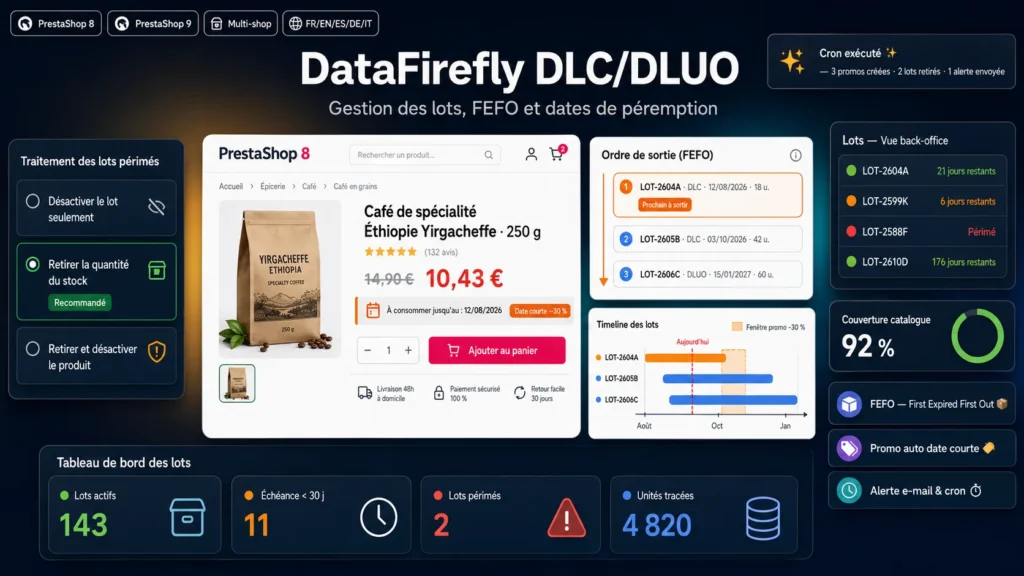
A use-by date applies to perishable goods: past it, the product must no longer be sold. A best-before date signals a loss of quality, not a safety risk: the product remains sellable afterwards if the customer is informed. The module treats the date type as a first-class field. Automatic stock actions only apply to use-by lots, and an expired use-by lot is never allocated to an order.
Why PrestaShop stock is not enough
PrestaShop stores one quantity per product and combination, with no memory of what makes it up. Thirty units received in March and twenty in June show as fifty, with no idea which should ship first, which will expire, or what each delivery cost. Merchants end up with a spreadsheet on the side, find unsold stock too late and discount in a hurry. The module replaces that spreadsheet with integrated management aligned on the real stock of the shop.
Receiving a lot by unit or in boxes
A lot takes seconds to create: product, combination if needed, number, date type, expiry date, quantity and cost. If your supplier delivers by the box, declare the packaging once: box reference and EAN, number of units, usual cost, reference and EAN of the unit you sell. At reception, choose Received in supplier boxes and enter 3 boxes at 30 EUR: the module records 36 units at 2.50 EUR each. The box cost can change with every delivery, the unit cost follows. At each reception you choose whether to add the quantity to PrestaShop stock.
FEFO on every order
FEFO stands for First Expired, First Out: the lot with the closest date ships first. When an order is validated, the module takes lots of the ordered combination first, then product-level lots, from the closest date onwards. An order can finish one lot and start the next, exactly as in picking. The lot to pick shows on the order page and is printed on the delivery slip. If the order is cancelled, units go back into their lots; if it is reactivated, they are taken again.
The real cost of every sale
The purchase price of a product changes from one delivery to the next. The module stores the unit cost of each lot and, on every order, writes the weighted cost of the lots actually consumed on the order line. Native PrestaShop margin reports then use the real cost instead of a fixed wholesale price. The dashboard shows the purchase value of stock held in lots and the share at risk, from lots nearing expiry.
Tiered short-date discounts
A short-dated product loses value every day. Set up to 10 tiers, for example 10 percent with 90 days left, 20 percent at 60 days and 30 percent at 30 days. The discount is a standard PrestaShop catalog price rule, created on the lot that ships next, attached to its combination when needed, and ending on the expiry date. When that lot sells out, the discount moves to the next lot or disappears. On the product page a badge explains the discount to the customer.
What happens on expiry
Three modes for expired use-by lots: deactivate the lot only, also remove its remaining quantity from PrestaShop stock, or additionally disable the product when no valid lot remains. Expired best-before lots are only deactivated, the product remaining legally sellable. A summary email warns you before expiry with a threshold you choose, and each lot is reported only once.
Traceability and recalls
Every movement is recorded: reception, order, cancellation, manual adjustment, removal on expiry. From a lot you see the orders that consumed it and can export its history to CSV. From an order you see the lots shipped. A lot already sold can no longer be deleted, only deactivated. That is the data your recall procedure needs.
Getting started and staying accurate
To start on an existing catalog, import your lots from CSV: product by reference, EAN, ID or combination reference, dates as YYYY-MM-DD or DD/MM/YYYY, boxes converted automatically, line-by-line error report. Afterwards, the Stock check page compares units in lots with PrestaShop stock and reports every difference, for example after a manual correction or a return. One click creates the lot for the missing units. A Lots panel on the back-office product page gives the same view product by product.
Who it is for
Pet shops, delicatessens, coffee roasters, wine and beer merchants, food supplements, cosmetics, veterinary products, technical consumables: any catalog where the date and the purchase price matter as much as the reference, and where several deliveries of the same product sit in stock together.
Technical design
Standard ObjectModels and admin controllers, no Composer, no external dependency, JavaScript without jQuery. Three tables indexed on product, date and order. Interface translated into 8 languages. Upgrading from 1.0.0 keeps your data: columns are added and the former single discount becomes the first tier.

There are no reviews yet.