PrestaShop Catalogue Management

PrestaShop POS Integration: Sync Stock & Sales with Square, Zettle, SumUp

One stock quantity for your physical shop and your website, whatever your POS.

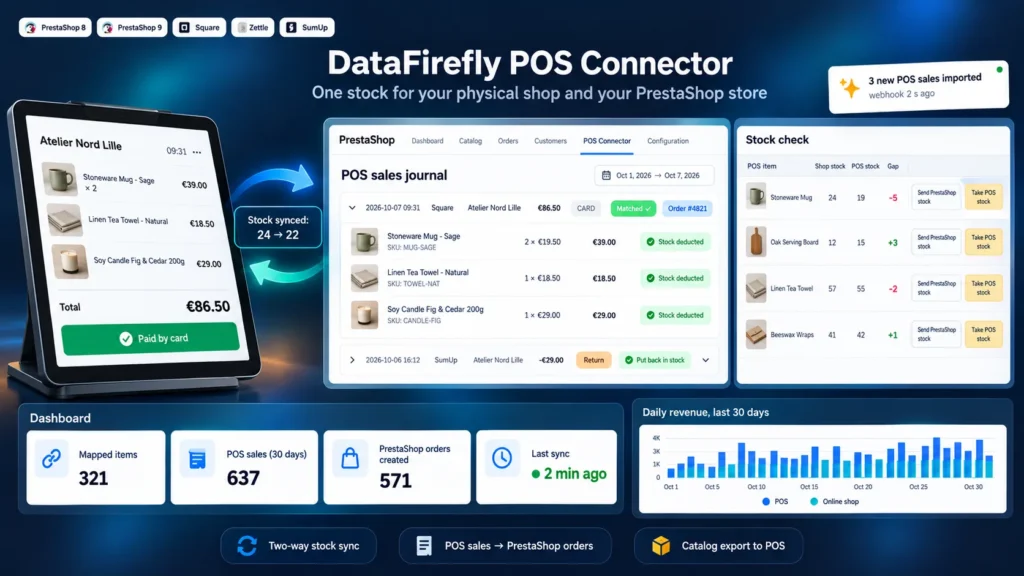
You sell in store with Square, Zettle or SumUp and online with PrestaShop, and the two stocks drift apart after the first busy Saturday. This module makes PrestaShop the single source of truth: every POS sale is imported and deducted from the online stock, then the new level goes back to the POS. In-store sales can become real PrestaShop orders, returns go back to stock, and your catalog reaches the POS without retyping. A stock gap check and email alerts tell you when something drifts.

At a glance
  • PrestaShop stock sent to Square and Zettle, POS sales deducted from the online stock
  • Square, Zettle and SumUp sales imported, with optional real PrestaShop orders
  • In-store returns put back in stock automatically on Square and Zettle
  • PrestaShop catalog sent to the POS without creating duplicates
  • Stock gap check and email alert when the sync fails
PrestaShop 8 & 9 Square · Zettle · SumUp Real-time webhooks No subscription
  • 30-day refund
  • 12 months updates
  • 24h support
www.datafirefly.com/en/
PrestaShop POS Integration: Sync Stock & Sales with Square, Zettle, SumUp
v1.3.0 · updated 2026-10-07
What it does

The short version.

01

PrestaShop stays the stock master

Every stock change of a mapped product is sent to the POS as an absolute quantity, right away or at the next cron run. An in-store sale is deducted from the PrestaShop stock with a dedicated stock movement, then the new level goes back to the other POS. Each cron run also catches changes made outside PrestaShop events, such as an SQL import or an ERP.

02

In-store sales become orders

As an option, each sale whose items are all mapped creates a PrestaShop order: dedicated walk-in customer, POS carrier hidden from the checkout, ticket prices, sale date, no email sent. Your statistics and accounting exports finally cover the physical shop.

03

Your catalog in the POS without retyping

Send your PrestaShop products to Square or Zettle with their combinations, prices, SKU, barcode and stock. The POS catalog is read first: an item that already exists is mapped by SKU or barcode instead of being created a second time.

04

You know when something drifts

The Stock check tab compares the real quantities of the POS and PrestaShop and lets you align each gap in either direction. If the scheduled sync fails three times in a row, an email tells you, then another one when everything works again.

The long version

Everything you'd want to know before you install.

A detailed look at how PrestaShop POS Integration: Sync Stock & Sales with Square, Zettle, SumUp works, why we built it the way we did, and the thinking behind the features above.

§ 01

One physical shop, one website, one stock

When the POS and the website each keep their own stock, the last item sells twice: once at the counter, once online. The module removes this double count by making PrestaShop the only reference. The POS always receives the real quantity, and each in-store sale comes back into PrestaShop to decrease the online stock.

§ 02

How the sync works

Each stock change of a mapped product is queued, then the PrestaShop quantity is sent to every POS. The module sends an absolute quantity, never a difference, so a replayed update creates no drift. Sales arrive through the cron every 5 minutes and, for Square and Zettle, within seconds through signed webhooks. A nightly full sync and a gap check on each run catch anything changed outside PrestaShop.

§ 03

In-store sales inside PrestaShop

Each sale is recorded in a journal with its lines, POS, location and payment method. As an option, a fully mapped sale becomes a PrestaShop order at ticket prices, dated at the time of the sale, with a walk-in customer and a POS carrier that never shows at the checkout. No email goes out, to the customer or to you. Square returns and Zettle refunds put the items back in stock and leave a note on the original order.

§ 04

Starting from an existing catalog

If your products are already in PrestaShop, the Send catalog tab creates them in Square or Zettle with their combinations, price, SKU, barcode and stock, then maps them at once. If the POS already holds items, reading its catalog maps them by reference or barcode, and the name suggestions handle items entered without a SKU.

§ 05

What each POS supports

Square and Zettle support everything: two-way stock, sales, returns, gap check and catalog export. On Zettle, stock tracking must be enabled on the products, which the catalog export does automatically. SumUp only exposes transactions in its public API: the module imports the sales and deducts them from the PrestaShop stock, but it cannot update the stock shown in SumUp or create products there.