
Everything you'd want to know before you install.
A detailed look at how robots.txt Editor works, why we built it the way we did, and the thinking behind the features above.
§ 01
What is this module for?
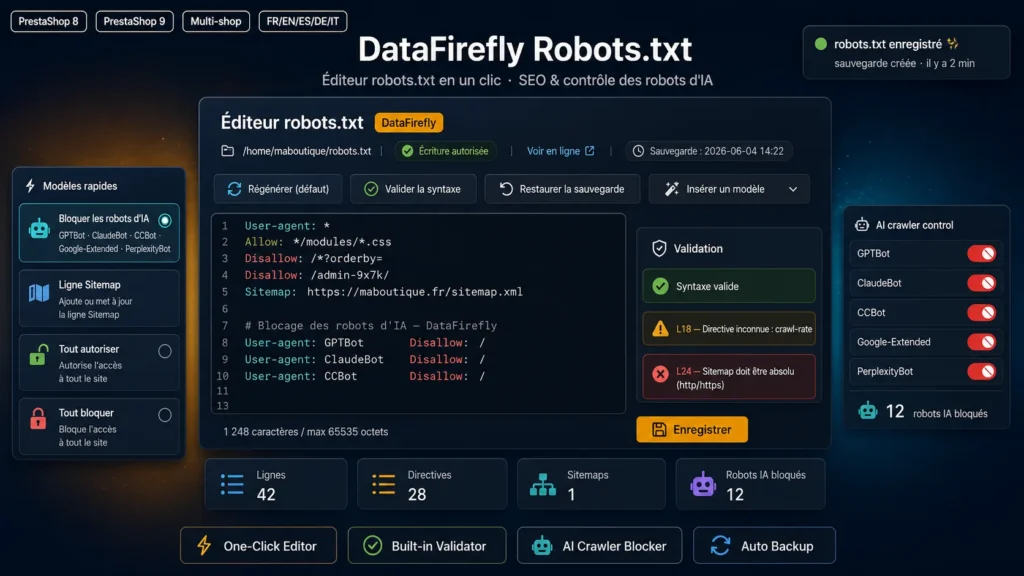
The robots.txt file controls how search engines and crawlers explore your store. Editing it usually requires FTP or SSH access. This editor lets you do it in one click from the PrestaShop back office, safely.
§ 02
Editing and backup
Edit the content in a clean editor, then save: the previous version is automatically backed up and can be restored at any time. The backup is kept in the database, never publicly accessible.
§ 03
Built-in validator
Before publishing, validate the syntax in one click. The linter flags unknown directives, non-absolute Sitemap URLs, rules placed before a User-agent, the presence of a BOM, or the Noindex directive now ignored by Google.
§ 04
Take control of AI crawlers
In one click, insert a template blocking the main AI crawlers (GPTBot, ClaudeBot, CCBot, Google-Extended, PerplexityBot, Bytespider and more). Ideal to protect your content or refine your AEO strategy.
§ 05
Security
Writing is limited to the root robots.txt file only, the content is sanitized and capped, and every action is protected by the PrestaShop admin token.





There are no reviews yet.