
Everything you'd want to know before you install.
A detailed look at how Export PrestaShop Orders to 3PL / Fulfilment Provider — CSV, EDI, API + Tracking Import works, why we built it the way we did, and the thinking behind the features above.
§ 01
Why this module
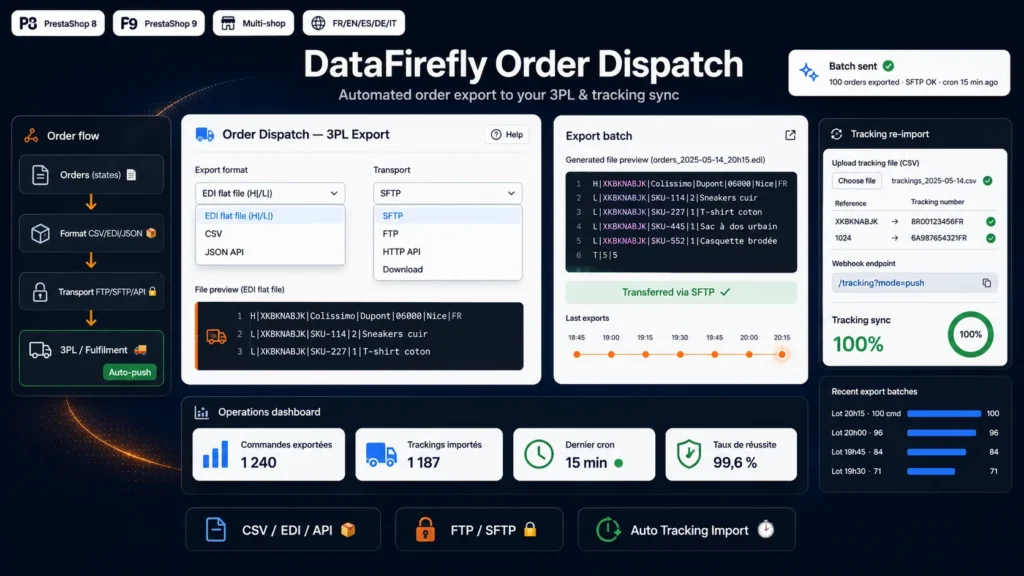
When logistics is outsourced, every order must be sent to the fulfilment provider in its exact format, then the tracking number must flow back into PrestaShop to inform the customer. Done by hand, it is time-consuming and error-prone. Order Dispatch industrialises this flow end to end: export in the right format, automatic transfer, and tracking return with no re-keying.
§ 02
A format for every provider
Logistics providers and WMS don't all accept the same format. The module generates classic CSV (one row per order line, repeated header), an EDI flat file with pipe-separated H|/L| records, or a JSON payload for modern APIs. The CSV delimiter and the filename pattern are configurable.
§ 03
Automatic, scheduled transfer
Drop the files via FTP or SFTP into your provider's directory, or POST them to its HTTP API. A token-secured cron triggers the export at the frequency of your choice. Auto-push mode also sends an order immediately as soon as it reaches an exportable state, without waiting for the next cron run.
§ 04
Return of tracking numbers
Three channels to retrieve trackings: manual CSV upload from the back office, a cron that scans an FTP folder or downloads a URL, or a webhook your 3PL calls via POST with JSON. The CSV column mapping is fully configurable. Once received, the number is saved on the order and it automatically moves to Shipped.
§ 05
Reliability and traceability
Deduplication guarantees an order is never exported twice. A log keeps every operation (export and import) with its status, batch and message, to diagnose any transfer incident immediately.

There are no reviews yet.