PrestaShop Catalogue Management

Unit Price per Kg & Sell by Weight PrestaShop 8 & 9

Price per kilo, litre or metre next to every price, sale by the weight the customer chooses, and pieces at actual weight settled with a credit slip.

In the European Union, a product sold by weight, volume or length must show its unit price next to the selling price. The native PrestaShop field is an amount the merchant calculates by hand, and it ignores discounts. This module starts from the product net content (750 g, 1.5 l, 25 m) and calculates the price per kilo, litre, metre, m² or m³ from the price actually shown to the customer, on the product page, in product lists and in the cart. It adds sale by customer-chosen weight for bulk goods, coffee or fabric by the metre, and pieces sold at actual weight for butchers and cheese shops, with weighing in the back office and an automatic credit slip.

At a glance
  • Price per kg, litre, metre, m² or m³ calculated from the displayed price, discounts included
  • Shown on the product page, in product lists, the quick view and the cart
  • Sale by customer-chosen weight, with quantity buttons and a +/- selector
  • Pieces at actual weight: weighing on the order, credit slip and email to the customer
  • Bulk editor that detects the net content written in product names
PrestaShop 8 & 9 Directive 98/6/EC PAngV Sell by weight
  • 30-day refund
  • 12 months updates
  • 24h support
www.datafirefly.com/en/
Unit Price per Kg & Sell by Weight PrestaShop 8 & 9
v1.2.0 · updated 2026-09-23
What it does

The short version.

01

A unit price that follows your prices

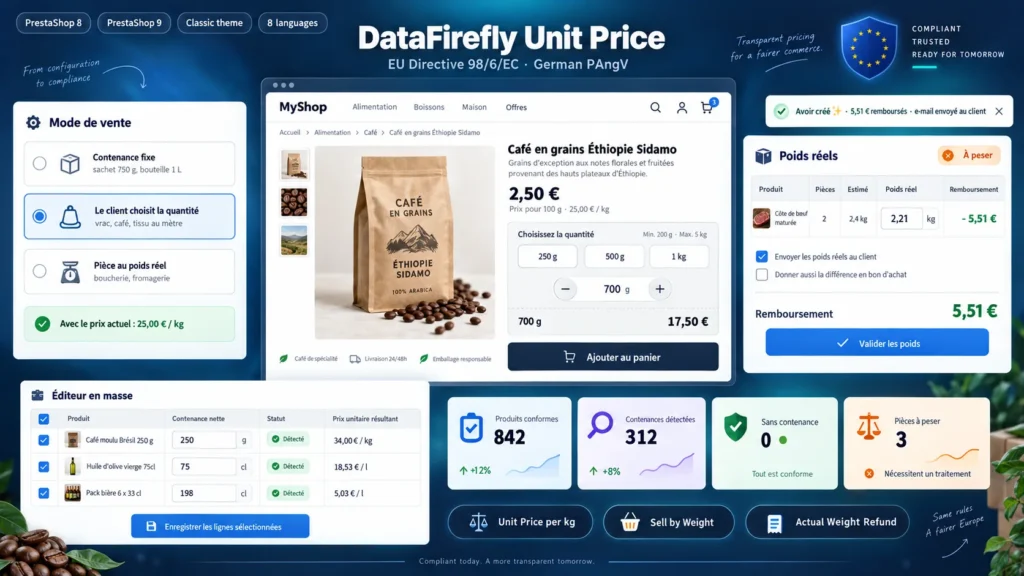
The price per kilo is calculated from the price shown to the customer: tax included or excluded depending on the group, specific prices and discounts included. A 750 g bag at €9.68 shows €12.91 / kg, and the amount updates on its own during sales. The native unit price field is also filled for the feed modules that read it.

02

Sale by customer-chosen weight

Your coffee costs €2.50 per 100 g. The customer picks 700 g with the 250 g, 500 g or 1 kg buttons or the +/- selector and sees the total live. Minimum and maximum are enforced in the cart, and the order reads “Coffee (700 g)” in the back office, on the invoice and in the confirmation email.

03

Pieces at actual weight

A rib of beef of about 1.2 kg is sold at the estimated price. After weighing, you enter the actual weight on the order page: a lighter piece creates a pro rata PrestaShop credit slip and an email to the customer, a heavier piece costs the customer nothing extra. The refund can also be given as a voucher.

04

A whole catalogue made compliant

The bulk editor reads the net content in product names (250 g, 75 cl, 6 x 33 cl, 1.5 kg) and pre-fills the grid, which you confirm in one click. The compliance report lists the active products without net content in the categories where the unit price is mandatory.

The long version

Everything you'd want to know before you install.

A detailed look at how Unit Price per Kg & Sell by Weight PrestaShop 8 & 9 works, why we built it the way we did, and the thinking behind the features above.

§ 01

A legal requirement PrestaShop leaves to the merchant

EU Directive 98/6/EC requires the price per unit of measure for products sold by weight, volume or length. France applies it through the decree of 3 December 1987, Germany through the PAngV, which also requires a price per 1 kg or 1 l in the immediate vicinity of the price. PrestaShop offers a “unit price” field typed by hand: it has to be recalculated at every price change, and it ignores discounts and group prices.

§ 02

The calculation starts from the net content

You enter the net content once, on the product or on each combination: 750 g, 1.5 l, 25 m. The module divides the price shown to the customer by that content and expresses it per 1 kg or 100 g, 1 l or 100 ml, 1 m, 1 m² or 1 m³. The same product in 250 g and 1 kg shows two different prices per kilo, and a German customer always sees a price per 1 kg, even if you chose 100 g for the rest of Europe.

§ 03

Sale by customer-chosen weight

The net content becomes a sale step, for example 100 g, and the product price is the price of one step. On the product page, the quantity field is replaced by quantity buttons and a +/- selector that move step by step, with the total shown live. In the cart, the quantity is the number of steps: 700 g is 7 steps. Stock is still counted in steps, since PrestaShop does not handle decimal quantities, and the back office product page shows the conversion (stock 50 = 5 kg).

§ 04

Pieces at actual weight, settled after weighing

For a piece whose exact weight is only known during preparation, the customer pays the price of a piece of average weight. On the order page, a weighing panel waits for the actual weight of each line and calculates the pro rata refund. On validation, the module creates a PrestaShop credit slip, emails the weights to the customer and, if you choose so, a voucher for the difference. A piece heavier than expected costs the customer nothing extra.

§ 05

Hundreds of products in a few minutes

The bulk editor in the configuration lists your products by category, with a filter on those without net content yet. Net contents written in names are detected and pre-filled, “6 x 33 cl” packs are multiplied, dimensions such as “40x60 cm” are ignored. Combinations whose name contains a net content are filled at the same time.