
Everything you'd want to know before you install.
A detailed look at how Prescription Glasses Module for PrestaShop: Rx Entry and Lens Selection works, why we built it the way we did, and the thinking behind the features above.
Selling prescription glasses on PrestaShop
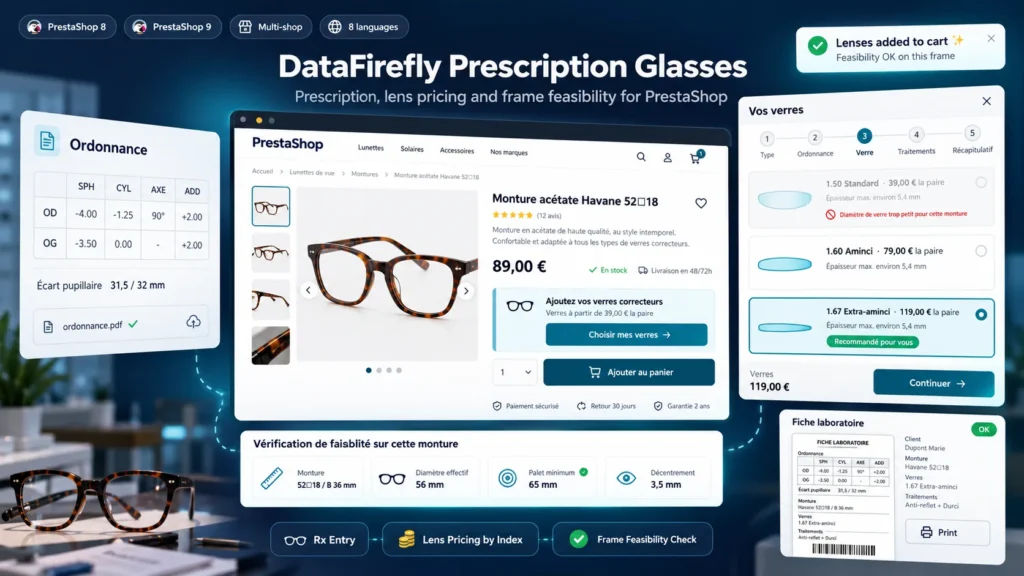
PrestaShop can sell a frame, not prescription lenses. Optical shops work around it with a customization text field, combinations such as 1.60 lenses + anti-reflective that keep multiplying, or an e-mail requested after the order. The result: prescriptions copied wrongly, lens prices that are wrong as soon as an option changes, and orders that cannot be fitted, discovered in the workshop. This module handles the prescription, the price and the feasibility as one flow checked by the server.
What customers see on the frame page
Below the cart button, an Add your prescription lenses block shows the starting lens price and the frame size. It opens a five-step side panel. Customers choose single vision, progressive or no correction, copy their prescription, then see the available lenses with their price, estimated thickness and a recommended lens. They add treatments and finish with a summary: prescription, lenses, feasibility notes, lens price, frame price and total. One click adds the frame and lenses to the cart.
How feasibility is checked
The module works on the minus cylinder form, like lens manufacturers. It compares sphere and cylinder with the range of each index, calculates for each eye the decentration between the pupillary distance and the frame centre (A + DBL), then the minimum blank diameter: ED plus twice the decentration plus the edging allowance. A lens whose blank is too small is set aside. For progressive lenses, the frame height B is compared with the minimum height you set. Thickness is estimated with the sag formula, using the centre thickness of minus lenses and the edge thickness of plus lenses you set. These are estimates to guide the choice, not the lab calculation.
For the shop and the workshop
Lenses and treatments are managed in Sell > Optics. Frame measurements are entered per product or per combination, from the Modules tab of the product page or by CSV import. Each order shows the prescription transposed to your convention, the calculated centring and the feasibility notes, and the lab sheet prints in A4. Orders flagged to check (unknown pupillary distance, strong anisometropia) stand out in the prescription list. Prescriptions are health data: files are stored outside the public folder, prescriptions of abandoned carts are deleted after the delay you set, and export and deletion go through the official GDPR module.


There are no reviews yet.