
Everything you'd want to know before you install.
A detailed look at how Shopware Notification Center works, why we built it the way we did, and the thinking behind the features above.
§ 01
A bell your customers already know
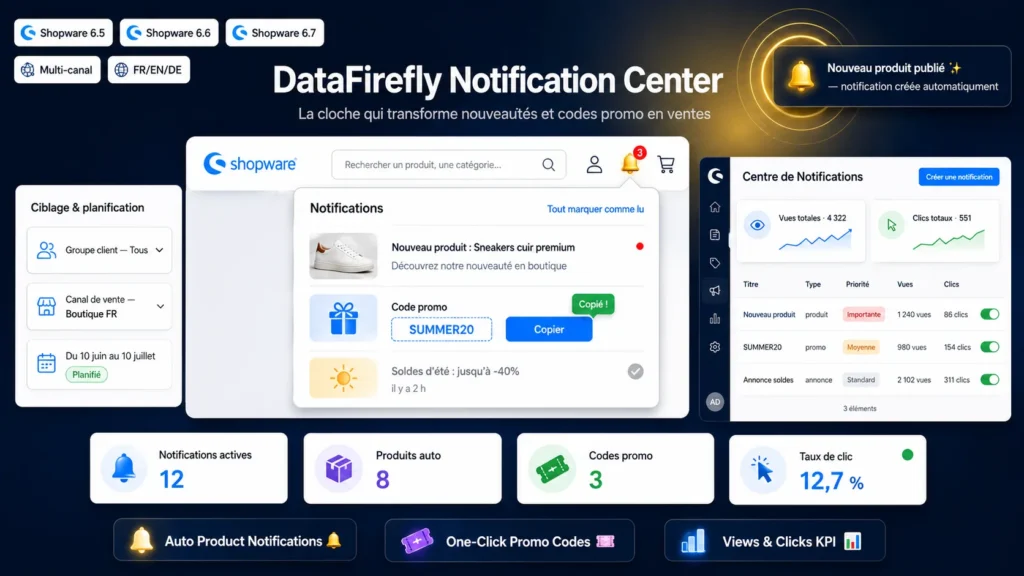
Your visitors have the notification-bell reflex from every social network. The plugin brings it to your Shopware header, right next to the cart. A red badge flags unread messages and naturally invites the click — no intrusive pop-up, no banner getting in the way. If your theme heavily customises the header, a JavaScript fallback inserts the bell automatically in the right place.
§ 02
Your new products sell themselves
Every time a product is published, a notification automatically appears in the bell, with the cover image and the link to the product page. Image and link are recalculated at display time: even if you edit the product later, the notification stays correct. You can limit it to active products and set an automatic lifetime.
§ 03
Promo codes that end up in the cart
Create a promo-type notification, enter your code, and it shows on the storefront with a Copy button. One click, the code is in the clipboard, the customer heads back to the cart. Optionally, a promo notification can be created automatically as soon as an active promotion with a global code is published.
§ 04
You stay in control
Every notification can be scheduled (start and end dates), targeted at a customer group or a sales channel, prioritised and deactivated in one click. View and click counters tell you what works. Bell sound and animation can be enabled to match your style.
§ 05
Built for Shopware 6.5, 6.6 and 6.7
One plugin, one zip, no overrides: cleanly extended templates, native DAL entities, clean uninstall. The administration module ships pre-compiled and loads without any build step, including on the Vite-based administration of Shopware 6.7. Multilingual and multi-channel by design, delivered in FR, EN and DE.



There are no reviews yet.