PrestaShop Catalogue Management

Nutri-Score & INCO Nutrition Facts — Official Logo and schema.org Table (PrestaShop 8 & 9)

Nutritional transparency that reassures and sells

Enter your INCO nutrition values in the product sheet: the module computes the Nutri-Score with the official 2023 algorithm (French decree of 15 March 2025), shows the logo on product pages and listings, and renders the nutrition table with schema.org structured data.

PrestaShop 8 & 9 Official 2023 algorithm INCO table + schema.org FR / EN included
  • 30-day refund
  • 12 months updates
  • 24h support
www.datafirefly.com/en/
Nutri-Score & valeurs nutritionnelles INCO — Logo officiel et tableau schema.org (PrestaShop 8 & 9)
v1.0.0 · updated 2026-06-13
What it does

The short version.

01

Automatic computation with the 2023 algorithm

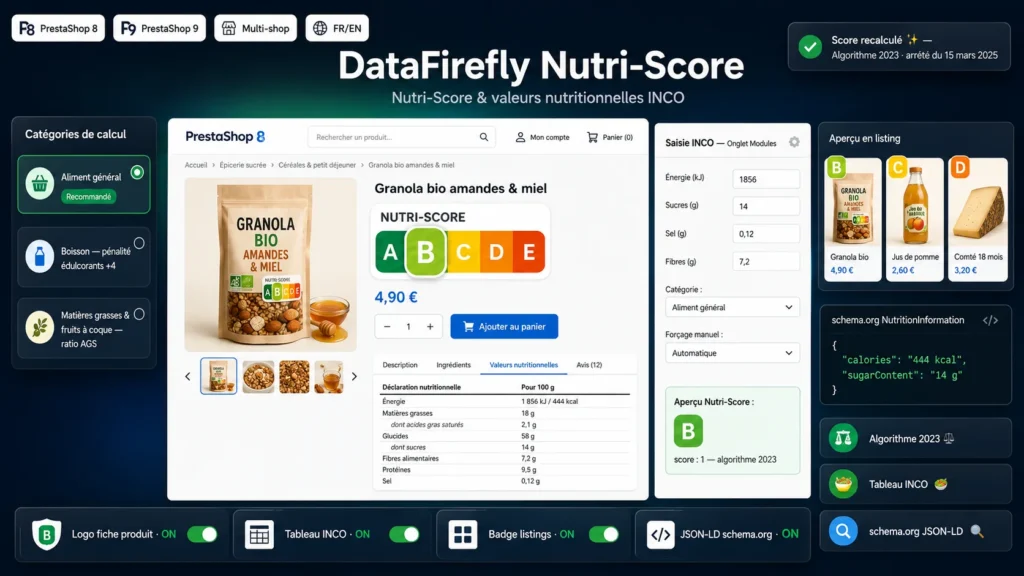
The score is computed from per-100 g/ml values using the revised algorithm made official by the French decree of 15 March 2025: sugars up to 15 points, salt up to 20 points, protein capped for red meat, sweetener penalty for beverages. Six scales handled: general food, cheese, red meat, fats and nuts, beverages, water. Validated against the official Santé publique France test cases.

02

INCO entry with live preview

A dedicated tab in the product sheet covers the 7 mandatory values plus optional ones (fibre, mono/polyunsaturated fats, polyols, starch, fruit and vegetable %, portion). The letter and score recompute live while you type, and a manual A–E override remains available per product.

03

Official logo and listing badge

The Nutri-Score logo (crisp vector SVG) is displayed on the product page, and a compact badge appears on miniatures in categories, home and search. Each placement can be toggled with one click in the configuration.

04

Structured schema.org nutrition table

The INCO table is rendered in a product page tab, in regulatory order, showing only the values you filled in. A JSON-LD schema.org NutritionInformation block is injected for search engines and AI assistants.

The long version

Everything you'd want to know before you install.

A detailed look at how Nutri-Score & INCO Nutrition Facts — Official Logo and schema.org Table (PrestaShop 8 & 9) works, why we built it the way we did, and the thinking behind the features above.

§ 01

A compliant Nutri-Score, without spreadsheets or manual math

Since the French decree of 15 March 2025, the new Nutri-Score algorithm is the official reference — and many products change letter under it. The module applies the revised scales right in your back office: you enter the values from your INCO nutrition declaration, it assigns the letter according to the product category, including the special cases (cheese, red meat, fats and nuts, beverages with sweetener penalty, water). The computation engine is validated against the official Santé publique France test cases.

§ 02

A product page that reassures and converts

The official logo is displayed as a crisp SVG on the product page, the badge slips onto your listing miniatures, and the full nutrition table appears in a dedicated tab, in INCO regulatory order. Shoppers compare your products like they would in the aisle — and search engines receive the same information as schema.org NutritionInformation structured data, ready for Google and AI assistants.

§ 03

Designed for the day-to-day of merchants

Everything happens in the product sheet: a clear entry tab, a score preview that updates live, and a manual override if your score was established by a laboratory or third party. Four switches in the configuration control each display placement. The module follows PrestaShop 8 and 9 standards, works with the Classic theme and its derivatives, and uninstalls cleanly.