
Everything you'd want to know before you install.
A detailed look at how Shopware 6 PWA & Push Notifications Plugin — DfPwaPush: Self-Hosted VAPID Web Push, Manifest + Service Worker, Campaigns, Zero Dependency works, why we built it the way we did, and the thinking behind the features above.
§ 01
Two re-engagement levers, a single plugin
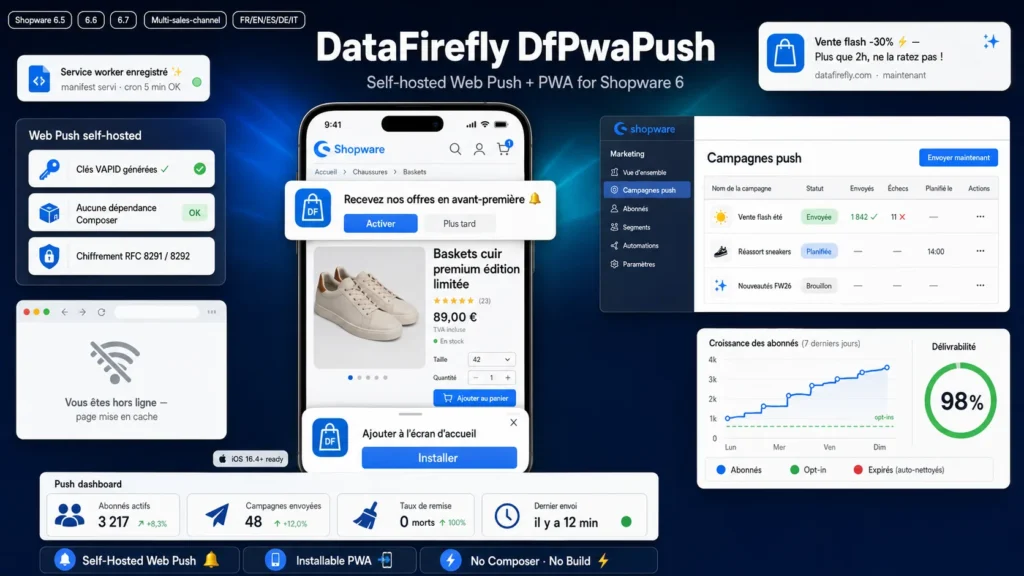
An installable PWA and Web Push notifications answer the same question: how to bring a visitor back without depending on email or social networks. DfPwaPush combines both. On one side, your shop becomes installable on the home screen with a real app experience: icon, splash screen, full-screen mode, offline page. On the other, you can notify your subscribers of a flash sale, a restock or a promotion directly on their device, even when the tab is closed. All without a subscription to a third-party service and without sending any customer data outside.
§ 02
Self-hosted Web Push: your subscribers belong to you
Most e-commerce push solutions go through Firebase Cloud Messaging or a SaaS service like OneSignal: your subscribers are stored with a third party, subject to its quotas, pricing and data policy. DfPwaPush takes the opposite path. The complete Web Push stack is implemented natively in the plugin: VAPID key generation, ES256 request signing, per-subscriber aes128gcm message encryption. The subscription endpoints, the subscriber base and the sending all live entirely on your server. You pay no subscription and no data leaves your infrastructure — a decisive GDPR argument.
§ 03
Serious cryptography, not an approximation
Web Push mandates two precise standards: VAPID signing (RFC 8292) that authenticates your server, and content encryption (RFC 8291) that protects each message end to end. DfPwaPush implements them with OpenSSL: P-256 key pairs, JWTs signed in ES256 with DER to R-concatenated-S conversion, per-subscriber ephemeral ECDH, HKDF derivation of the encryption keys and nonce, then AES-128-GCM. To guarantee this implementation is correct and interoperable, it is tested byte for byte against the official test vector published in RFC 8291. Concretely: what Chrome, Firefox, Edge and Safari expect, the plugin produces exactly.
§ 04
Zero dependency, zero build: designed to install anywhere
Many Web Push plugins rely on the minishlink/web-push library, which forces a Composer step at install time — often blocked on shared hosting and disabled in production. DfPwaPush has no dependency: the only required extensions, OpenSSL and cURL, are already required by Shopware itself. Likewise, the administration module ships precompiled and the storefront JavaScript is injected via Twig, so there is neither a build-administration nor a storefront build to run. The ZIP installs and activates directly, on shared hosting as well as on a VPS, and stays immune to the 6.7 bundler change.
§ 05
Campaigns, not just an API
Sending a notification should not require writing code. DfPwaPush adds a real campaign manager in the administration, under Marketing. You compose your message — title, body, destination URL, icon — you choose to target all your subscribers or a single sales channel, then you schedule the send to the minute or send it immediately. Each campaign shows its status and its sent and failed counters, to measure the real reach of your notifications. The sending itself is delegated to a ScheduledTask that processes due campaigns in the background, without blocking the administration.
§ 06
Broad compatibility and honest behavior on iOS
A single codebase covers Shopware 6.5, 6.6 and 6.7. On the browser side, push works on Chrome, Firefox and Edge on desktop as well as on Android. On iOS, Apple imposes two conditions: version 16.4 minimum and prior installation of the PWA on the home screen — Safari does not deliver push to a plain tab. DfPwaPush handles this case properly: the opt-in banner only appears when the Push API is actually available, so your iOS visitors never see a promise the system could not keep. When in doubt, DfPwaPush-prefixed diagnostic messages in the browser console explain precisely why a banner appears or not.

There are no reviews yet.